

How to Access AI Lead Insights
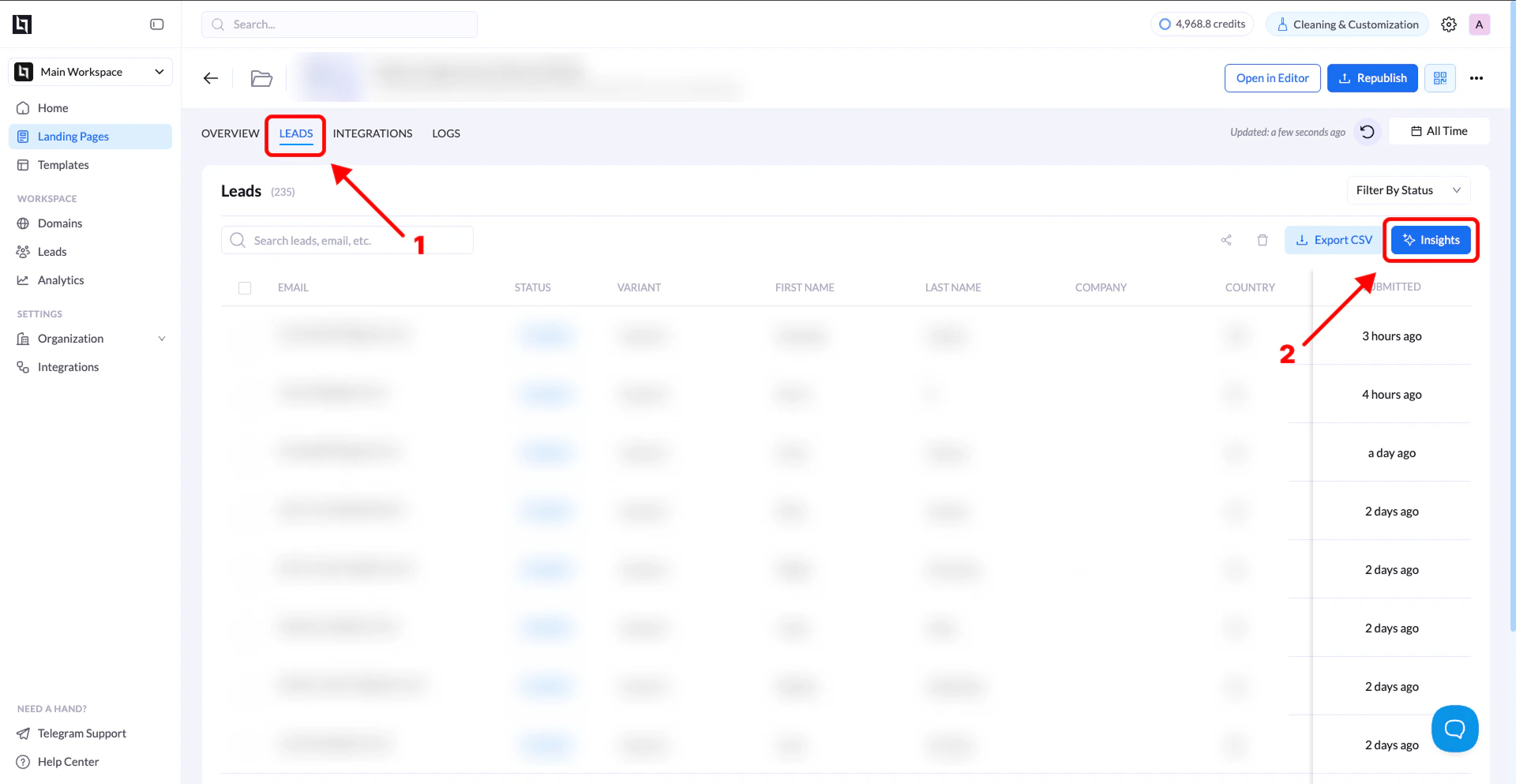
- Go to your Landing Pages
- Open the specific landing page you want to analyze
- Click on the Leads tab
- Click Insights (top right above the table)
What You’ll See
Data Overview
Visual breakdowns of your lead data, including:- Total responses
- Field-level distributions (e.g., answers, selections)
- General performance overview
AI Insights
Anomalies
- Detect unusual activity or duplicate entries
- Spot irregular patterns in submissions
Segments
- Understand how different groups behave
- See breakdowns by country, answers, or inputs
Data Quality
- Identify missing or inconsistent data
- Get suggestions to improve form quality
Quick Performance Breakdown
The AI summarizes:- How your leads are coming in
- Patterns in responses
- Areas that may need optimization
Why It Matters
- Saves time on manual analysis
- Helps you improve conversion quality
- Gives clear next steps to optimize your funnel