

Formulas in Quiz Funnels

- Open your quiz and click the Formulas icon in the left sidebar
- Click Add Formula, give it a clear name, and build the calculation in the Expression field
- Insert any number field as a variable with the
{ }button, then set your decimals and a fallback - Check the result live in the Test section
- Add the formula to any text field with the
{{=Formula Name}}syntax, or pick it from the variable menu
MCP Now Uses OAuth
Connecting an AI assistant no longer requires an API key. Addhttps://api.landerlab.dev/mcp as a connector, sign in to LanderLab in your browser, and you are done. No headers, no keys stored in config files.What changed- New MCP server URL:
https://api.landerlab.dev/mcp - Authentication happens through a browser sign-in instead of the
X-API-Keyheader - Your organization is resolved from the account you sign in with
- In Claude, LanderLab is now a listed connector: search for it under Settings > Connectors > Browse connectors instead of adding a custom connector
https://api.landerlab.dev/api/v2/mcp with an X-API-Key header should be removed and re-added with the new URL. API keys continue to work for direct REST API calls.Learn moreTwo-Factor Authentication and Active Sessions
Your LanderLab account now has two new security controls: two-factor authentication and a list of every device signed in to your account.Two-Factor AuthenticationAdd a second step to your login. After entering your password, LanderLab asks for a one-time code from your authenticator app, so a stolen password is not enough to get in.- Works with any authenticator app, such as Google Authenticator, Authy, or 1Password
- Scan the QR code once and confirm with a code to turn it on
- Save your recovery codes somewhere safe in case you lose your phone
- Click Sign out on any device you do not recognize
- Click Sign out everywhere to end every session at once, including your current one
- Expand a session to see more detail about the device
- Go to Settings and open Security
- Under Two-Factor Authentication, click Enable and follow the setup steps
- Under Sessions, review your signed in devices and sign out of anything unfamiliar
Global Blocks

- In the left sidebar, under Assets, click Global Blocks
- Click Add Global Block
- Describe what you want with AI, pick a preset like Navbar, Footer, Testimonials, FAQ section, or CTA banner, or click Create From Scratch
- Refine the block in the editor, then click Save & Publish
Version History
You can now go back to an earlier version of your landing page and restore it in one click. As you build and edit, LanderLab keeps a record of previous versions, so nothing you worked on is ever truly lost.Changed your mind about an edit? Prefer how a section looked before? Removed something by mistake? Open Version History, find the version you want, and bring it back.How to use it- Open your landing page in the editor
- Click the Version History icon in the left sidebar, near the bottom
- Select any previous version and click Restore
Workflows (BETA)
LanderLab now lets you automate what happens after a visitor becomes a lead. Build a visual flow that triggers on every new lead, branches with conditions, and sends data wherever you need it, from Google Sheets to any CRM or API. Go to Workflows, click Add Workflow, and connect your trigger, conditions, and actions on the canvas. Track every lead’s path, including failed steps, in the Runs view. Learn moreSystem Activity Logs
LanderLab now has a full audit log under Settings. Every change made across your organization is recorded, including who made it, when, and from which device and IP address.Go to Settings and click Logs to view the audit trail. Learn moreIn-App Notifications
LanderLab now has a notification center. You will get updates directly inside the app whenever something happens across your account.Click the Bell icon in the top navigation bar to open your notifications.Live Mode
Live Mode lets you preview all JavaScript on your landing page exactly as visitors will see it. The editor normally blocks JS to keep editing clean, but features like popups, mouse effects, and scroll animations need it to run. Live Mode is how you check all of that without leaving the editor.When active, the editor panel is disabled. You can still use AI mode to keep iterating.How to enter Live ModeClick the Play icon in the bottom toolbar.The editor also switches to Live Mode automatically every time the AI mode applies a refinement, so you can immediately see the full result including any JS effects.How to return to Edit Mode- Click the Pencil icon in the bottom toolbar
- Hover over the Live Mode button in the top-right corner and click Go to Edit Mode
Domain-Level Custom Code
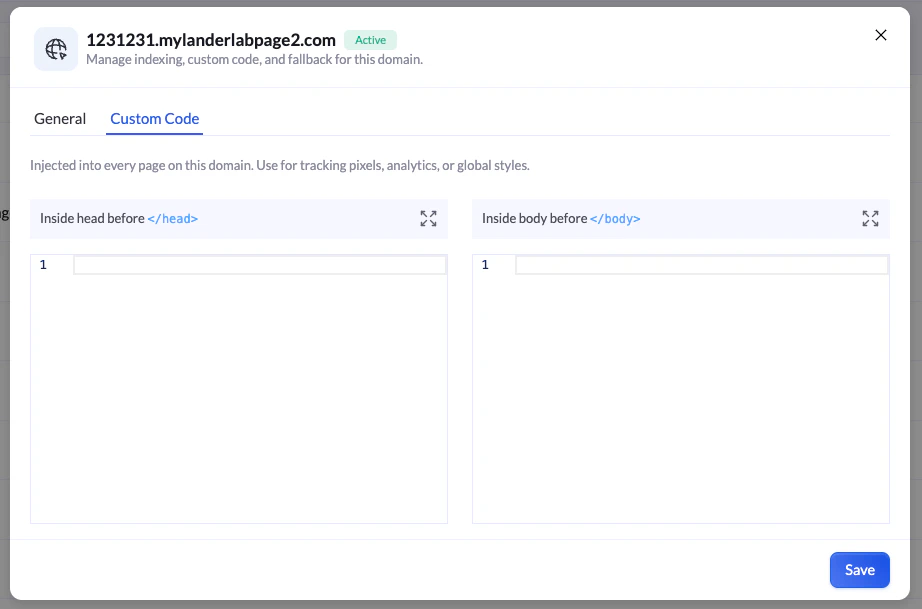
- Inside head before
</head>- for tracking pixels, tag managers, and analytics scripts that need to load early - Inside body before
</body>- for scripts that should load after the page content
MCP (Model Context Protocol) Support
LanderLab now supports MCP, letting you connect AI assistants like Claude directly to your workspace. Once connected, you can build, edit, and manage landing pages through natural language without leaving your AI tool.What you can do with MCP:- Create and update landing pages by describing what you want
- Query your workspace data, pages, and settings
- Automate repetitive tasks through AI-assisted workflows To get started, visit the MCP documentation for setup instructions and available actions.
New UI: Landing Page Preview, Grid View, and Better Settings
The LanderLab interface has been updated with several improvements that make it faster and easier to manage your pages and settings.Grid View gives you a visual overview of all your landing pages at once. Instead of scanning a flat list, you can now browse pages as cards and spot what you need at a glance.Better Settings Organization reorganizes the settings panel so related options are grouped together. Finding and updating your configurations now takes fewer steps.These changes apply to all workspaces automatically.Domain Settings: Disable Indexing & Custom 404 Page
Two new options are now available in Domain Settings, giving you more control over how your domains behave.Disable Indexing lets you block search engines from indexing all pages published under a specific domain. When enabled, anoindex directive is applied across every page on that domain automatically. Useful for staging environments, paid traffic campaigns, or any domain you want to keep out of organic search.Custom 404 Page lets you replace the default LanderLab 404 page with a URL of your own. When a visitor hits a broken or missing link under your domain, they get redirected to your fully designed page instead.To access both settings, go to Settings > Domains, click the three-dot menu next to any domain, and select Settings.Disable Indexing · Custom 404 PageFile Upload Block
You can now add a File Upload block to any quiz funnel step. Users get a drag-and-drop upload area where they can submit images, documents, or videos before moving forward. Set accepted file types, min/max file limits, and make the upload required if needed. Total upload size is capped at 30 MB per file.Learn moreSignature Block
You can now add a Signature block to any step in your quiz funnel.When a user clicks the field and enters their signature, it is automatically saved as an image and stored as a URL link in the LanderLab CRM under the lead’s record.Signature field- Clickable input field with a customizable placeholder text
- Defaults to “Click here to sign”
- Captures and saves the signature as an image on submission
- The signature is stored automatically as an image URL in the lead’s record
- Enable the Required toggle to prevent submission without a signature
- Set a custom error message shown when the user tries to skip it
Quiz Canvas Upgrade
The quiz canvas now works smarter and faster. Every element in your quiz step is now directly interactive, giving you full control without leaving the canvas.Navigate elements with arrows- Click any element to select it
- Use the up and down arrows to reorder it within the step
- Left and right arrows appear when movement in that direction is available
- Click the plus icon that appears between elements to insert a new block exactly where you need it
- No need to drag from a sidebar or scroll through menus
- Copy - duplicate the element to use elsewhere
- Paste - insert a copied element in the current position
- Cut - remove and move the element to a new location
- Duplicate - create an instant copy right below
- Remove - delete the element from the step
- Click directly on any element in the canvas preview to select it
- The settings panel on the left will automatically switch to show the options for that element
- No more hunting through layers or menus to find what you want to edit
New Experience of Pop-up Builder
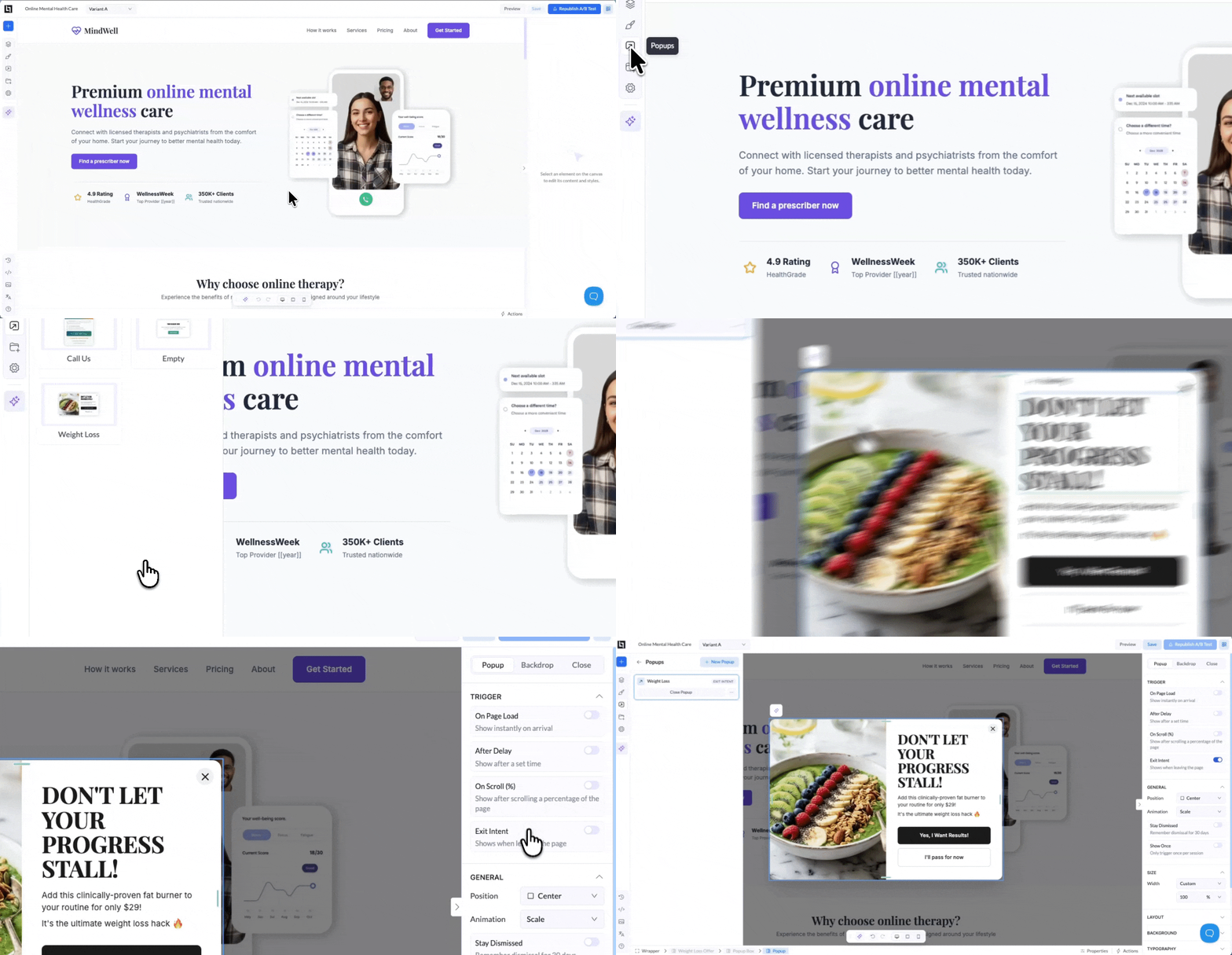
- Access pop-ups from the Popups icon in the left sidebar
- Choose from ready-made templates or start with a blank canvas
- Use the AI builder to generate content instantly
- Drag and drop any element into your popup — text, images, CTAs, forms, countdown timers, quiz funnels, or custom code
- Customize size, layout, background, typography, and animations
- On Page Load - show immediately when the visitor lands
- After Delay - set an exact wait time in seconds
- On Scroll (%) - trigger after the visitor scrolls a set percentage of the page
- Exit Intent - catch visitors before they leave
- Stay Dismissed - visitors who close it won’t see it again for 30 days
- Show Once - trigger the popup one time per session only
- Position - place your popup in 7 positions (center, corners, or sides)
- Animation - choose from Scale, Fade, Slide Up, Slide Down, or Bounce
- Show or hide the backdrop, set its color, opacity, and blur effect
- Enable close on backdrop click or close on ESC key
- Fully customize the close button shape, position, size, and colors
AI Credit Distribution
Enhanced credit management for team admins:- Simplified credit limits: Set monthly spending caps per user or leave blank for unlimited
- Better visibility: View real-time credit usage across your entire team
- Quick adjustments: Change credit limits anytime—new limits apply on the next billing cycle
- Clearer interface: Streamlined settings in Settings → Users with one-click access to credit controls
Conditional Visibility
You can now show or hide any block based on user answers.- Display elements only when conditions are met
- Personalize the flow based on user input
- Control exactly what each visitor sees
Advanced Conditional Logic
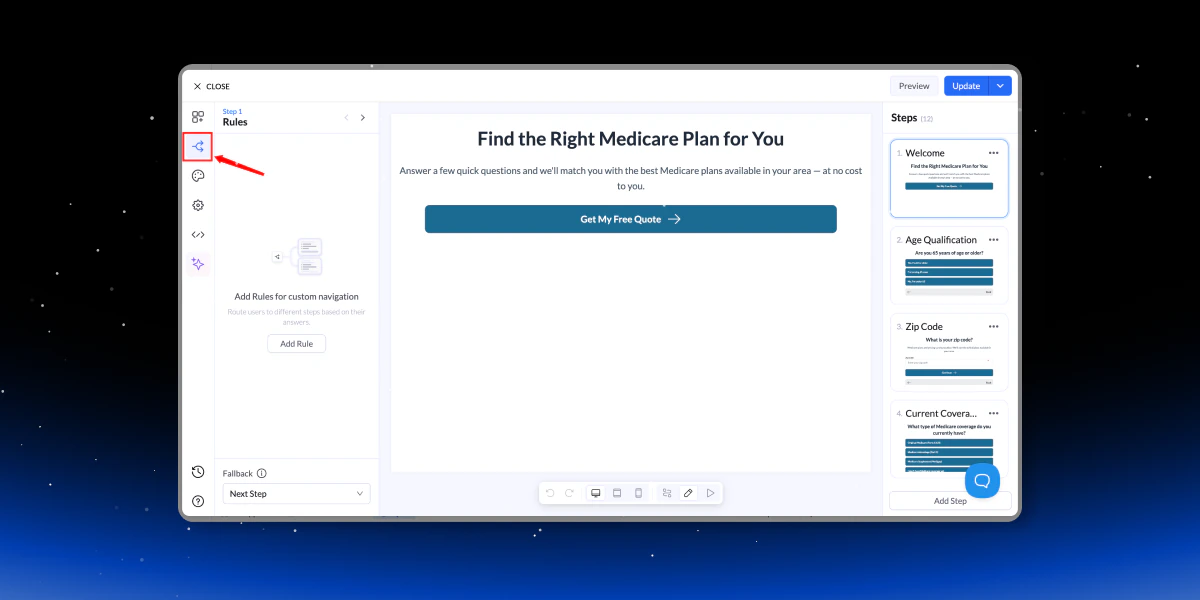
- Combine answers from multiple questions
- Build complex qualification logic in one flow
- Send users to different steps, pages, or outcomes
Flow Map View
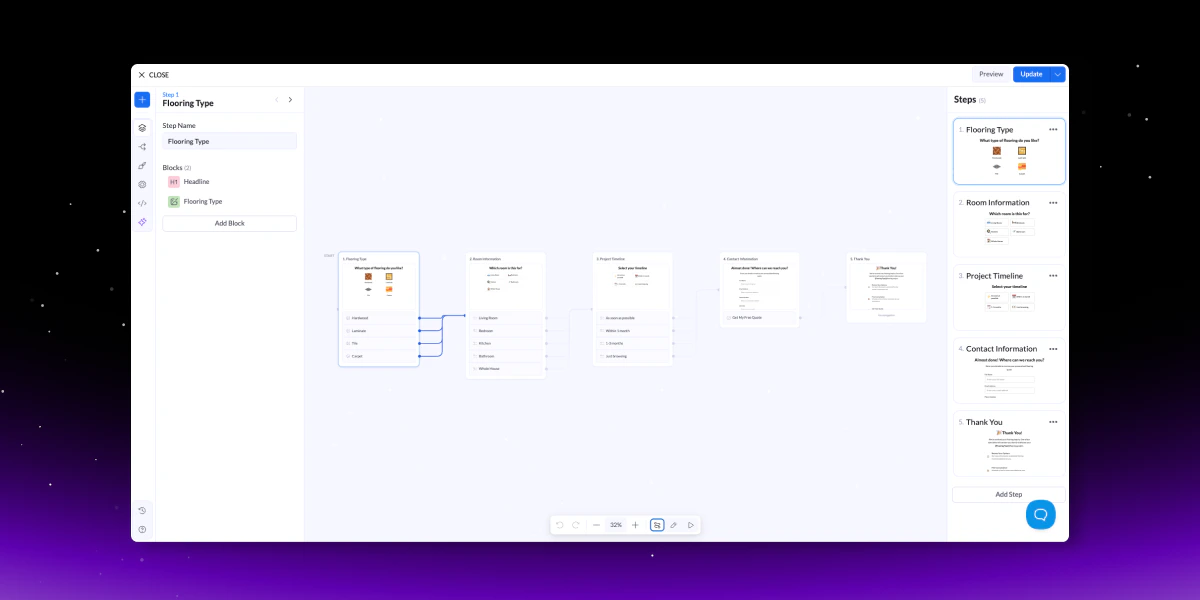
- Visual overview of all steps
- Click any step to edit instantly
- Easier navigation for complex flows
AI Lead Insights
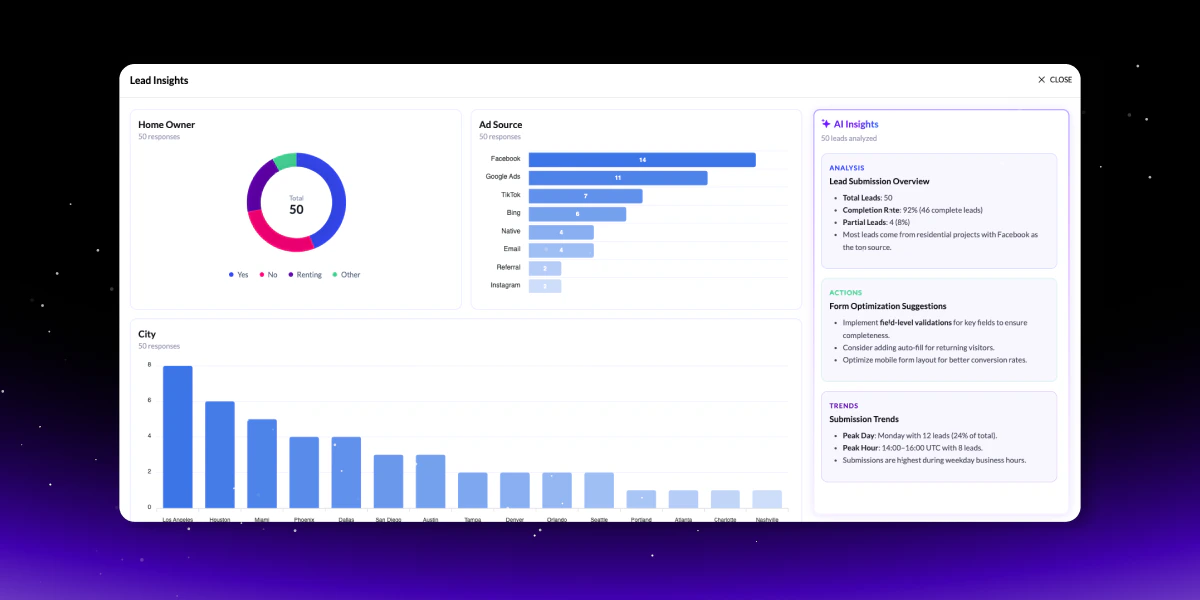
- Data overview (completion rates, countries, patterns)
- Actionable insights to improve performance
- Trends (timing, spikes, behavior)
- Anomaly detection
- Audience segmentation
- Data quality checks
AI Quiz Builder Upgrade
We’ve shipped a major upgrade to the AI Quiz Builder - faster, smarter, and more powerful.- 10x faster with conversational editing (make changes via chat)
- AI-generated images and icons built-in
- Smarter logic and improved question flow
- Upload a PDF to generate a landing page or quiz
Image Compression
We’ve added a built-in Image Compressor that also converts images to WebP for faster loading pages.- Reduce image size in one click
- Automatically convert to WebP
- Improve page speed and performance