

window.llPopupsApi from a Custom Code element or any script to open a popup from a button, close it after a form is submitted, or wire popups into your own integrations.
Use the popup’s ID, not its name. Everything in the API targets a popup by its
id. The popup name (the human-readable label you see in the editor) is only metadata for analytics and display - it is never used for targeting. If you target by name, nothing will happen.Step 1 - Prepare the popup
Before you can control a popup with code, set it up so it doesn’t fight your triggers, and give it an ID you can reference.1
Set the trigger to Manual
In the Popup tab of the right sidebar, set the Trigger to Manual (button-only). The popup will never auto-open - it appears only when your link or script opens it.
2
Copy the popup's ID
Every popup already has a unique ID. To find it, open the Popups panel in the left sidebar, click the three dots (actions) next to your popup, and choose Copy ID. Paste that value wherever the API asks for the popup ID.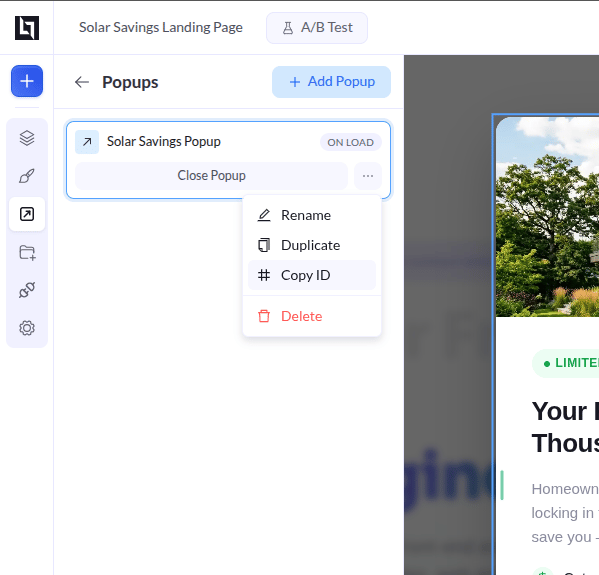
The JavaScript API (window.llPopupsApi)
Call the global window.llPopupsApi object to open, close, or toggle a popup - on a custom event, after a delay you control, or from another script. Drop the code into a Custom Code element on your page.
Targeting: ID is optional
Every method takes an optional popup ID:- Pass an ID → the action affects that one popup.
- Omit the ID → the action affects every popup on the page.
Methods
close vs dismiss. close() is a temporary close - auto-triggers like exit-intent can still fire again. dismiss() is permanent for the session (and up to 30 days with Stay Dismissed). Use close() for “maybe later”, dismiss() for “don’t show this again”.Examples
Good to know
- Run your code after the page is ready.
window.llPopupsApionly exists once the popup script has loaded. Wrap your calls in aDOMContentLoadedlistener — like the Open from a button example above — so the API is available before you call it. - Preview mode. On preview URLs, the “Stay Dismissed” cookie and “Show Once” flag are never read or written, so the popup always appears while you’re testing.
- ESC to close. If Close on ESC is enabled for the popup, pressing Esc closes the topmost open popup - no code needed.
- Open wins over dismissal. Calling
open()reopens a popup even after a visitor dismissed it, but the popup’s own auto-triggers still respect the dismissal. Usedismiss()if you want to re-lock it.