The Delay node pauses the workflow for a set amount of time before the lead continues to the next node. Use it to wait before acting - for example, to hold a new lead for a day before sending a follow-up email instead of sending it the moment they sign up.
A delay doesn’t change or filter the lead. It only controls when the rest of the workflow runs.
A Delay node affects everything after it. Place it in the flow at the point where you want the pause to start — the nodes below it won’t run until the wait is over.
Add the Delay node
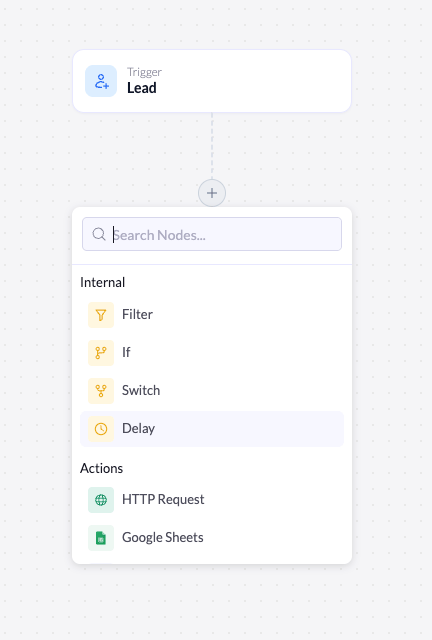
Delay lives under the Internal group in the node menu.
Open the node menu
Click the + at the point in the flow where you want the pause to begin.
Select Delay
Under Internal, click Delay. The node is added to the canvas and its settings open on the right.
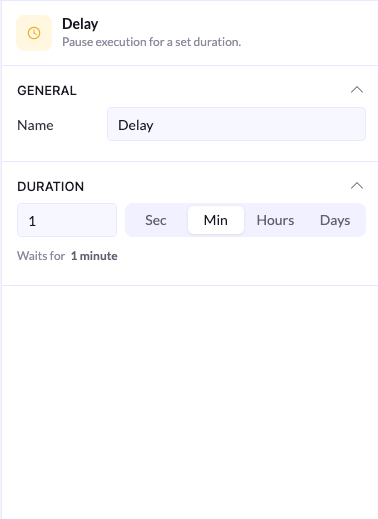
General
| Setting | Description |
|---|
| Name | The label for the node on the canvas. Rename it to describe the wait (for example, Wait 1 day) so the workflow stays readable. |
Duration
The Duration section sets how long the workflow waits.
- Enter a number in the field on the left.
- Choose a unit from the toggle: Sec, Min, Hours, or Days.
A live preview below the field confirms the total wait - for example, Waits for 1 minute. Check this line to make sure the number and unit read the way you intended.
Example: wait before sending an email
A common pattern is to delay a follow-up so it doesn’t arrive the instant a lead signs up:
Capture the lead
The Lead trigger fires when someone signs up on your landing page.
Wait a day
Add a Delay node set to 1 Day.
Send the follow-up
Add the action that sends the email after the delay. It runs a day later instead of immediately.
You can chain delays through a workflow — for example, a short delay, an action, another delay, then a second action — to space out a multi-step sequence.