

Where to Find It
- Select any element
- Go to the right panel
- Open the Visibility section (usually at the bottom)
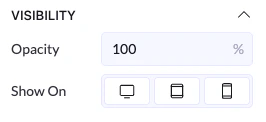
Visibility Options
Show On (Devices)
You can choose where the element is displayed:- Desktop → shows on larger screens
- Tablet → shows on tablet devices
- Mobile → shows on phones
How It Works
- If a device is enabled → the element is visible there
- If a device is disabled → the element is hidden on that device
Example
- Show on Desktop: ON
- Show on Tablet: OFF
- Show on Mobile: OFF
Opacity
Opacity controls how transparent an element is.- 100% → fully visible
- 0% → completely invisible
- 50% → semi-transparent
How to Use It
- Lower opacity to create softer elements
- Use it for overlays or subtle effects