

How It Works
A shadow is made up of multiple settings that control how it looks and behaves.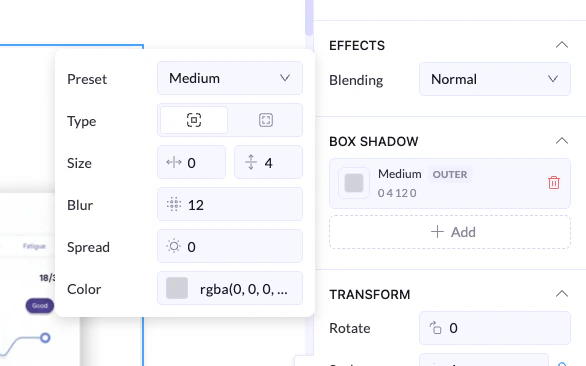
Shadow Settings
Preset
- Quickly apply a ready-made shadow style (e.g., Small, Medium, Large)
- Best for fast and consistent design
Type
- Outer Shadow → appears outside the element (most common)
- Inner Shadow → appears inside the element
Size (X & Y)
- Controls the shadow position
- X (horizontal) → moves left or right
- Y (vertical) → moves up or down
- X: 0, Y: 4 → shadow goes slightly below the element
Blur
- Controls how soft the shadow is
👉 Lower value = sharper shadow
Spread
- Controls how wide the shadow spreads
👉 Negative = tighter shadow
Color
- Sets the shadow color (usually black or gray with transparency)
rgba(0, 0, 0, 0.1–0.3) for soft shadows
Multiple Shadows
- You can click + Add to stack multiple shadows
- Useful for more advanced or layered effects