

Why Use Lead Compliance Delivery
Enabling this feature can help you:- Meet data compliance requirements such as GDPR or CCPA
- Maintain full control over your lead data storage
- Deliver leads directly to your CRM or automation tools
- Avoid storing sensitive information on third-party platforms
How to Enable Lead Compliance Delivery
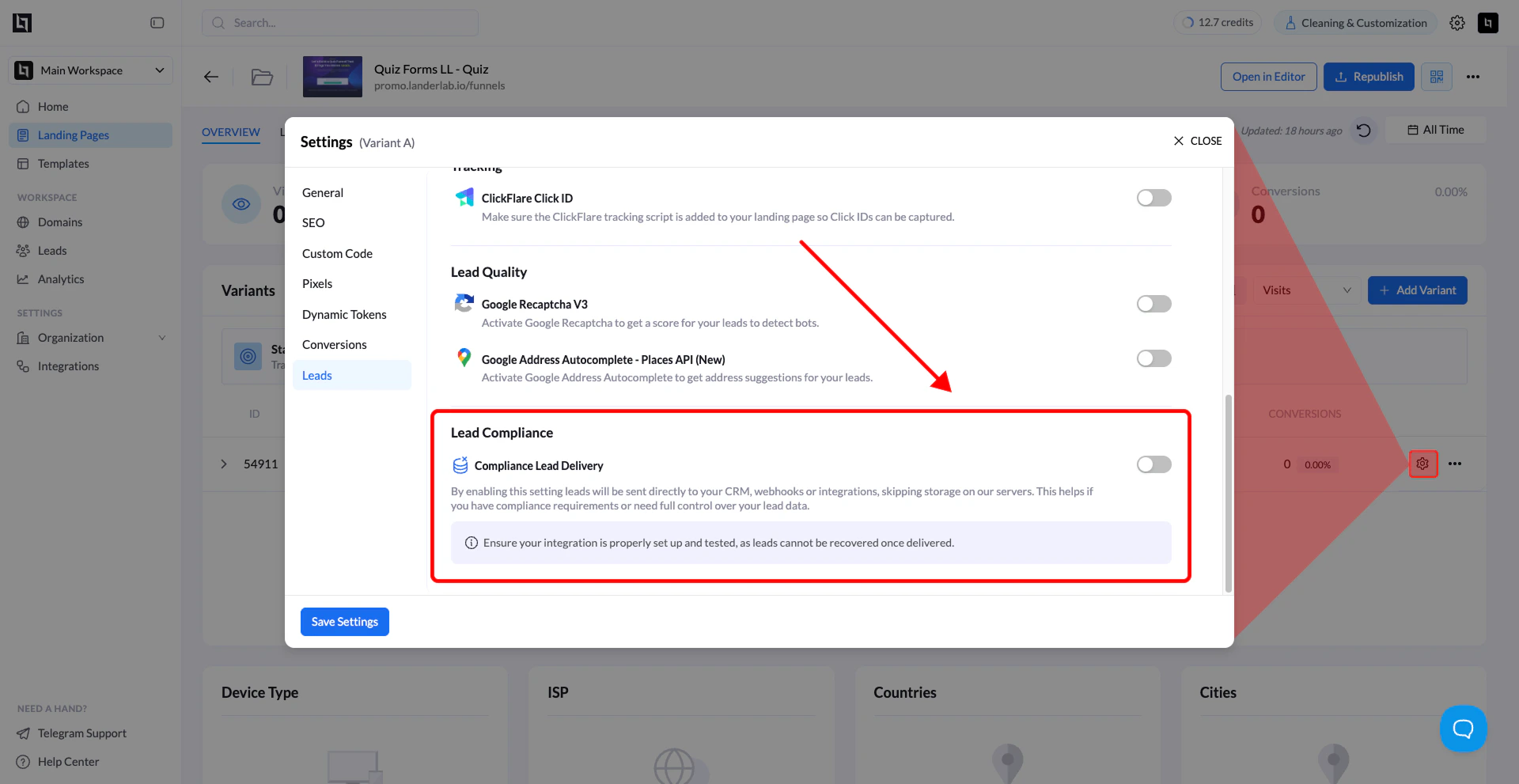
1. Open your landing page
From the LanderLab dashboard, go to Landing Pages and click the landing page you want to configure.2. Open Settings
Click the Settings button to open the landing page settings window.3. Go to the Leads section
In the settings panel, select Leads from the left-side menu.4. Enable Lead Compliance Delivery
Scroll to the Lead Compliance Delivery section. Toggle Lead Compliance Delivery to ON.5. Save your settings
Click Save Settings to apply the change. Once enabled, leads will be delivered directly to your configured integrations instead of being stored on LanderLab.Important Notes
How it works
- Leads are sent directly to your configured CRM, webhook, or integration
- LanderLab does not store the lead data