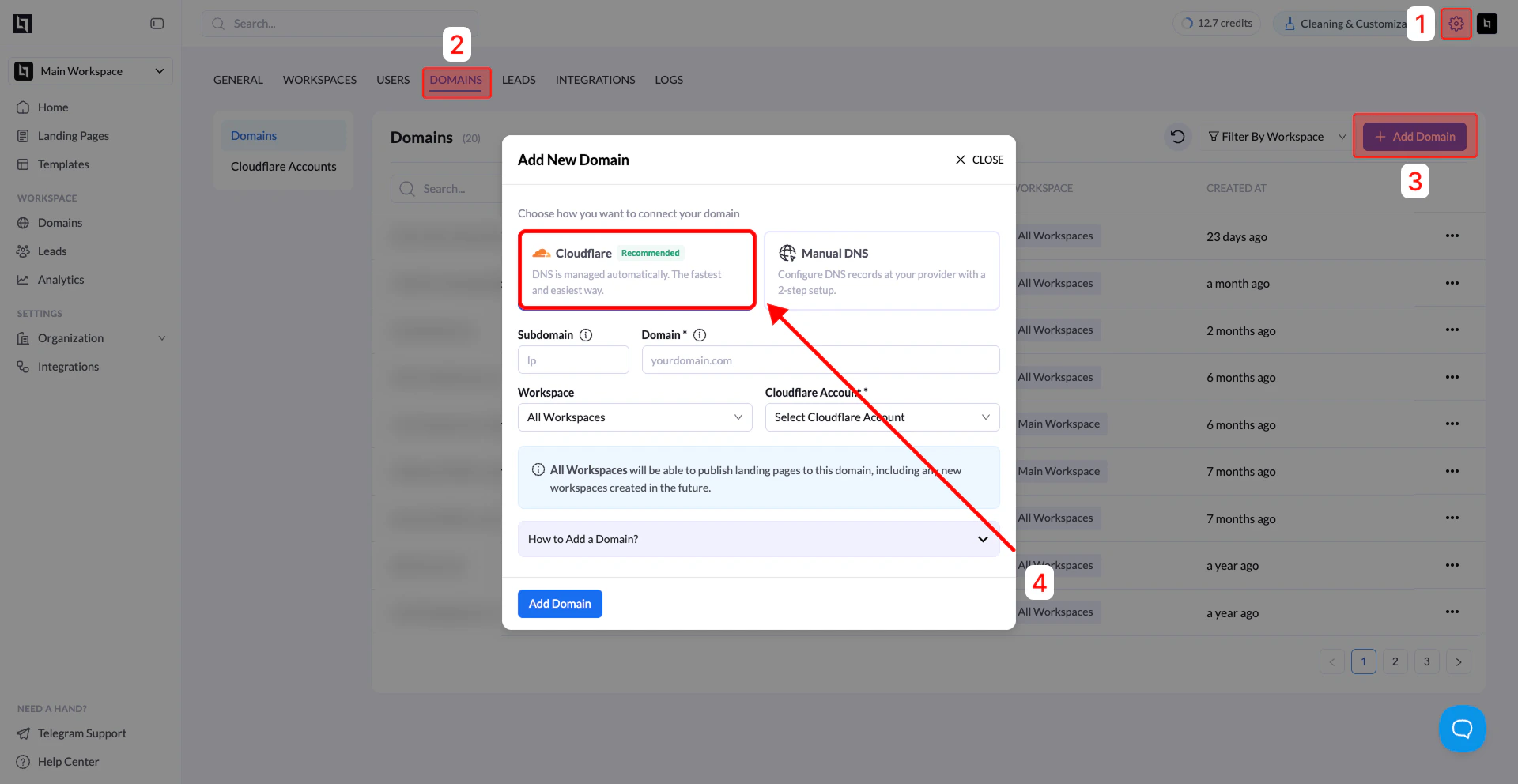
Connecting your domain through Cloudflare is the fastest and recommended way to publish landing pages in LanderLab. When connected, LanderLab can automatically manage the required DNS records for your landing pages.
Before You Begin
Make sure you have:
- An active Cloudflare account
- Your Cloudflare account connected to LanderLab
- Admin permissions in LanderLab
- Your domain already added to Cloudflare
If you have not connected your Cloudflare account yet, follow the Add Cloudflare Account guide first.
Step 1: Open the Domains Settings
- Log in to your LanderLab dashboard.
- Go to Settings.
- Click Domains.
You will see the list of connected domains.
Step 2: Click Add Domain
- Click Add Domain in the top-right corner.
- The Add New Domain window will open.
Make sure Cloudflare (Recommended) is selected.
Step 3: Enter Domain Information
Fill in the required fields:
| Field | Description |
|---|
| Subdomain | Enter the subdomain you want to use for your landing pages (example: lp) |
| Domain | Enter your main domain (example: yourdomain.com) |
| Workspace | Choose which workspace can publish pages to this domain |
| Cloudflare Account | Select the Cloudflare account connected to LanderLab |
Subdomain: lp
Domain: yourdomain.com
Step 4: Choose Workspace Access
You can choose how the domain is used across your workspaces.
Options
- All Workspaces – any workspace can publish landing pages to this domain
- Specific Workspace – restrict publishing to a specific workspace
Step 5: Add the Domain
Click Add Domain.
LanderLab will automatically configure the necessary DNS records through your Cloudflare account.
Step 6: Wait for Activation
After adding the domain:
- The domain will appear in the Domains list
- The status will show Pending
In most cases, activation only takes a few minutes.
Once completed, the status will change to Active.
Your domain will then be available when publishing landing pages.
Tip: It is recommended to use a dedicated subdomain for landing pages, such as:
lp.yourdomain.com
go.yourdomain.com
offers.yourdomain.com