> ## Documentation Index
> Fetch the complete documentation index at: https://docs.landerlab.io/llms.txt
> Use this file to discover all available pages before exploring further.
# 在测验漏斗中使用动态变量实现个性化
> 测验漏斗中的输入和选项字段会自动生成变量,你可以在后续步骤的文本中插入用户姓名等回答,展示个性化内容并提升参与度。
变量可以存储用户输入,并在流程后续步骤中重复使用。这让你的测验或表单更加动态、更加个性化。
例如,用户输入姓名后,你可以在下一步中显示他的姓名。
## 变量的工作原理
当用户与特定区块交互时,变量会自动创建。
支持的区块包括:
* **Choices**(选项类)→ Multiple Choice、Image Choice
* **Inputs**(输入类)→ Text、Email、Phone、Long Text、Select、Checkbox、Number、Date、Zip Code、Range Slider、Hidden Field
每个输入都会将其值存储为一个变量。
## 变量命名
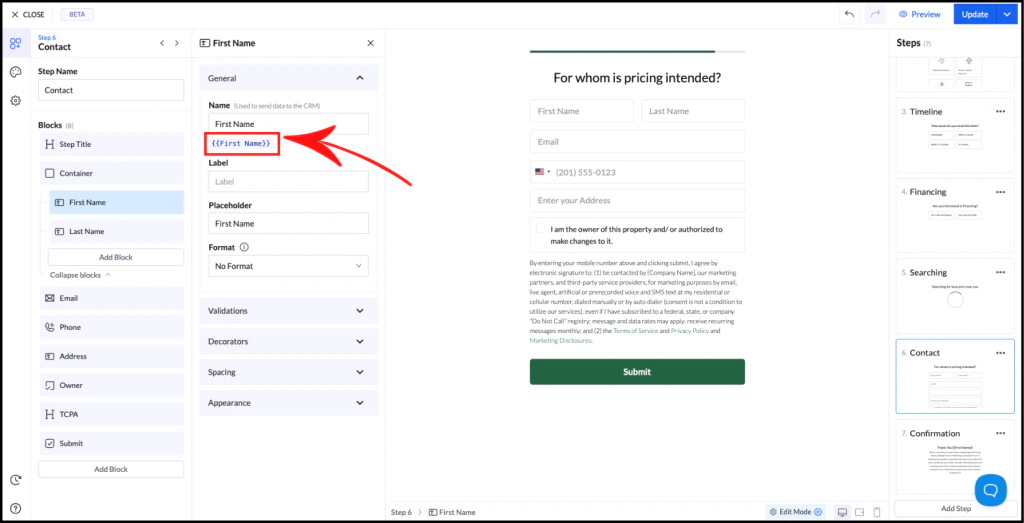 * **字段名称 = 变量名称**
* 变量的写法如下:
```text theme={null}
{{Variable Name}}
```
示例:
* **字段名称 = 变量名称**
* 变量的写法如下:
```text theme={null}
{{Variable Name}}
```
示例:
如果你的字段名为 **First Name**,对应的变量就是:
```text theme={null}
{{First Name}}
```
如果你重命名字段,变量会自动更新。
## 使用变量
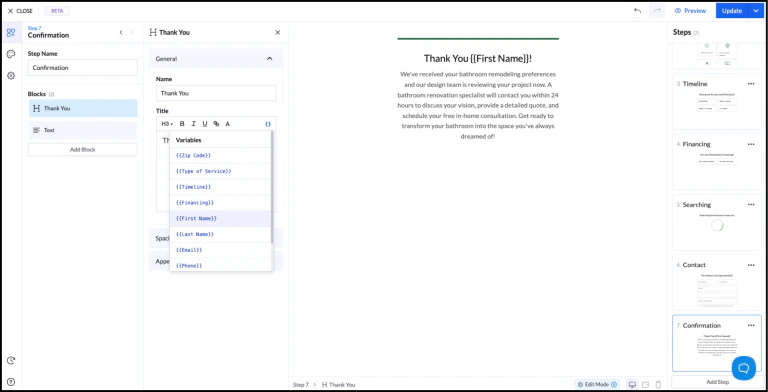 你可以通过两种方式在文本中插入变量:
### 1. 手动输入
直接输入变量:
```text theme={null}
Thank you {{First Name}}!
```
### 2. 变量选择器
使用文本编辑器中的 `{ }` 图标插入变量。
## 示例
步骤 1:用户输入姓名
你可以通过两种方式在文本中插入变量:
### 1. 手动输入
直接输入变量:
```text theme={null}
Thank you {{First Name}}!
```
### 2. 变量选择器
使用文本编辑器中的 `{ }` 图标插入变量。
## 示例
步骤 1:用户输入姓名
步骤 2:显示个性化消息
输出:
```text theme={null}
Thank you {{First Name}}!
```
## 重要规则
* 变量只能在**后续步骤**中使用,不能在同一步骤中使用
* 变量名称必须**唯一**
* 值以**文本**形式存储
## 最佳实践
* 使用清晰且一致的字段名称
* 避免不同字段使用重复的名称
* 规划好步骤顺序,以便有效地使用变量
提示:使用变量实现个性化可以提升用户参与度,并有助于提高转化率。
This documentation is built and hosted on [Mintlify](https://mintlify.com), a developer documentation platform.