> ## Documentation Index
> Fetch the complete documentation index at: https://docs.landerlab.io/llms.txt
> Use this file to discover all available pages before exploring further.
# 使用可见性条件展示动态内容
> 使用可见性条件,根据用户在测验漏斗前面步骤中的回答动态显示或隐藏区块,只展示相关的问题,减少阻力并提升完成率。
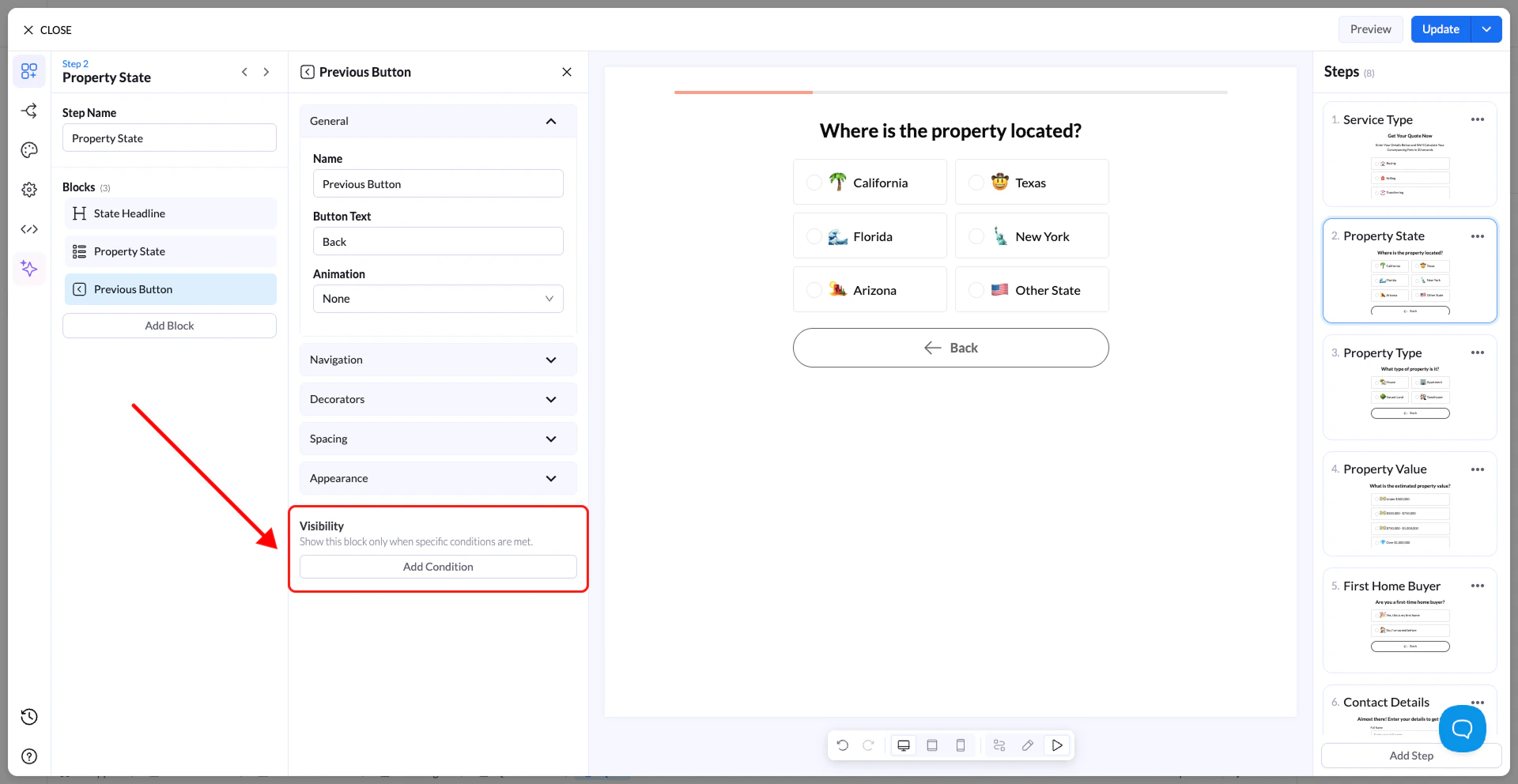
可见性条件(Visibility Conditions)让你可以根据用户在流程前面给出的回答,**动态显示或隐藏区块**。
你无需向所有人显示相同的内容,而是可以精确控制**区块何时出现**,让流程更加个性化、更具相关性。
 ## 功能说明
启用可见性条件后:
* 区块**仅在满足条件时显示**
* 如果**不满足**条件,区块将保持隐藏
* 你可以基于**测验中之前的回答**设置条件
这适用于任何区块,包括:
* Text
* Multiple Choice
* Inputs
* Buttons
## 如何添加可见性条件
1. 选择你要控制的区块
2. 在设置面板中打开 **Visibility** 部分
3. 点击 **Add Condition**
4. 选择:
* 你要检查的**字段/区块**
* **运算符**(规则类型)
* **值**
## 功能说明
启用可见性条件后:
* 区块**仅在满足条件时显示**
* 如果**不满足**条件,区块将保持隐藏
* 你可以基于**测验中之前的回答**设置条件
这适用于任何区块,包括:
* Text
* Multiple Choice
* Inputs
* Buttons
## 如何添加可见性条件
1. 选择你要控制的区块
2. 在设置面板中打开 **Visibility** 部分
3. 点击 **Add Condition**
4. 选择:
* 你要检查的**字段/区块**
* **运算符**(规则类型)
* **值**
 ## 可用运算符
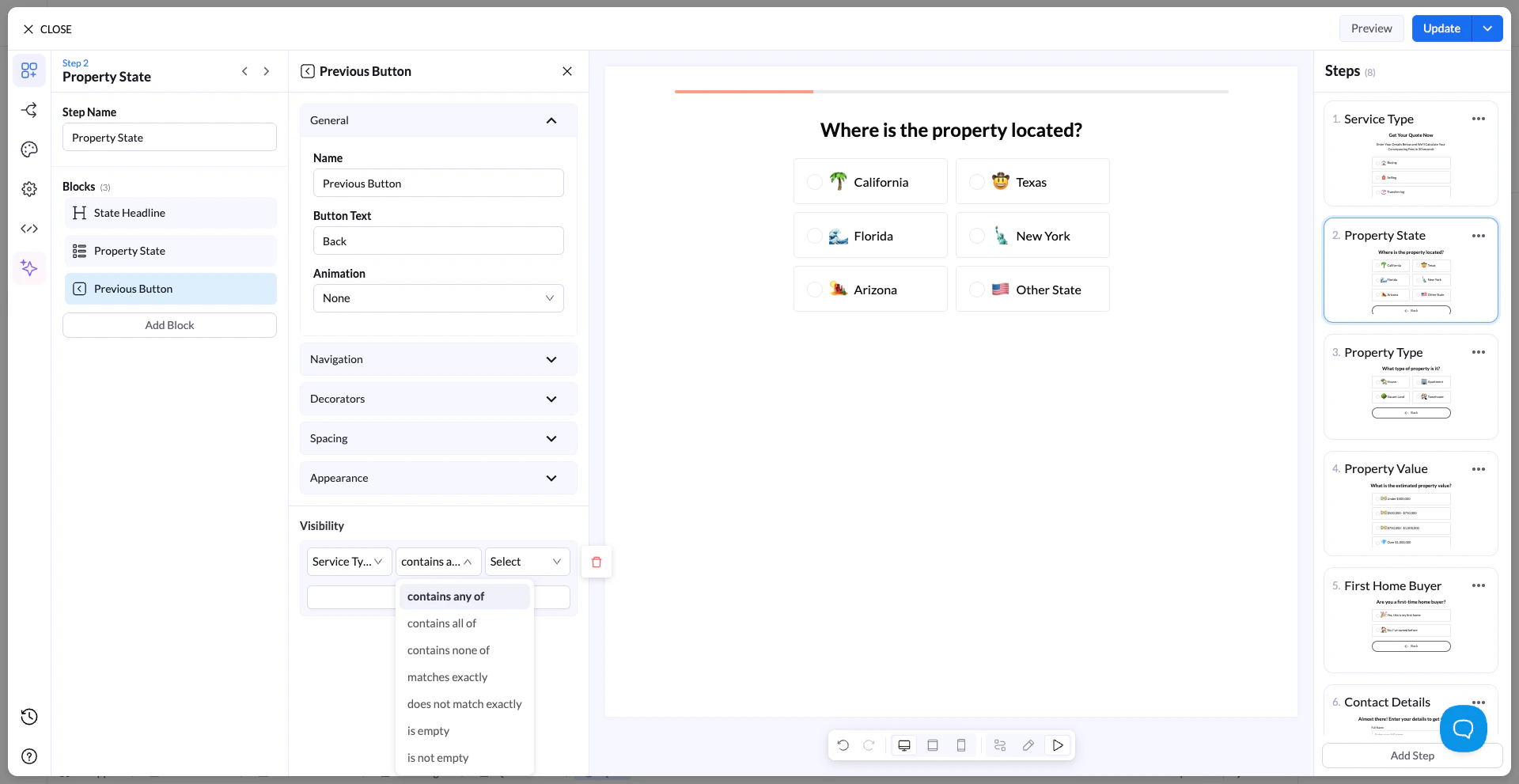
你可以使用以下运算符定义条件:
* contains any of(包含任意一项)
* contains all of(包含全部)
* contains none of(不包含任何一项)
* matches exactly(完全匹配)
* does not match exactly(不完全匹配)
* is empty(为空)
* is not empty(不为空)
## 工作原理(示例)
### 场景
你提问:
**“你在寻找哪种服务?”**
选项:
* 购买
* 出售
### 目标
仅当用户选择**购买**时才显示后续问题
### 设置
可见性条件:
* Field → 服务类型
* Operator → matches exactly
* Value → 购买
### 结果
* 如果用户选择**购买** → 下一个区块会显示
* 如果用户选择**出售** → 该区块保持隐藏
## 实际使用案例
假设你正在搭建一个房地产流程:
第 1 步:
## 可用运算符
你可以使用以下运算符定义条件:
* contains any of(包含任意一项)
* contains all of(包含全部)
* contains none of(不包含任何一项)
* matches exactly(完全匹配)
* does not match exactly(不完全匹配)
* is empty(为空)
* is not empty(不为空)
## 工作原理(示例)
### 场景
你提问:
**“你在寻找哪种服务?”**
选项:
* 购买
* 出售
### 目标
仅当用户选择**购买**时才显示后续问题
### 设置
可见性条件:
* Field → 服务类型
* Operator → matches exactly
* Value → 购买
### 结果
* 如果用户选择**购买** → 下一个区块会显示
* 如果用户选择**出售** → 该区块保持隐藏
## 实际使用案例
假设你正在搭建一个房地产流程:
第 1 步:
**“你是否拥有房产?”**
* 是
* 否
第 2 步(条件):
**“你的房产价值是多少?”**
👉 应用可见性条件:
* Field → 是否拥有房产
* Operator → matches exactly
* Value → 是
### 效果
* 选择**是**的用户 → 会看到房产价值问题
* 选择**否**的用户 → 会完全跳过该问题
## 重要说明
* 条件仅适用于**之前的步骤**
* 如果添加了多个条件,则必须全部满足
* 隐藏的区块**不会显示,也不是必填项**
* 有助于减少阻力并提升完成率
## 最佳实践
* 使用条件移除不相关的问题
* 保持逻辑简单、易于理解
* 始终测试不同的用户路径
* 与条件导航结合使用,构建高级流程
This documentation is built and hosted on [Mintlify](https://mintlify.com), a developer documentation platform.