> ## Documentation Index
> Fetch the complete documentation index at: https://docs.landerlab.io/llms.txt
> Use this file to discover all available pages before exploring further.
# 在测验漏斗中使用条件导航
> 使用条件导航让测验漏斗根据用户回答跳转到不同步骤或外部 URL,为多项选择和图片选择区块设置分支路径,打造个性化的线索筛选流程。
条件导航(Conditional Navigation)让你的测验可以根据用户的回答进行调整。用户不必遵循固定路径,而是可以根据所选内容被引导至不同的步骤。
这有助于你打造**动态流程**、更精准的线索筛选和更个性化的体验。
## 工作原理
你可以根据用户的选择,在流程中定义不同的路径。
例如:
* 如果用户选择**是**,将其引导至合格步骤
* 如果用户选择**否**,将其引导至另一个步骤
## 适用范围
条件导航仅适用于:
* **Multiple Choice 区块**
* **Image Choice 区块**
## 如何添加条件导航
 ### 1. 添加选择类区块
* 添加 **Multiple Choice** 或 **Image Choice** 区块
* 创建答案选项
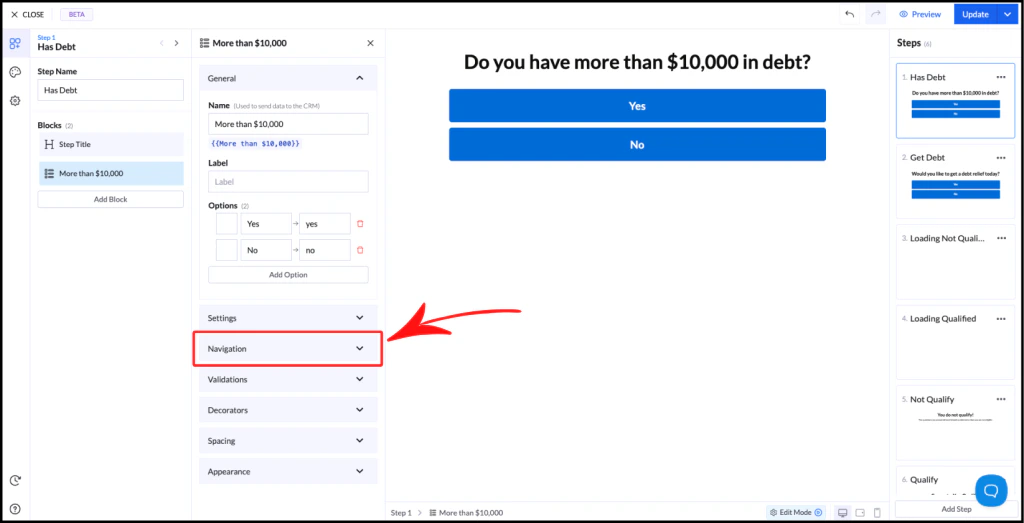
### 2. 打开导航设置
* 选择该区块
* 滚动到 **Navigation** 部分
* 点击将其展开
## 导航选项
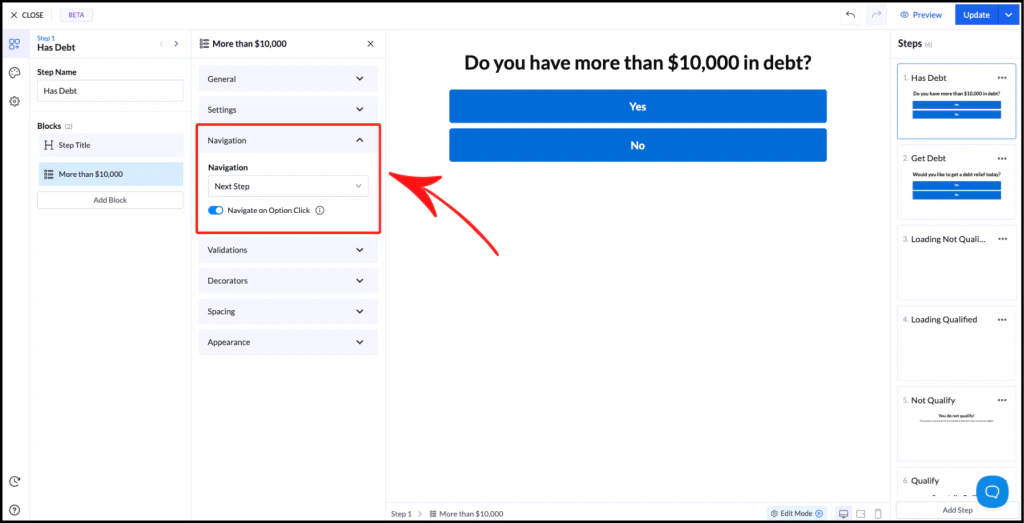
### Next Step(默认)
* 将用户引导至流程中的下一步
* 对所有答案一视同仁
### 1. 添加选择类区块
* 添加 **Multiple Choice** 或 **Image Choice** 区块
* 创建答案选项
### 2. 打开导航设置
* 选择该区块
* 滚动到 **Navigation** 部分
* 点击将其展开
## 导航选项
### Next Step(默认)
* 将用户引导至流程中的下一步
* 对所有答案一视同仁
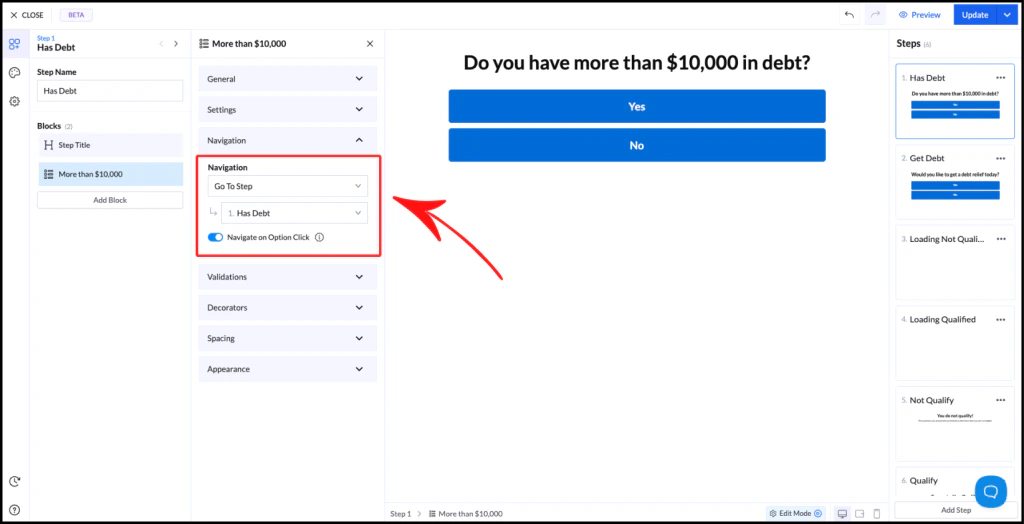
 ### Go to Step
* 将用户引导至指定步骤
* 忽略默认的步骤顺序
### Go to Step
* 将用户引导至指定步骤
* 忽略默认的步骤顺序
 ### Conditional Navigation
* 允许为每个答案设置不同的路径
启用后:
* 每个选项都会有自己的**步骤选择器**
* 你可以定义每个答案通向哪里
示例:
* **是** → 步骤:合格
* **否** → 步骤:不合格
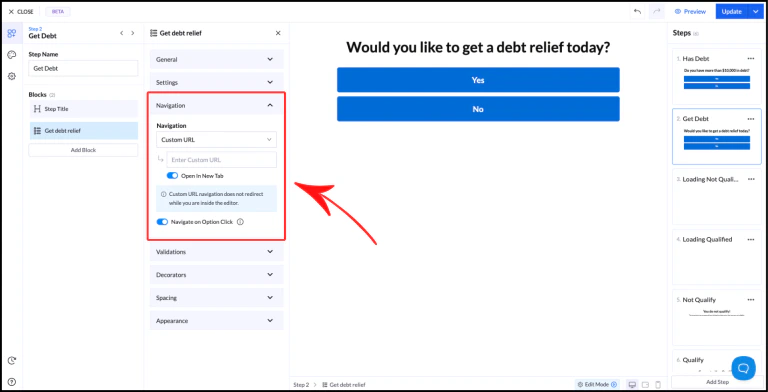
### Custom URL
* 将用户重定向到外部页面
* 无论选择哪个选项都会生效
使用场景:
* 外部感谢页
* 优惠页面
* 其他漏斗
⚠️ 请确保 URL 以 `https://` 开头
### Conditional Navigation
* 允许为每个答案设置不同的路径
启用后:
* 每个选项都会有自己的**步骤选择器**
* 你可以定义每个答案通向哪里
示例:
* **是** → 步骤:合格
* **否** → 步骤:不合格
### Custom URL
* 将用户重定向到外部页面
* 无论选择哪个选项都会生效
使用场景:
* 外部感谢页
* 优惠页面
* 其他漏斗
⚠️ 请确保 URL 以 `https://` 开头
 ## Navigate on Option Click
此设置控制用户如何向前推进:
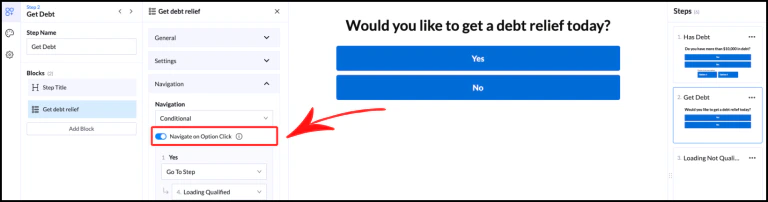
* **Enabled** → 点击选项后自动继续
* **Disabled** → 需要用户点击按钮才能继续
## Navigate on Option Click
此设置控制用户如何向前推进:
* **Enabled** → 点击选项后自动继续
* **Disabled** → 需要用户点击按钮才能继续
 ## 最佳实践
* 保持逻辑简单、易于理解
* 使用清晰的步骤名称,避免混淆
* 测试所有分支,确保导航正确
This documentation is built and hosted on [Mintlify](https://mintlify.com), a developer documentation platform.
## 最佳实践
* 保持逻辑简单、易于理解
* 使用清晰的步骤名称,避免混淆
* 测试所有分支,确保导航正确
This documentation is built and hosted on [Mintlify](https://mintlify.com), a developer documentation platform.