> ## Documentation Index
> Fetch the complete documentation index at: https://docs.landerlab.io/llms.txt
> Use this file to discover all available pages before exploring further.
# 使用预设区块更快搭建漏斗
> 使用预设区块,借助现成字段快速搭建表单和漏斗,加快设置速度并保持数据收集的一致性。
预设区块是**开箱即用的字段**,帮助你更快地搭建流程。每个区块都预先配置好了**字段类型、标签和名称**等常用设置,因此你无需手动创建输入字段。
## 如何使用预设区块
### 操作步骤
1. 打开 **Quiz Builder / Editor**
2. 点击 **Add Block**
3. 切换到 **Predefined** 选项卡
4. 浏览或搜索你需要的字段
5. 点击或拖动区块到流程中
区块会立即以默认设置添加。
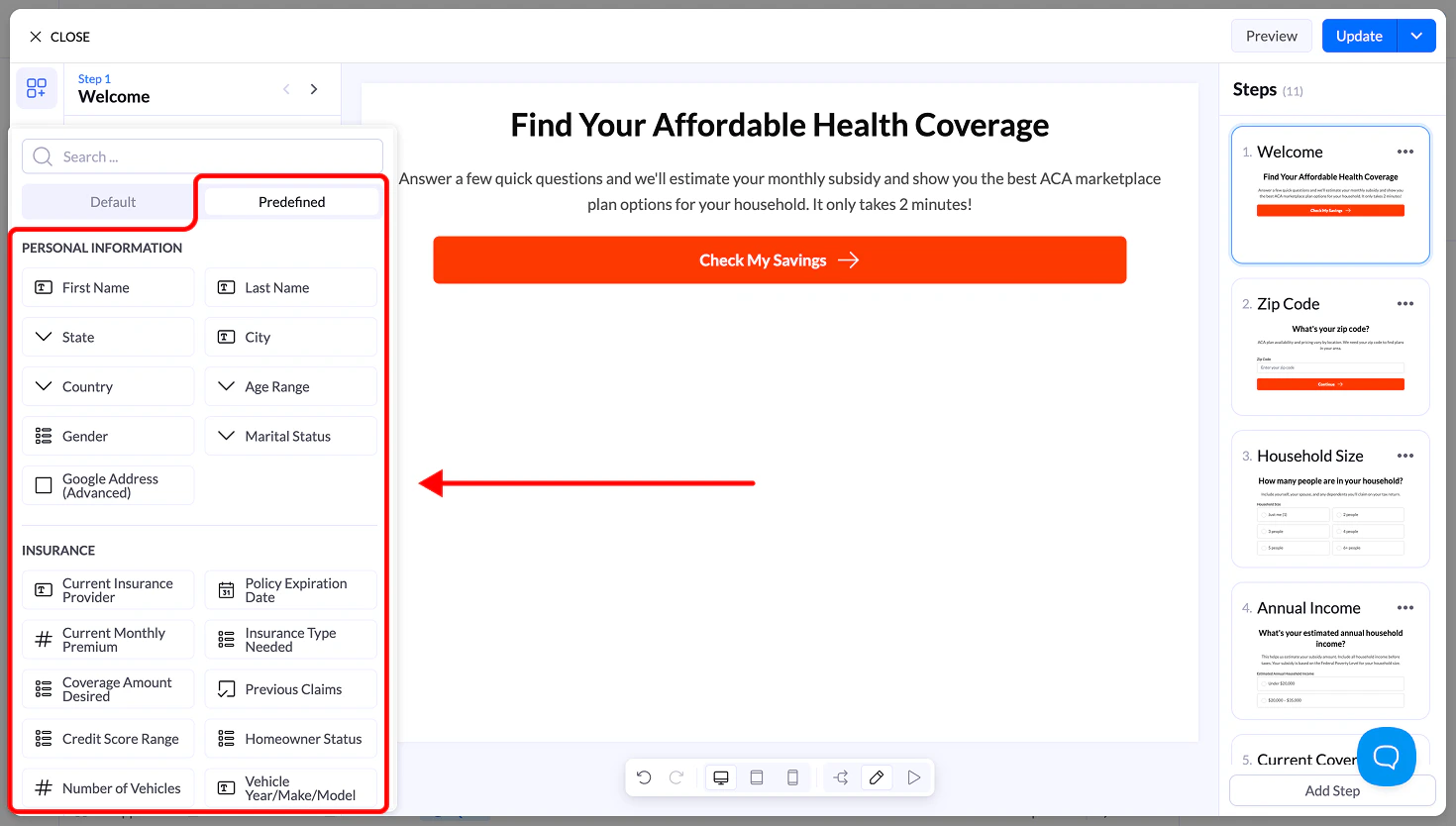 ## 可用类别
预设区块按类别整理,便于查找。
### Personal Information(个人信息)
常用的身份信息字段,例如:
* First Name(名字)
* Last Name(姓氏)
* City(城市)
* State(州)
* Country(国家)
* Age Range(年龄段)
* Gender(性别)
* Marital Status(婚姻状况)
### Insurance(保险)
保险类流程中常用的字段:
* Current Insurance Provider(当前保险公司)
* Policy Expiration Date(保单到期日)
* Monthly Premium(月保费)
* Insurance Type Needed(所需保险类型)
* Coverage Amount(保额)
* Previous Claims(既往理赔)
### Financial Information(财务信息)
用于财务和贷款资格筛选:
* Credit Score Range(信用分范围)
* Loan Amount Needed(所需贷款金额)
* Employment Status(就业状况)
* Monthly Income(月收入)
* Debt Amount(债务金额)
* Bankruptcy History(破产记录)
### Property & Service(房产与服务)
适用于家居服务和房地产:
* Property Type(房产类型)
* Property Age(房龄)
* Square Footage(面积)
* Homeownership Status(房屋所有权状况)
* Project Budget(项目预算)
* Service Needed(所需服务)
### Lead Qualification(线索筛选:Pay Per Call / 漏斗)
用于快速筛选线索的字段:
* Best Time to Call(最佳来电时间)
* Preferred Contact Method(首选联系方式)
* Urgency Level(紧迫程度)
* Budget Range(预算范围)
* Decision Maker(决策人)
* Timeline(时间计划)
### 行业专属字段集
根据你的流程,你可能还会看到以下行业的预设字段:
* **Health & Senior**(健康与老年:Medicare 状态、健康状况等)
* **Legal**(法律:案件类型、事发日期等)
* **Solar**(太阳能:电费账单、屋顶类型等)
* **Debt Relief**(债务减免:债务类型、还款情况等)
## 为什么使用预设区块
使用预设输入字段可以帮助你:
* **更快**地搭建流程
* 保持 **CRM 集成命名的一致性**
* 减少设置错误
* 遵循**经过验证的线索获取结构**
## 重要说明
* 添加任何预设区块后,你都可以对其进行**完全编辑**
* 确保 **Name 字段在整个流程中保持唯一**
* 你可以将预设区块与自定义输入字段结合使用
This documentation is built and hosted on [Mintlify](https://mintlify.com), a developer documentation platform.
## 可用类别
预设区块按类别整理,便于查找。
### Personal Information(个人信息)
常用的身份信息字段,例如:
* First Name(名字)
* Last Name(姓氏)
* City(城市)
* State(州)
* Country(国家)
* Age Range(年龄段)
* Gender(性别)
* Marital Status(婚姻状况)
### Insurance(保险)
保险类流程中常用的字段:
* Current Insurance Provider(当前保险公司)
* Policy Expiration Date(保单到期日)
* Monthly Premium(月保费)
* Insurance Type Needed(所需保险类型)
* Coverage Amount(保额)
* Previous Claims(既往理赔)
### Financial Information(财务信息)
用于财务和贷款资格筛选:
* Credit Score Range(信用分范围)
* Loan Amount Needed(所需贷款金额)
* Employment Status(就业状况)
* Monthly Income(月收入)
* Debt Amount(债务金额)
* Bankruptcy History(破产记录)
### Property & Service(房产与服务)
适用于家居服务和房地产:
* Property Type(房产类型)
* Property Age(房龄)
* Square Footage(面积)
* Homeownership Status(房屋所有权状况)
* Project Budget(项目预算)
* Service Needed(所需服务)
### Lead Qualification(线索筛选:Pay Per Call / 漏斗)
用于快速筛选线索的字段:
* Best Time to Call(最佳来电时间)
* Preferred Contact Method(首选联系方式)
* Urgency Level(紧迫程度)
* Budget Range(预算范围)
* Decision Maker(决策人)
* Timeline(时间计划)
### 行业专属字段集
根据你的流程,你可能还会看到以下行业的预设字段:
* **Health & Senior**(健康与老年:Medicare 状态、健康状况等)
* **Legal**(法律:案件类型、事发日期等)
* **Solar**(太阳能:电费账单、屋顶类型等)
* **Debt Relief**(债务减免:债务类型、还款情况等)
## 为什么使用预设区块
使用预设输入字段可以帮助你:
* **更快**地搭建流程
* 保持 **CRM 集成命名的一致性**
* 减少设置错误
* 遵循**经过验证的线索获取结构**
## 重要说明
* 添加任何预设区块后,你都可以对其进行**完全编辑**
* 确保 **Name 字段在整个流程中保持唯一**
* 你可以将预设区块与自定义输入字段结合使用
This documentation is built and hosted on [Mintlify](https://mintlify.com), a developer documentation platform.