> ## Documentation Index
> Fetch the complete documentation index at: https://docs.landerlab.io/llms.txt
> Use this file to discover all available pages before exploring further.
# 使用图片选择区块进行可视化选择
> 使用图片选择区块让用户点击图片作答,为每个选项设置图片、显示名称和 CRM 值,支持多选、校验和网格布局,提升测验互动参与度。
**Image Choice Block**(图片选择区块)的用法与 Multiple Choice 类似,但使用**图片而非文字**,更具吸引力,也更便于用户直观地做出选择。
## 常规设置
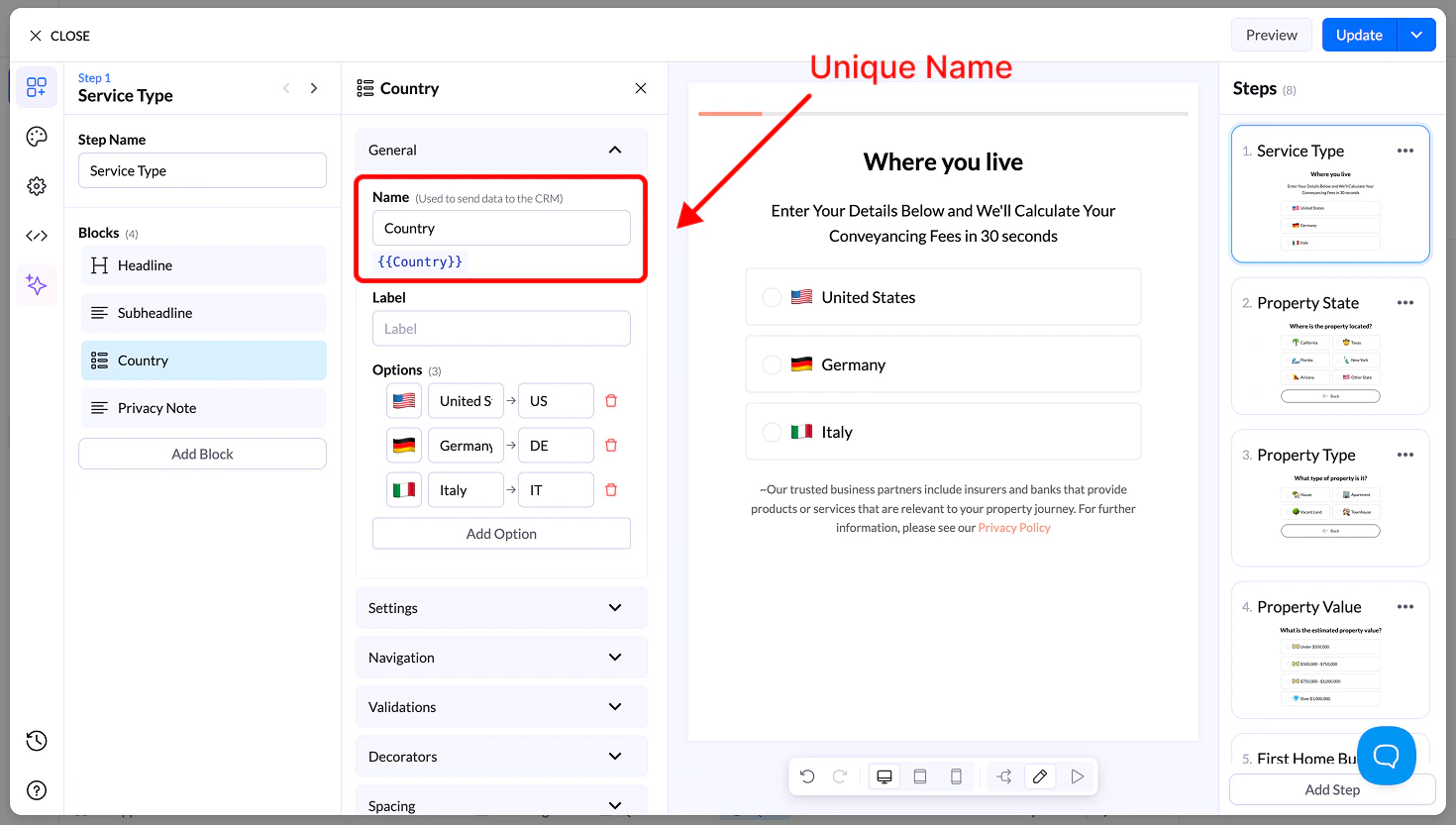
### Name(名称)
* 唯一的字段名称,用于存储和发送数据
* 可作为变量复用
 ### Label(标签)
* 显示在区块上方的可选说明文字
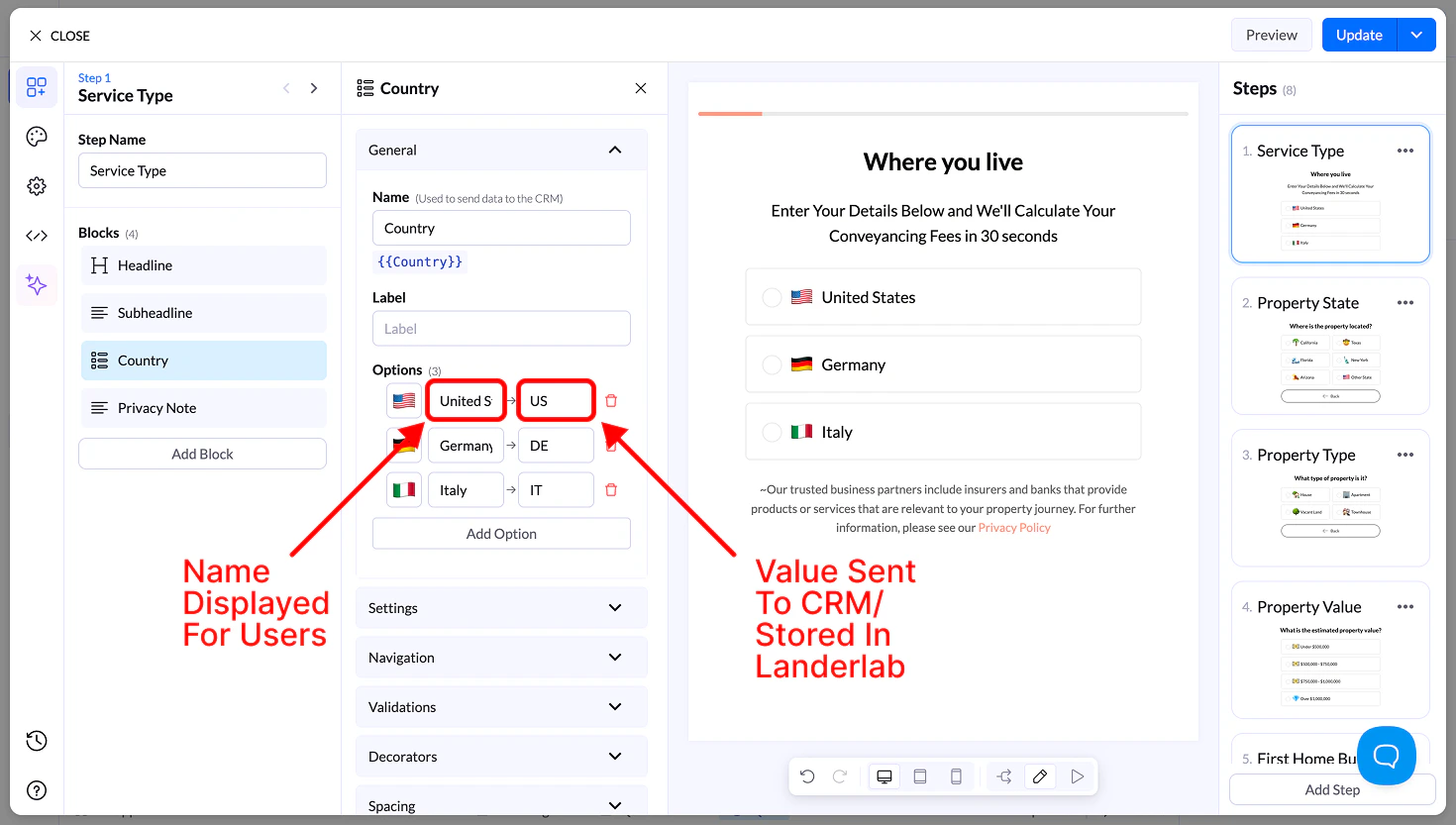
### Options(选项)
每个选项包括:
* **Image** → 上传或选择一张图片
* **Display Name** → 可见的标签
* **Value** → 发送到你的 CRM
### Label(标签)
* 显示在区块上方的可选说明文字
### Options(选项)
每个选项包括:
* **Image** → 上传或选择一张图片
* **Display Name** → 可见的标签
* **Value** → 发送到你的 CRM
 ## 设置
* **Allow Multiple Selection** → 可选择多张图片
* 需要一个按钮才能继续
* **Sort Alphabetically**
* **Reverse Order**
* **Randomize**
## 导航与校验
* **Navigation** → 定义下一步或条件流程
* **Validation** → 要求至少选择一项
## Decorators(装饰项)
* **Multiple Selection Separator** → 定义多个值的存储方式
* **Help Text** → 在区块下方添加引导说明
## 间距
* **Size** → S、M、L、Full width
* **Margin** → 调整区块周围的间距
## 外观
* **Layout Type** → Grid 或 List
* **Items per Row (Desktop & Mobile)**
* **对齐选项**
* **Visibility** → Desktop / Mobile
## 设计
* **Presets** → 预设样式
* **Advanced Settings** → 自定义:
* 默认状态
* 悬停状态
* 选中状态
* 边框、间距、媒体尺寸
This documentation is built and hosted on [Mintlify](https://mintlify.com), a developer documentation platform.
## 设置
* **Allow Multiple Selection** → 可选择多张图片
* 需要一个按钮才能继续
* **Sort Alphabetically**
* **Reverse Order**
* **Randomize**
## 导航与校验
* **Navigation** → 定义下一步或条件流程
* **Validation** → 要求至少选择一项
## Decorators(装饰项)
* **Multiple Selection Separator** → 定义多个值的存储方式
* **Help Text** → 在区块下方添加引导说明
## 间距
* **Size** → S、M、L、Full width
* **Margin** → 调整区块周围的间距
## 外观
* **Layout Type** → Grid 或 List
* **Items per Row (Desktop & Mobile)**
* **对齐选项**
* **Visibility** → Desktop / Mobile
## 设计
* **Presets** → 预设样式
* **Advanced Settings** → 自定义:
* 默认状态
* 悬停状态
* 选中状态
* 边框、间距、媒体尺寸
This documentation is built and hosted on [Mintlify](https://mintlify.com), a developer documentation platform.