> ## Documentation Index
> Fetch the complete documentation index at: https://docs.landerlab.io/llms.txt
> Use this file to discover all available pages before exploring further.
# 如何在 LanderLab 中为团队成员分配和监控 AI 额度
> 了解如何在 LanderLab 中为团队成员设置每月 AI 额度上限,并监控整个组织的额度使用情况。控制支出,并为整个团队优化 AI 工具的使用权限。
## 设置额度上限
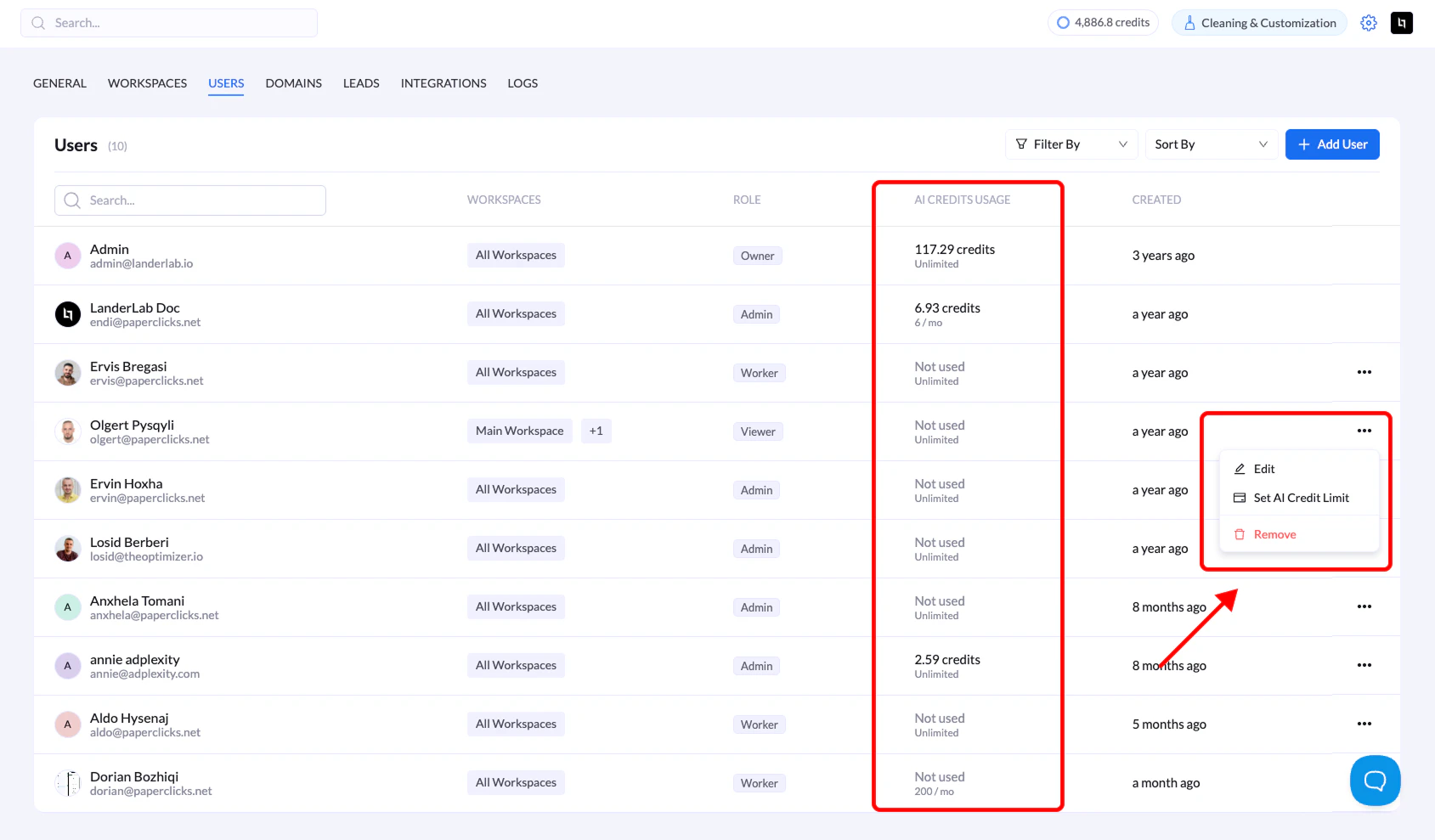
1. 进入 **Settings** → **Users**
2. 点击用户名旁边的**三点菜单(•••)**
3. 选择 **Set AI Credit Limit**
4. 输入每月上限,留空则表示不限量
5. 点击 **Save**
额度会在每月 1 日重置。
 ## 监控用量
查看 Users 列表中的 **AI CREDITS USAGE** 列,可以看到:
* 每位用户已消耗的额度
* 每月分配量(例如 "6.93 / 100" 或 "Unlimited")
## 要点
* **留空 = 不限量使用**组织的额度分配
* 额度由 AI 驱动的功能消耗(页面生成、文本/图片生成、背景移除)
* 每月 1 日自动重置
* 可随时通过同一菜单调整上限
## 故障排查
**用户无法使用 AI 功能?**
* 在 Users 列表中检查其额度用量
* 如果已达到上限,请等待每月重置
This documentation is built and hosted on [Mintlify](https://mintlify.com), a developer documentation platform.
## 监控用量
查看 Users 列表中的 **AI CREDITS USAGE** 列,可以看到:
* 每位用户已消耗的额度
* 每月分配量(例如 "6.93 / 100" 或 "Unlimited")
## 要点
* **留空 = 不限量使用**组织的额度分配
* 额度由 AI 驱动的功能消耗(页面生成、文本/图片生成、背景移除)
* 每月 1 日自动重置
* 可随时通过同一菜单调整上限
## 故障排查
**用户无法使用 AI 功能?**
* 在 Users 列表中检查其额度用量
* 如果已达到上限,请等待每月重置
This documentation is built and hosted on [Mintlify](https://mintlify.com), a developer documentation platform.