> ## Documentation Index
> Fetch the complete documentation index at: https://docs.landerlab.io/llms.txt
> Use this file to discover all available pages before exploring further.
# 取消发布落地页:下线页面但不删除
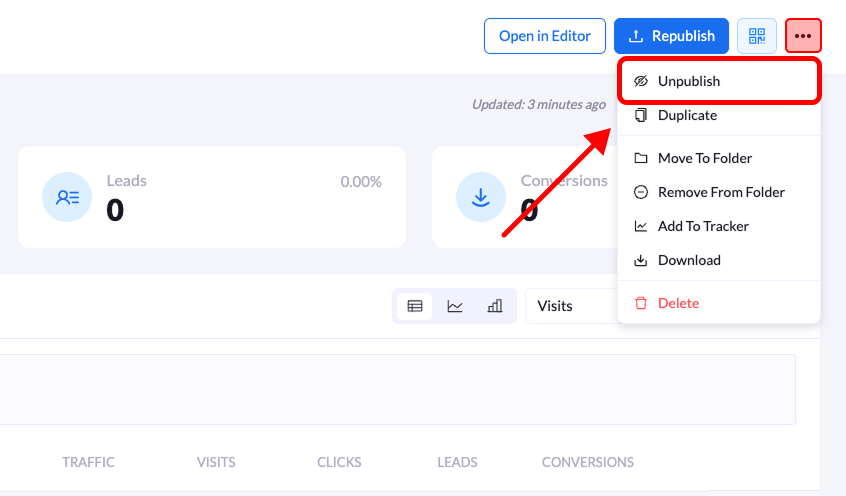
> 取消发布落地页:在概览页 Republish 按钮旁的三点菜单中选择 Unpublish 并确认,页面立即对访客下线,但不会被删除。
取消发布后,落地页对**访客不再可访问**。正式 URL 不再显示你的页面,这样你可以让它下线而不必删除。
 ## 分步说明
### 1. 打开落地页概览
在 **Landing Pages** 列表中,点击要取消发布的**落地页标题**。
### 2. 打开选项菜单
在概览界面**右上角**,点击 **Republish** 按钮旁边的**三点菜单(•••)**。
### 3. 选择 Unpublish
在下拉菜单中点击 **Unpublish**。
### 4. 确认操作
会弹出一个名为 **Unpublish Landing Page** 的确认窗口。
点击 **Unpublish** 确认,页面即下线。
落地页会立即**对访客不可用**。
This documentation is built and hosted on [Mintlify](https://mintlify.com), a developer documentation platform.
## 分步说明
### 1. 打开落地页概览
在 **Landing Pages** 列表中,点击要取消发布的**落地页标题**。
### 2. 打开选项菜单
在概览界面**右上角**,点击 **Republish** 按钮旁边的**三点菜单(•••)**。
### 3. 选择 Unpublish
在下拉菜单中点击 **Unpublish**。
### 4. 确认操作
会弹出一个名为 **Unpublish Landing Page** 的确认窗口。
点击 **Unpublish** 确认,页面即下线。
落地页会立即**对访客不可用**。
This documentation is built and hosted on [Mintlify](https://mintlify.com), a developer documentation platform.