> ## Documentation Index
> Fetch the complete documentation index at: https://docs.landerlab.io/llms.txt
> Use this file to discover all available pages before exploring further.
# 用 Layout 设置控制对齐和间距
> 用 Layout 设置控制元素在容器内的排列:Direction 设定横排或竖排,Distribution、Align Items 和 Gap 调整对齐与间距。
Layout 设置控制**元素在容器内的排列方式**。
是**并排、堆叠、居中还是均匀分布**,都在这里决定。
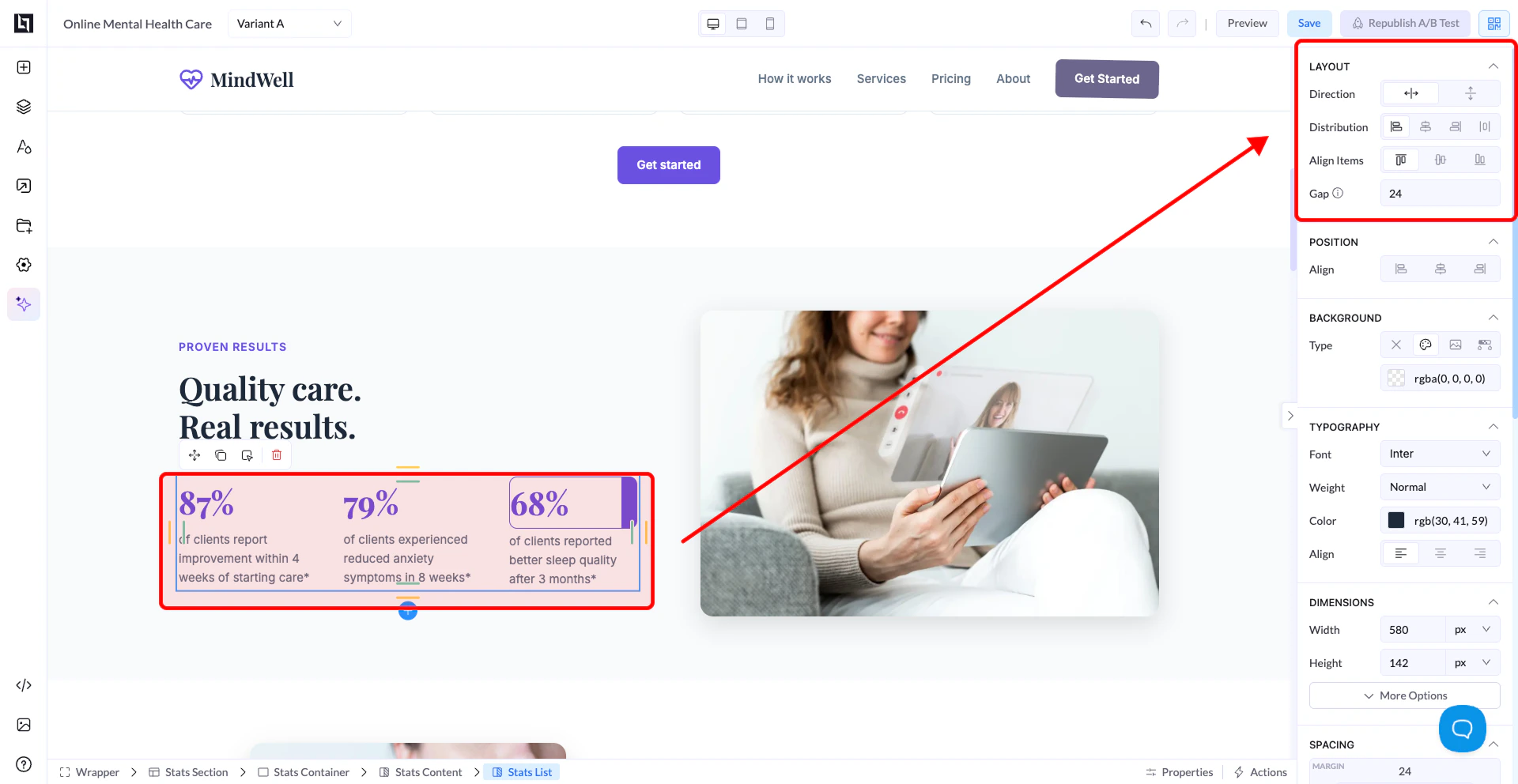 ## 四个核心设置
## 1. Direction(最重要)
它控制**元素在容器内的排列方向**。
### Horizontal(行)
* 元素**从左到右**排列
* 例如:几个按钮并排
👉 适用于:
* 行布局
* 内联元素
* 并排的分栏
### Vertical(列)
* 元素**从上到下**排列
* 例如:标题 → 正文 → 按钮
👉 适用于:
* 表单
* 堆叠式内容
* 大多数布局(默认)
如果某个元素总对不齐,先检查 Direction,这是用户最常遇到的问题。
## 2. Distribution(元素间的分布)
它控制**元素在容器中的分布方式**。
常见选项:
* **Start**:元素靠起始端
* **Center**:元素居中
* **End**:元素靠末端
* **Space Between**:首项靠左、末项靠右,中间平均分布
* **Space Around**:每个元素周围的间距相等
👉 示例:
假设你有 3 个按钮:
* Space Between:铺满整个宽度
* Center:集中在中间
## 3. Align Items(对齐)
它控制**与 Direction 相反那一个轴**上的对齐。
### 当 Direction 为 Row(水平)
* Align Items 负责垂直对齐
* 顶部
* 居中
* 底部
### 当 Direction 为 Column(垂直)
* Align Items 负责水平对齐
* 左对齐
* 居中
* 右对齐
**重要:**
* Direction 是主轴
* Align Items 是交叉轴
(大部分混淆都出在这里)
## 4. Gap
* 控制**元素之间**的间距
* 相当于自动留白
👉 示例:
* Gap 为 20:所有元素之间都加上相等间距
# 简单示例
### 示例 1:全部居中
* Direction:Vertical
* Align Items:Center
* Distribution:Center
👉 结果:所有内容完美居中
### 示例 2:一排按钮
* Direction:Horizontal
* Distribution:Space Between
* Align Items:Center
👉 结果:按钮水平铺开
### 示例 3:简单表单布局
* Direction:Vertical
* Align Items:Left
* Gap:10 到 20
👉 结果:整洁的竖向表单
## 常见错误
❌ 不改 Direction 就想把元素居中
## 四个核心设置
## 1. Direction(最重要)
它控制**元素在容器内的排列方向**。
### Horizontal(行)
* 元素**从左到右**排列
* 例如:几个按钮并排
👉 适用于:
* 行布局
* 内联元素
* 并排的分栏
### Vertical(列)
* 元素**从上到下**排列
* 例如:标题 → 正文 → 按钮
👉 适用于:
* 表单
* 堆叠式内容
* 大多数布局(默认)
如果某个元素总对不齐,先检查 Direction,这是用户最常遇到的问题。
## 2. Distribution(元素间的分布)
它控制**元素在容器中的分布方式**。
常见选项:
* **Start**:元素靠起始端
* **Center**:元素居中
* **End**:元素靠末端
* **Space Between**:首项靠左、末项靠右,中间平均分布
* **Space Around**:每个元素周围的间距相等
👉 示例:
假设你有 3 个按钮:
* Space Between:铺满整个宽度
* Center:集中在中间
## 3. Align Items(对齐)
它控制**与 Direction 相反那一个轴**上的对齐。
### 当 Direction 为 Row(水平)
* Align Items 负责垂直对齐
* 顶部
* 居中
* 底部
### 当 Direction 为 Column(垂直)
* Align Items 负责水平对齐
* 左对齐
* 居中
* 右对齐
**重要:**
* Direction 是主轴
* Align Items 是交叉轴
(大部分混淆都出在这里)
## 4. Gap
* 控制**元素之间**的间距
* 相当于自动留白
👉 示例:
* Gap 为 20:所有元素之间都加上相等间距
# 简单示例
### 示例 1:全部居中
* Direction:Vertical
* Align Items:Center
* Distribution:Center
👉 结果:所有内容完美居中
### 示例 2:一排按钮
* Direction:Horizontal
* Distribution:Space Between
* Align Items:Center
👉 结果:按钮水平铺开
### 示例 3:简单表单布局
* Direction:Vertical
* Align Items:Left
* Gap:10 到 20
👉 结果:整洁的竖向表单
## 常见错误
❌ 不改 Direction 就想把元素居中
❌ 把 Align Items 和 Distribution 搞混
❌ 用 margin 代替 Gap
❌ 忘记是容器在控制子元素
## 最佳实践
* 大多数布局从 **Column** 开始
* **只在必要时用 Row**
* **用 Gap 而不是手动加间距**
* 布局保持简单和一致
**黄金法则:**
如果效果看着“不对”,几乎总是这两个原因:
* Direction 选错
* 对齐方式选错
This documentation is built and hosted on [Mintlify](https://mintlify.com), a developer documentation platform.