> ## Documentation Index
> Fetch the complete documentation index at: https://docs.landerlab.io/llms.txt
> Use this file to discover all available pages before exploring further.
# 设置元素边框和圆角样式
> 在 Border 设置中调整元素的圆角弧度、边框样式、颜色和粗细,可以统一设置,也可以按单个角或单条边分别设置。
Border 区域控制元素的边框和圆角弧度。它帮你定义形状、分隔内容,并提升整体视觉风格。
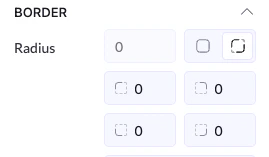
## Radius(圆角)
* 控制四个角的圆润程度
两种设置方式:
* **四角统一**:所有角使用相同数值
* **单角设置**:每个角单独设定
👉 数值越大,角越圆
👉 0 表示直角
 ## Style
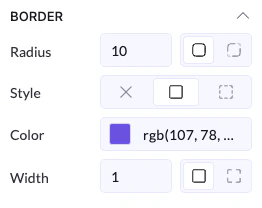
决定边框的外观:
* **None**:没有边框
* **Solid**:连续的实线
* **Dashed / Dotted**(如果可用):虚线或点线样式
## Style
决定边框的外观:
* **None**:没有边框
* **Solid**:连续的实线
* **Dashed / Dotted**(如果可用):虚线或点线样式
 ## Color
* 设置边框颜色
* 可以跟随品牌色,也可以和背景形成对比
## Width
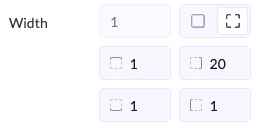
* 控制边框的粗细
你可以:
* **四边用同一个数值**
* 或分别设置每一边(上、右、下、左)
## Color
* 设置边框颜色
* 可以跟随品牌色,也可以和背景形成对比
## Width
* 控制边框的粗细
你可以:
* **四边用同一个数值**
* 或分别设置每一边(上、右、下、左)
 This documentation is built and hosted on [Mintlify](https://mintlify.com), a developer documentation platform.