> ## Documentation Index
> Fetch the complete documentation index at: https://docs.landerlab.io/llms.txt
> Use this file to discover all available pages before exploring further.
# 用倒计时器提升转化
> 用 Countdown 倒计时元素营造紧迫感:选择 Date 截止日期或 Timer 计时模式,设置样式和显示的时间单位,并在倒计时结束时跳转访客。
Countdown 元素通过倒计时器在页面上营造紧迫感。
它常用于报价、截止时间,或限时活动。
你可以从左侧边栏添加它,并完全自定义它的行为和外观。
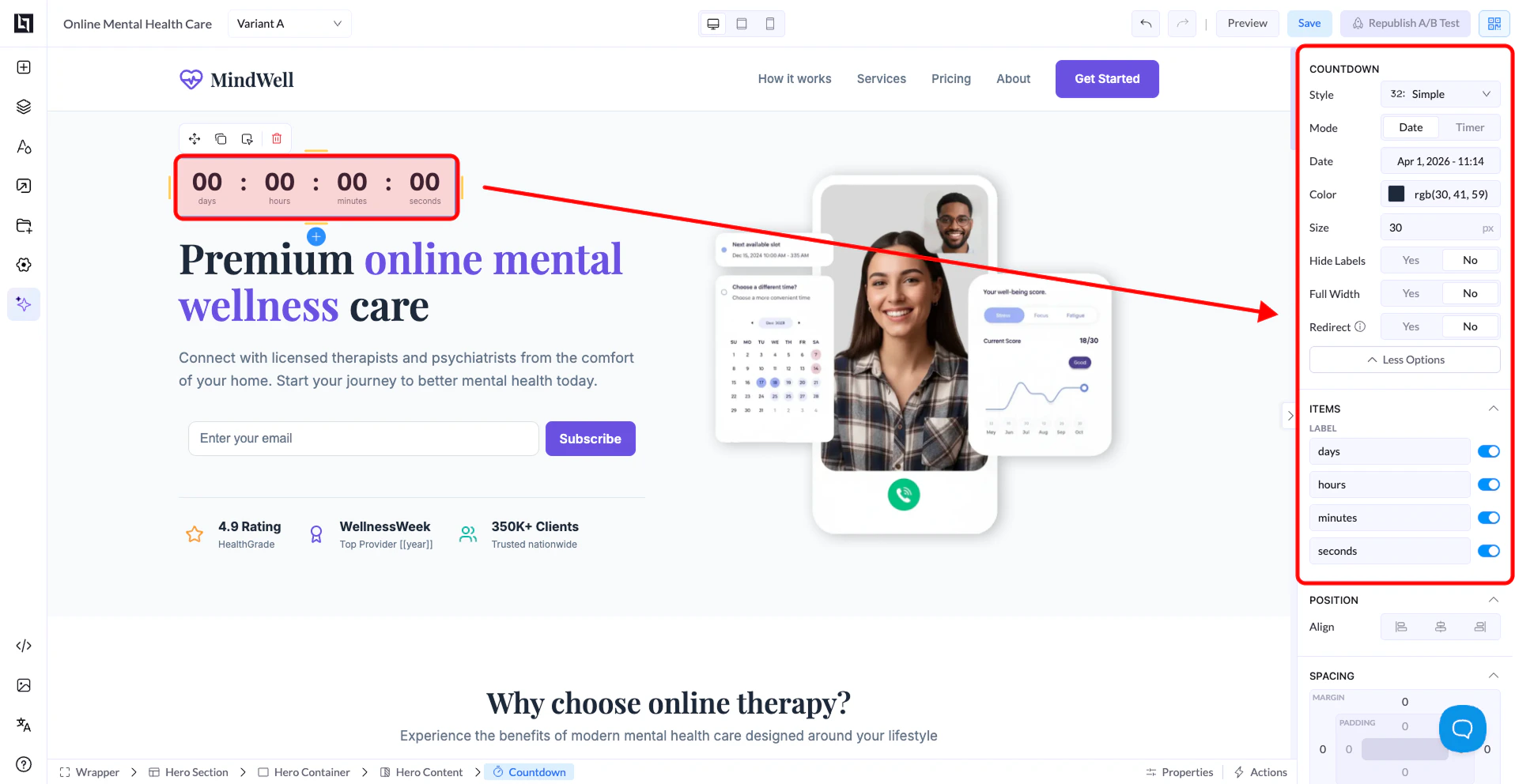 ## Countdown 设置
### Style
* 选择倒计时的视觉样式
* 不同样式下,数字和标签的展示方式不同
### Mode
两种模式:
* **Date**:倒数到某个具体的日期和时间
* **Timer**:页面加载时开始倒计时(例如 10 分钟)
### Date
* 使用 **Date** 模式时可用
* 用选择器指定确切的日期和时间
### Color
* 控制数字和标签的颜色
### Size
* 调整倒计时文字的大小
### Hide Labels
* **Yes**:隐藏天、小时、分钟等标签
* **No**:显示标签
### Full Width
* **Yes**:倒计时铺满整个容器
* **No**:保持紧凑
### Redirect
* **Yes**:倒计时结束时跳转用户
* **No**:结束后不做任何动作
## Items(时间单位)
你可以控制显示哪些时间单位:
* 天
* 小时
* 分钟
* 秒
每个单位都可以单独开启或关闭。
## 位置与间距
和其他元素一样,你可以调整:
* 对齐方式
* 间距(margin 与 padding)
## 工作方式
* **Date** 模式下,倒计时固定指向一个截止时间
* **Timer** 模式下,每个访客都从头开始计时
This documentation is built and hosted on [Mintlify](https://mintlify.com), a developer documentation platform.
## Countdown 设置
### Style
* 选择倒计时的视觉样式
* 不同样式下,数字和标签的展示方式不同
### Mode
两种模式:
* **Date**:倒数到某个具体的日期和时间
* **Timer**:页面加载时开始倒计时(例如 10 分钟)
### Date
* 使用 **Date** 模式时可用
* 用选择器指定确切的日期和时间
### Color
* 控制数字和标签的颜色
### Size
* 调整倒计时文字的大小
### Hide Labels
* **Yes**:隐藏天、小时、分钟等标签
* **No**:显示标签
### Full Width
* **Yes**:倒计时铺满整个容器
* **No**:保持紧凑
### Redirect
* **Yes**:倒计时结束时跳转用户
* **No**:结束后不做任何动作
## Items(时间单位)
你可以控制显示哪些时间单位:
* 天
* 小时
* 分钟
* 秒
每个单位都可以单独开启或关闭。
## 位置与间距
和其他元素一样,你可以调整:
* 对齐方式
* 间距(margin 与 padding)
## 工作方式
* **Date** 模式下,倒计时固定指向一个截止时间
* **Timer** 模式下,每个访客都从头开始计时
This documentation is built and hosted on [Mintlify](https://mintlify.com), a developer documentation platform.