> ## Documentation Index
> Fetch the complete documentation index at: https://docs.landerlab.io/llms.txt
> Use this file to discover all available pages before exploring further.
# 在 LanderLab 中禁止索引
> 在 LanderLab 域名设置中开启 Disable Indexing,为该域名下发布的所有页面添加 noindex 标签,阻止搜索引擎收录付费流量或测试域名。
**Disable Indexing**(禁止索引)会为某个域名下发布的每个页面添加 `noindex` meta 标签,让搜索引擎不将这些页面纳入搜索结果。它作用于整个域名,而不是单个页面。
## 在哪里找到
打开 **Settings > Domains**,点击域名旁边的**三点菜单(...)**,然后选择 **Settings**。该开关位于 **General** 标签页顶部。
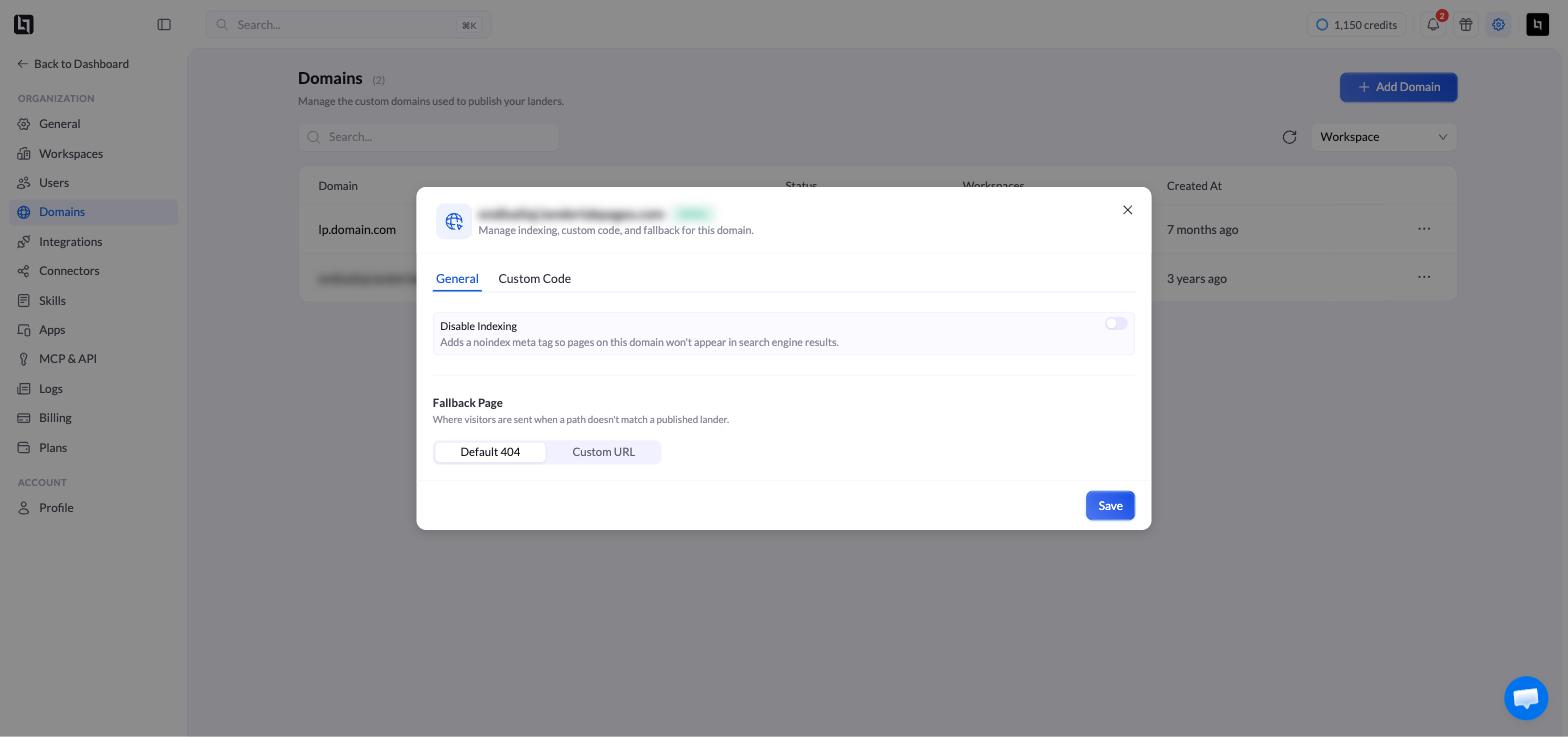 打开 **Disable Indexing** 并点击 **Save**。如需重新允许索引,关闭该开关并保存即可。
只有当域名处于 **Active** 状态时,**Settings** 才可用。
## 何时使用
* 仅用于付费流量、不希望获得自然搜索排名的域名。
* 预发布(staging)或测试域名。
* 任何你希望排除在公开搜索索引之外的域名。
搜索引擎只会在下次抓取你的域名时才会识别到这一更改,因此已被索引的页面可能需要一段时间才会从搜索结果中消失。
This documentation is built and hosted on [Mintlify](https://mintlify.com), a developer documentation platform.
打开 **Disable Indexing** 并点击 **Save**。如需重新允许索引,关闭该开关并保存即可。
只有当域名处于 **Active** 状态时,**Settings** 才可用。
## 何时使用
* 仅用于付费流量、不希望获得自然搜索排名的域名。
* 预发布(staging)或测试域名。
* 任何你希望排除在公开搜索索引之外的域名。
搜索引擎只会在下次抓取你的域名时才会识别到这一更改,因此已被索引的页面可能需要一段时间才会从搜索结果中消失。
This documentation is built and hosted on [Mintlify](https://mintlify.com), a developer documentation platform.