> ## Documentation Index
> Fetch the complete documentation index at: https://docs.landerlab.io/llms.txt
> Use this file to discover all available pages before exploring further.
# 自定义 404 Not Found 页面
> 了解如何在 LanderLab 中为你的域名配置 404 Not Found 页面,可以使用默认页面或自定义 URL。
当有人打开你域名下一个与任何已发布落地页都不匹配的 URL 时,LanderLab 会显示一个备用页面。你可以保留默认的 404 页面,也可以把这些访客引导到你自己的页面。
## 在哪里找到
打开 **Settings > Domains**,点击域名旁边的**三点菜单(...)**,然后选择 **Settings**。**Fallback Page**(备用页面)部分位于 **General** 标签页中。
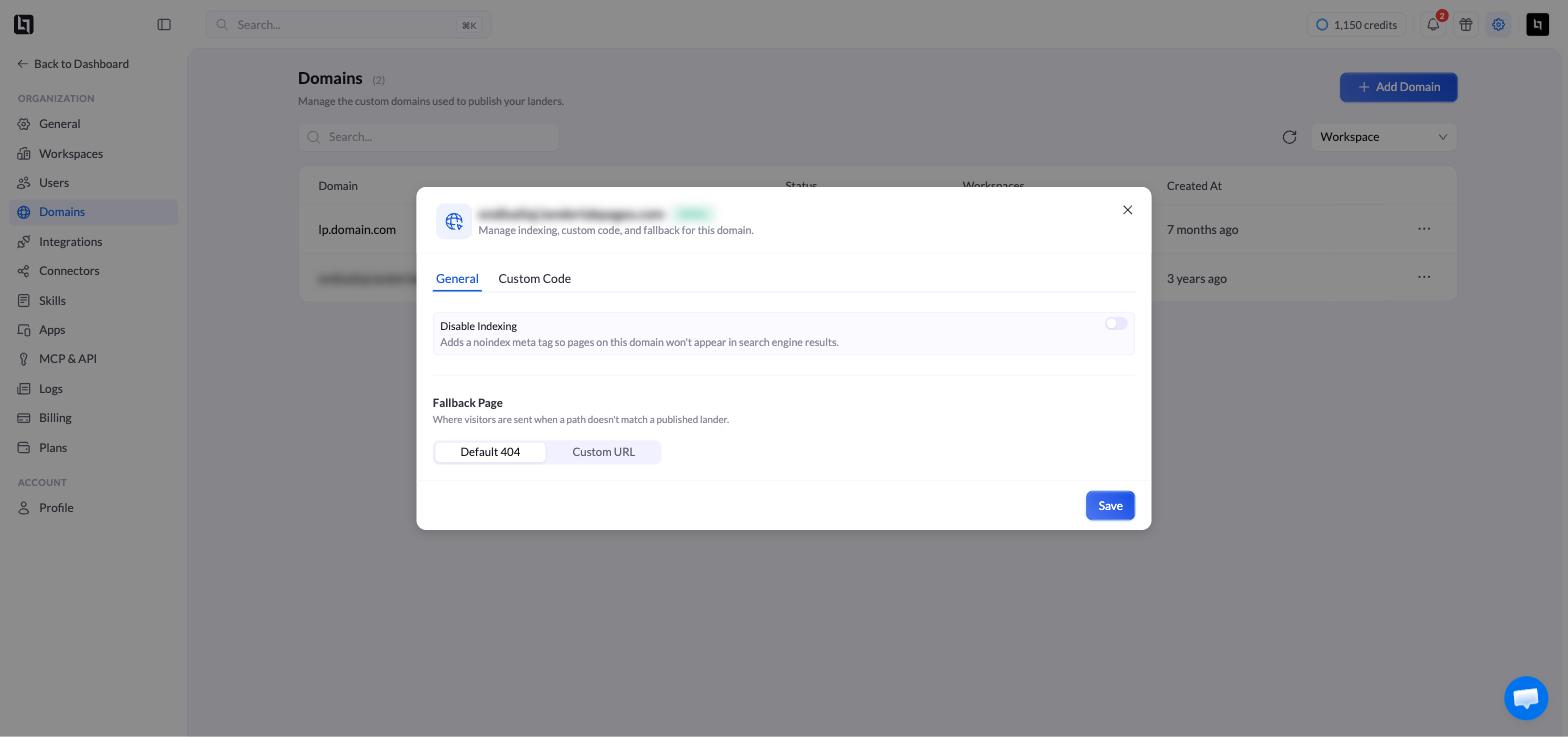 只有当域名处于 **Active** 状态时,**Settings** 才可用。
## 两个选项
| 选项 | 效果 |
| :- | :- |
| **Default 404** | LanderLab 的标准 404 页面。默认启用,无需任何配置。 |
| **Custom URL** | 访客会被重定向到你输入的 URL。 |
要使用你自己的页面,请选择 **Custom URL**,输入完整的 URL,然后点击 **Save**。
自定义 URL 必须可以公开访问。它可以是另一个落地页,也可以是你运营的任意网站上的任意页面。
## 建议
* 保持设计与你的品牌一致。
* 提供清晰的返回路径,例如指向你主落地页的链接。
* 在线索获取类广告活动中,在该页面上放置一个注册表单,可以挽回原本会流失的访客。
This documentation is built and hosted on [Mintlify](https://mintlify.com), a developer documentation platform.
只有当域名处于 **Active** 状态时,**Settings** 才可用。
## 两个选项
| 选项 | 效果 |
| :- | :- |
| **Default 404** | LanderLab 的标准 404 页面。默认启用,无需任何配置。 |
| **Custom URL** | 访客会被重定向到你输入的 URL。 |
要使用你自己的页面,请选择 **Custom URL**,输入完整的 URL,然后点击 **Save**。
自定义 URL 必须可以公开访问。它可以是另一个落地页,也可以是你运营的任意网站上的任意页面。
## 建议
* 保持设计与你的品牌一致。
* 提供清晰的返回路径,例如指向你主落地页的链接。
* 在线索获取类广告活动中,在该页面上放置一个注册表单,可以挽回原本会流失的访客。
This documentation is built and hosted on [Mintlify](https://mintlify.com), a developer documentation platform.