> ## Documentation Index
> Fetch the complete documentation index at: https://docs.landerlab.io/llms.txt
> Use this file to discover all available pages before exploring further.
# Use Predefined Blocks to Build Funnels Faster
> Use predefined blocks to quickly build forms and funnels with ready-made fields for faster setup and consistent data collection.
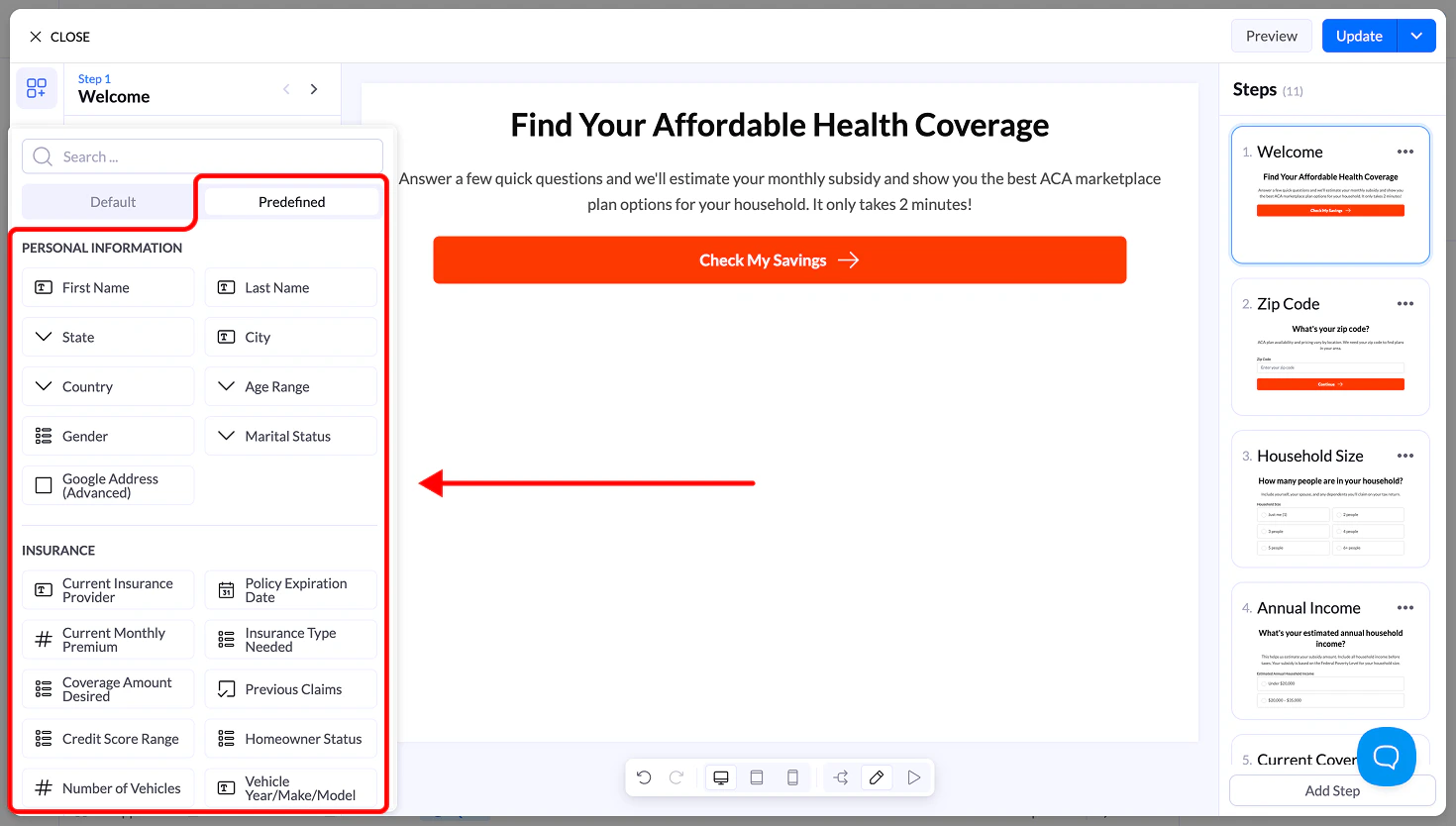
Predefined blocks are **ready-to-use fields** that help you build flows faster. Each block comes pre-configured with common settings like **field type, label, and name**, so you don’t need to create inputs manually.
## How to Use Predefined Blocks
### Steps
1. Open the **Quiz Builder / Editor**
2. Click **Add Block**
3. Switch to the **Predefined** tab
4. Browse or search for the field you need
5. Click or drag the block into your flow
The block will be added instantly with default settings.
 ***
## Available Categories
Predefined blocks are organized into categories to make them easy to find.
### Personal Information
Common identity fields such as:
* First Name
* Last Name
* City
* State
* Country
* Age Range
* Gender
* Marital Status
### Insurance
Fields commonly used in insurance flows:
* Current Insurance Provider
* Policy Expiration Date
* Monthly Premium
* Insurance Type Needed
* Coverage Amount
* Previous Claims
### Financial Information
Used for financial and loan qualification:
* Credit Score Range
* Loan Amount Needed
* Employment Status
* Monthly Income
* Debt Amount
* Bankruptcy History
### Property & Service
Useful for home services and real estate:
* Property Type
* Property Age
* Square Footage
* Homeownership Status
* Project Budget
* Service Needed
### Lead Qualification (Pay Per Call / Funnels)
Fields used to qualify leads quickly:
* Best Time to Call
* Preferred Contact Method
* Urgency Level
* Budget Range
* Decision Maker
* Timeline
### Industry-Specific Sets
Depending on your flow, you may also see predefined fields for:
* **Health & Senior** (Medicare status, conditions, etc.)
* **Legal** (case type, incident date, etc.)
* **Solar** (electric bill, roof type, etc.)
* **Debt Relief** (types of debt, payments, etc.)
***
## Why Use Predefined Blocks
Using predefined inputs helps you:
* Build flows **faster**
* Maintain **consistent naming for CRM integrations**
* Reduce setup errors
* Follow **proven lead generation structures**
***
## Important Notes
* You can **fully edit** any predefined block after adding it
* Make sure the **Name field stays unique** across your flow
* You can combine predefined blocks with custom inputs
***
## Available Categories
Predefined blocks are organized into categories to make them easy to find.
### Personal Information
Common identity fields such as:
* First Name
* Last Name
* City
* State
* Country
* Age Range
* Gender
* Marital Status
### Insurance
Fields commonly used in insurance flows:
* Current Insurance Provider
* Policy Expiration Date
* Monthly Premium
* Insurance Type Needed
* Coverage Amount
* Previous Claims
### Financial Information
Used for financial and loan qualification:
* Credit Score Range
* Loan Amount Needed
* Employment Status
* Monthly Income
* Debt Amount
* Bankruptcy History
### Property & Service
Useful for home services and real estate:
* Property Type
* Property Age
* Square Footage
* Homeownership Status
* Project Budget
* Service Needed
### Lead Qualification (Pay Per Call / Funnels)
Fields used to qualify leads quickly:
* Best Time to Call
* Preferred Contact Method
* Urgency Level
* Budget Range
* Decision Maker
* Timeline
### Industry-Specific Sets
Depending on your flow, you may also see predefined fields for:
* **Health & Senior** (Medicare status, conditions, etc.)
* **Legal** (case type, incident date, etc.)
* **Solar** (electric bill, roof type, etc.)
* **Debt Relief** (types of debt, payments, etc.)
***
## Why Use Predefined Blocks
Using predefined inputs helps you:
* Build flows **faster**
* Maintain **consistent naming for CRM integrations**
* Reduce setup errors
* Follow **proven lead generation structures**
***
## Important Notes
* You can **fully edit** any predefined block after adding it
* Make sure the **Name field stays unique** across your flow
* You can combine predefined blocks with custom inputs