> ## Documentation Index
> Fetch the complete documentation index at: https://docs.landerlab.io/llms.txt
> Use this file to discover all available pages before exploring further.
# How to Distribute and Monitor AI Credits to Team Members in LanderLab
> Learn how to set monthly AI credit limits for team members and monitor credit usage across your organization in LanderLab. Control spending and optimize AI tool access for your entire team.
## Set Credit Limits
1. Go to **Settings** → **Users**
2. Click the **three dots (•••)** next to a user's name
3. Select **Set AI Credit Limit**
4. Enter the monthly limit or leave blank for unlimited
5. Click **Save**
Credits reset on the 1st of each month.
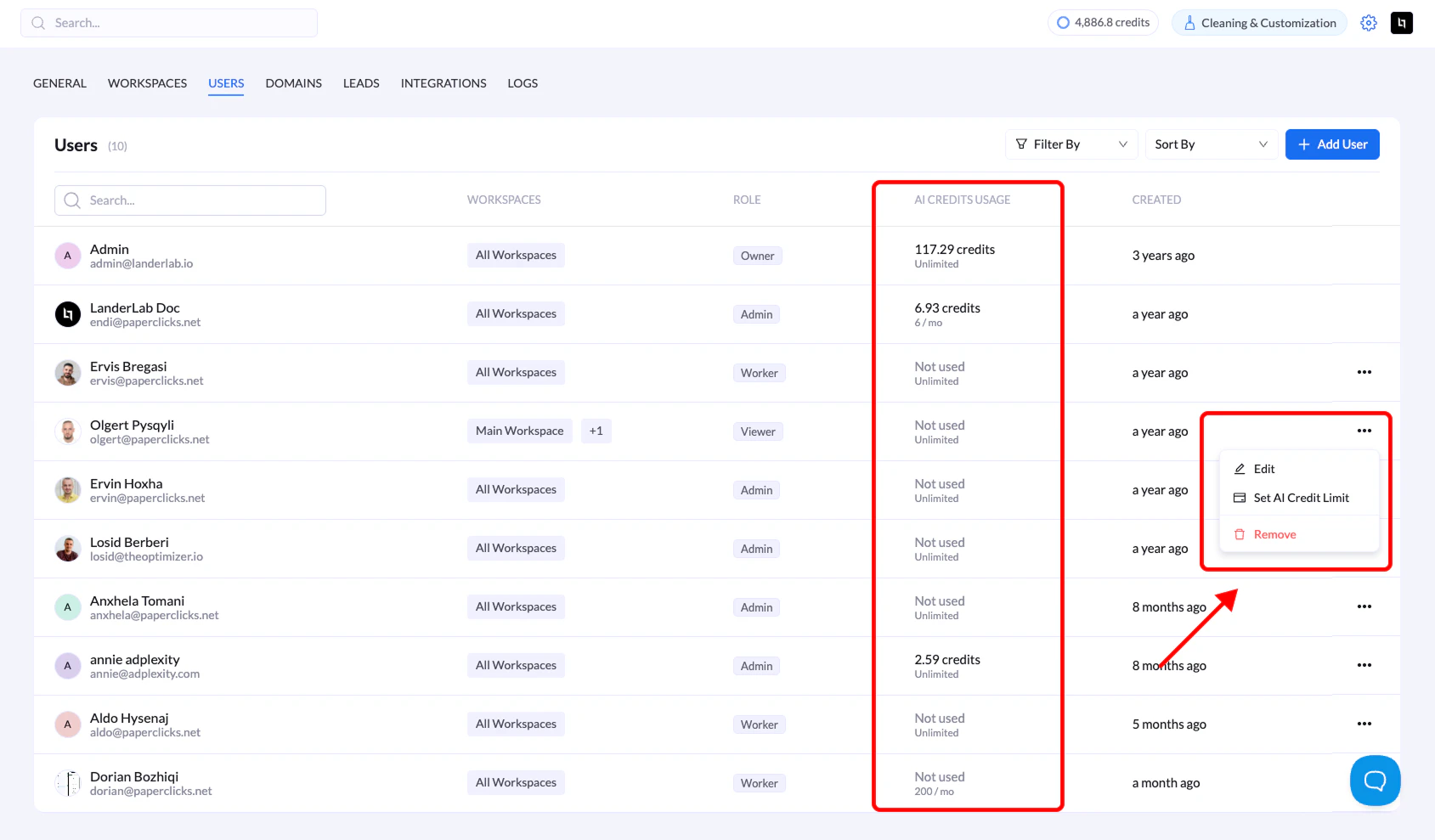 ## Monitor Usage
Check the **AI CREDITS USAGE** column in the Users list to see:
* Credits consumed per user
* Monthly allocation (e.g., "6.93 / 100" or "Unlimited")
## Key Points
* **Leave blank = unlimited access** to your organization's allocation
* Credits are consumed by AI-powered features (page generation, text/image generation, background removal)
* Monthly reset is automatic on the 1st of each month
* Adjust limits anytime through the same menu
## Troubleshooting
**User can't access AI features?**
* Check their credit usage in the Users list
* Wait for monthly reset if limit is reached
## Monitor Usage
Check the **AI CREDITS USAGE** column in the Users list to see:
* Credits consumed per user
* Monthly allocation (e.g., "6.93 / 100" or "Unlimited")
## Key Points
* **Leave blank = unlimited access** to your organization's allocation
* Credits are consumed by AI-powered features (page generation, text/image generation, background removal)
* Monthly reset is automatic on the 1st of each month
* Adjust limits anytime through the same menu
## Troubleshooting
**User can't access AI features?**
* Check their credit usage in the Users list
* Wait for monthly reset if limit is reached