> ## Documentation Index
> Fetch the complete documentation index at: https://docs.landerlab.io/llms.txt
> Use this file to discover all available pages before exploring further.
# Use Lead Compliance Delivery for Data Privacy
> Enable lead compliance delivery to send data directly to your CRM without storing it, ensuring privacy and regulatory compliance.
The **Lead Compliance Delivery** feature allows you to send leads **directly to your CRM, webhook, or integration without storing them on LanderLab servers**.
This option is useful for organizations that require **strict compliance, data privacy control, or direct lead routing**.
When enabled, LanderLab will **bypass storing the lead data locally** and deliver the information immediately to your configured integration.
## Why Use Lead Compliance Delivery
Enabling this feature can help you:
* Meet **data compliance requirements** such as GDPR or CCPA
* Maintain **full control over your lead data storage**
* Deliver leads **directly to your CRM or automation tools**
* Avoid storing sensitive information on third-party platforms
***
## How to Enable Lead Compliance Delivery
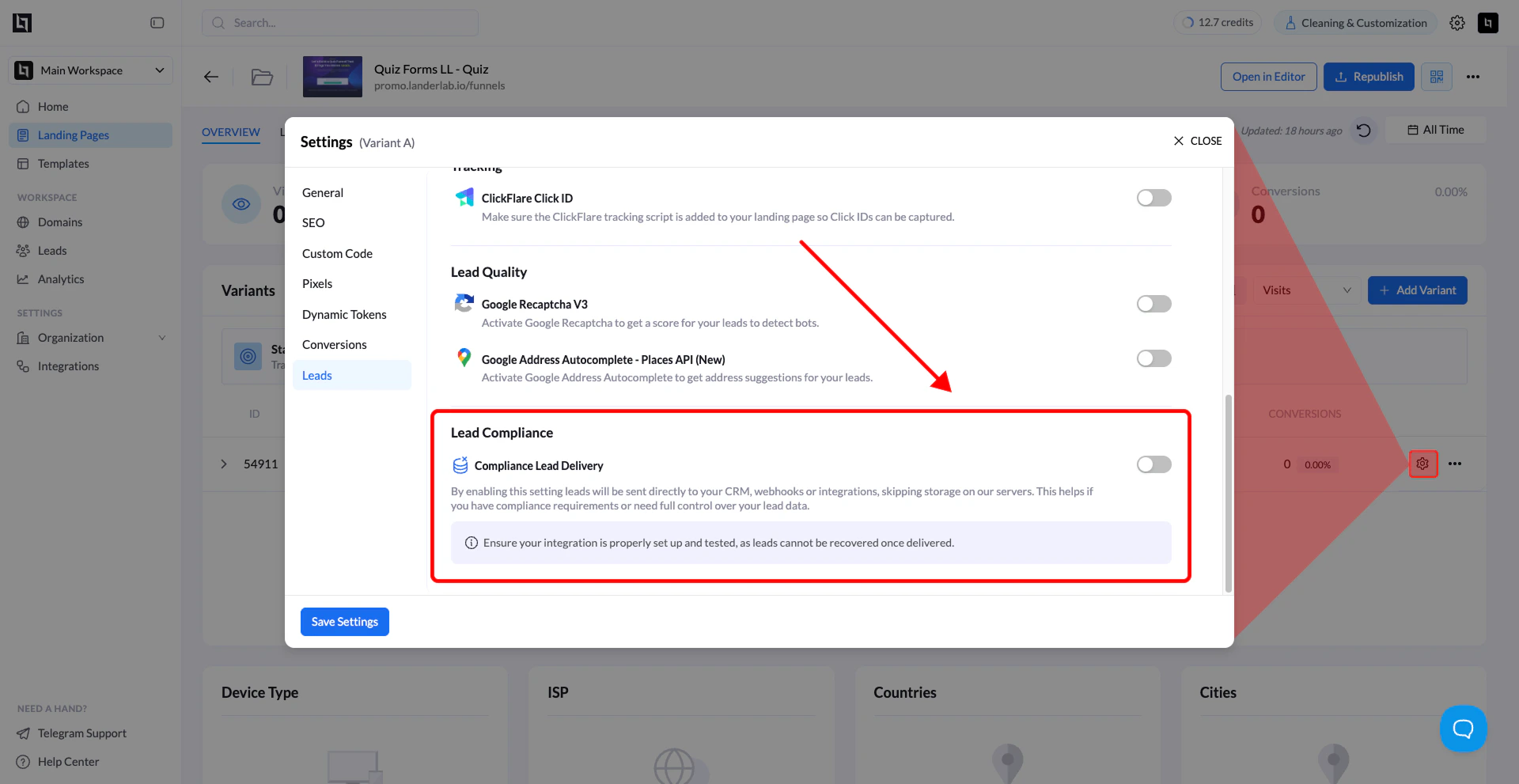 Follow these steps to activate the feature for your landing page.
### 1. Open your landing page
From the **LanderLab dashboard**, go to **Landing Pages** and click the landing page you want to configure.
### 2. Open Settings
Click the **Settings** button to open the landing page settings window.
### 3. Go to the Leads section
In the settings panel, select **Leads** from the left-side menu.
### 4. Enable Lead Compliance Delivery
Scroll to the **Lead Compliance Delivery** section.
Toggle **Lead Compliance Delivery** to **ON**.
### 5. Save your settings
Click **Save Settings** to apply the change.
Once enabled, leads will be **delivered directly to your configured integrations** instead of being stored on LanderLab.
***
## Important Notes
### How it works
* Leads are **sent directly to your configured CRM, webhook, or integration**
* LanderLab **does not store the lead data**
### Compliance benefits
This feature helps ensure that your lead flow aligns with **data privacy regulations and internal compliance policies**.
**Important Warning**
Before enabling Lead Compliance Delivery:
* Make sure your **CRM, webhook, or integration is properly configured**
* Test your lead flow to confirm that leads are received correctly
Leads **cannot be recovered** if the integration fails, because they were **never stored on LanderLab servers**.
Follow these steps to activate the feature for your landing page.
### 1. Open your landing page
From the **LanderLab dashboard**, go to **Landing Pages** and click the landing page you want to configure.
### 2. Open Settings
Click the **Settings** button to open the landing page settings window.
### 3. Go to the Leads section
In the settings panel, select **Leads** from the left-side menu.
### 4. Enable Lead Compliance Delivery
Scroll to the **Lead Compliance Delivery** section.
Toggle **Lead Compliance Delivery** to **ON**.
### 5. Save your settings
Click **Save Settings** to apply the change.
Once enabled, leads will be **delivered directly to your configured integrations** instead of being stored on LanderLab.
***
## Important Notes
### How it works
* Leads are **sent directly to your configured CRM, webhook, or integration**
* LanderLab **does not store the lead data**
### Compliance benefits
This feature helps ensure that your lead flow aligns with **data privacy regulations and internal compliance policies**.
**Important Warning**
Before enabling Lead Compliance Delivery:
* Make sure your **CRM, webhook, or integration is properly configured**
* Test your lead flow to confirm that leads are received correctly
Leads **cannot be recovered** if the integration fails, because they were **never stored on LanderLab servers**.