> ## Documentation Index
> Fetch the complete documentation index at: https://docs.landerlab.io/llms.txt
> Use this file to discover all available pages before exploring further.
# Republish a Landing Page
> Republish landing pages to update the live version with your latest changes and keep your content current and optimized.
Republishing updates the **live version of your landing page** with the latest changes you saved in the editor. This replaces the current live version with the updated one.
 ## Step-by-Step Guide
### 1. Open the landing page overview
From the **Landing Pages** list, click the **title of the page** you want to update.
### 2. Click “Republish”
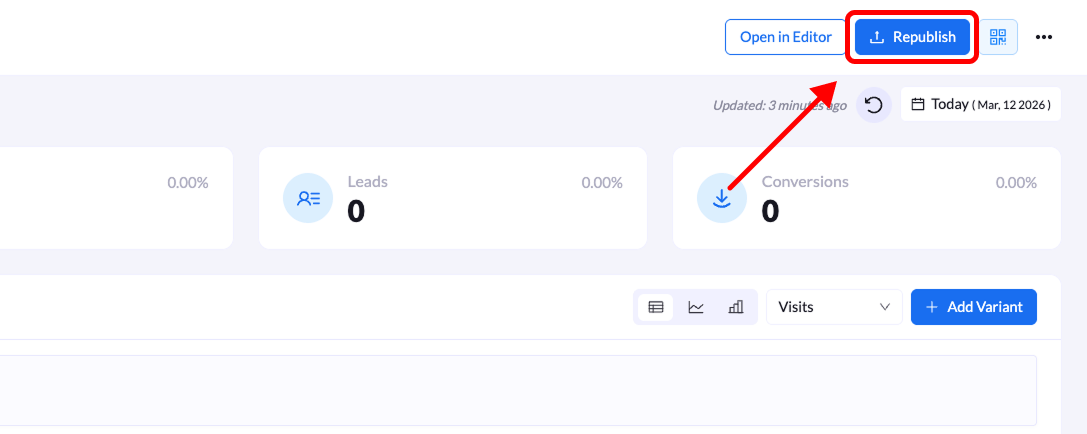
On the **top-right corner** of the overview screen, click the **Republish** button.
If there are unpublished changes, you may see a message indicating **“Unpublished changes.”**
### 3. Review the domain and path
A **Republish Your Landing Page** modal will appear.
The **domain and path fields** will be pre-filled with the current live URL settings.
Review the settings and update the **URL path** if needed.
### 4. Confirm republishing
Click **Republish Landing Page** to finalize the update.
A confirmation message will appear, and your **updated landing page will go live immediately**.
**Tip:** Republishing is required whenever you make changes in the editor and want those updates to appear on the **live version of your landing page**.
## Step-by-Step Guide
### 1. Open the landing page overview
From the **Landing Pages** list, click the **title of the page** you want to update.
### 2. Click “Republish”
On the **top-right corner** of the overview screen, click the **Republish** button.
If there are unpublished changes, you may see a message indicating **“Unpublished changes.”**
### 3. Review the domain and path
A **Republish Your Landing Page** modal will appear.
The **domain and path fields** will be pre-filled with the current live URL settings.
Review the settings and update the **URL path** if needed.
### 4. Confirm republishing
Click **Republish Landing Page** to finalize the update.
A confirmation message will appear, and your **updated landing page will go live immediately**.
**Tip:** Republishing is required whenever you make changes in the editor and want those updates to appear on the **live version of your landing page**.