> ## Documentation Index
> Fetch the complete documentation index at: https://docs.landerlab.io/llms.txt
> Use this file to discover all available pages before exploring further.
# Duplicate a Landing Page
> Duplicate landing pages to quickly create variations, reuse designs, and scale campaigns without rebuilding from scratch.
Duplicating landing pages is a powerful way to **save time and maintain consistency** across your campaigns. Instead of building a page from scratch, you can quickly create a copy of an existing page and modify it as needed.
## Why Duplicate a Landing Page?
Common reasons for duplicating pages include:
* Quickly creating new pages with the **same layout and structure**
* Reusing **design elements and functionality**
* Maintaining **branding and design consistency** across campaigns
* Creating variations of a page for different offers or traffic sources
**Note:** Duplicating a page is **not the same as A/B testing**.\
If you want to test different versions of a landing page, make sure to use the **A/B Test feature** instead.
 ## How to Duplicate a Landing Page
Follow the steps below to duplicate a landing page.
### 1. Go to Landing Pages
From the **left-side menu**, click **Landing Pages**.
### 2. Find the landing page
Locate the landing page you want to duplicate.
### 3. Open the page menu
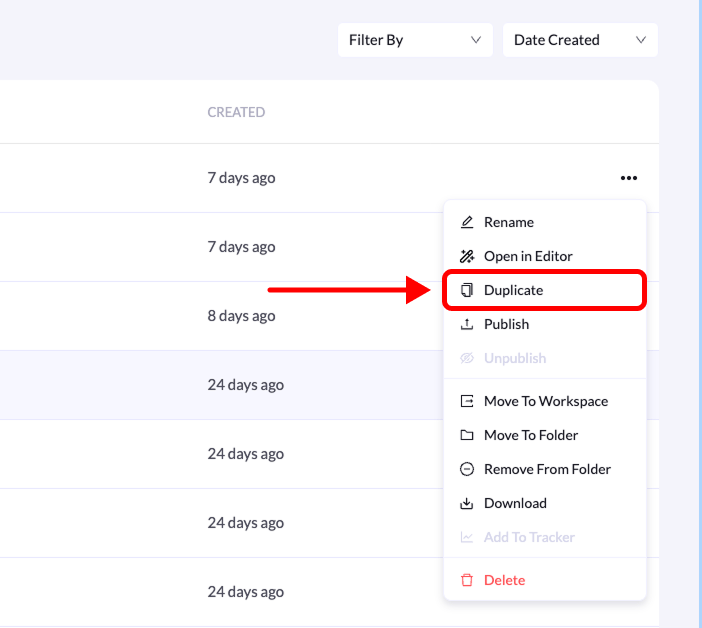
Click the **three-dot menu (•••)** on the right side of the landing page.
### 4. Select Duplicate
Click **Duplicate** from the list of available options.
A copy of the landing page will be created automatically, and you can then edit it as needed.
**Tip:** Duplicating pages is useful when creating **multiple campaign variations or targeting different audiences with similar landing pages**.
## How to Duplicate a Landing Page
Follow the steps below to duplicate a landing page.
### 1. Go to Landing Pages
From the **left-side menu**, click **Landing Pages**.
### 2. Find the landing page
Locate the landing page you want to duplicate.
### 3. Open the page menu
Click the **three-dot menu (•••)** on the right side of the landing page.
### 4. Select Duplicate
Click **Duplicate** from the list of available options.
A copy of the landing page will be created automatically, and you can then edit it as needed.
**Tip:** Duplicating pages is useful when creating **multiple campaign variations or targeting different audiences with similar landing pages**.