> ## Documentation Index
> Fetch the complete documentation index at: https://docs.landerlab.io/llms.txt
> Use this file to discover all available pages before exploring further.
# Download Landing Page as ZIP File
> Download landing pages as ZIP files with all assets included to back up, reuse, or host them on your own server.
LanderLab allows you to **download a complete copy of your landing page**, including all HTML, CSS, JavaScript, and media assets, packaged in a single **.zip file**.
 This is useful if you want to:
* Create a **backup** of your landing page
* **Export your design** for external use
* **Host the page on your own server**
## Step-by-Step Guide
Follow these steps to download your landing page:
### 1. Go to the Landing Pages section
From your **LanderLab dashboard**, navigate to the **Landing Pages** section.
### 2. Find the landing page
Locate the landing page you want to download in your list of pages.
### 3. Open the page menu
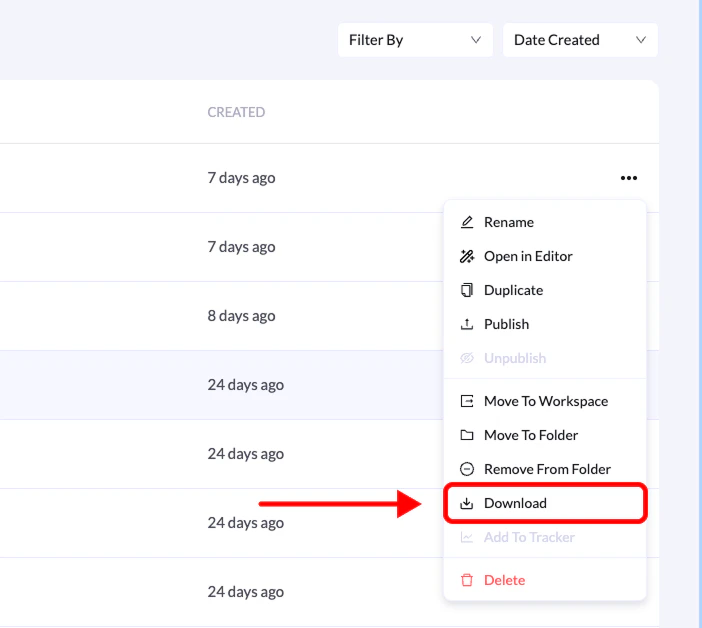
Click the **three-dot menu** on the right side of the landing page.
### 4. Select Download
From the dropdown menu, click **Download**.
### 5. Wait for the export
LanderLab will prepare your landing page for export. Once the process is complete, the **.zip file will download automatically**.
The file will appear in your computer’s **default downloads folder**, usually named after your landing page.
## What’s Included in the Download?
Your exported **.zip file** contains everything needed to host the landing page on any server:
* **HTML file** — the main structure of your landing page
* **CSS files** — styling and layout rules
* **JavaScript files** — page functionality and interactions
* **Images and media assets** — all images, icons, and videos used on the page
You can upload this package to **any hosting provider** or keep it as a **local backup of your landing page**.
This is useful if you want to:
* Create a **backup** of your landing page
* **Export your design** for external use
* **Host the page on your own server**
## Step-by-Step Guide
Follow these steps to download your landing page:
### 1. Go to the Landing Pages section
From your **LanderLab dashboard**, navigate to the **Landing Pages** section.
### 2. Find the landing page
Locate the landing page you want to download in your list of pages.
### 3. Open the page menu
Click the **three-dot menu** on the right side of the landing page.
### 4. Select Download
From the dropdown menu, click **Download**.
### 5. Wait for the export
LanderLab will prepare your landing page for export. Once the process is complete, the **.zip file will download automatically**.
The file will appear in your computer’s **default downloads folder**, usually named after your landing page.
## What’s Included in the Download?
Your exported **.zip file** contains everything needed to host the landing page on any server:
* **HTML file** — the main structure of your landing page
* **CSS files** — styling and layout rules
* **JavaScript files** — page functionality and interactions
* **Images and media assets** — all images, icons, and videos used on the page
You can upload this package to **any hosting provider** or keep it as a **local backup of your landing page**.