> ## Documentation Index
> Fetch the complete documentation index at: https://docs.landerlab.io/llms.txt
> Use this file to discover all available pages before exploring further.
# Remove Landing Pages from Folders
> Remove landing pages from folders to reorganize your workspace and manage pages more flexibly across campaigns.
You can remove a landing page from a folder at any time. This is useful if you want to reorganize your pages or move them back to the main landing pages list.
Follow the steps below to remove a landing page from a folder.
 ## Step-by-Step Guide
### 1. Go to Landing Pages
From the **left-side menu**, click **Landing Pages**.
### 2. Open the folder
Locate the folder that contains the landing page and click on it.
### 3. Find the landing page
Inside the folder, locate the landing page you want to remove.
### 4. Open the page menu
Click the **three-dot menu (•••)** on the right side of the landing page.
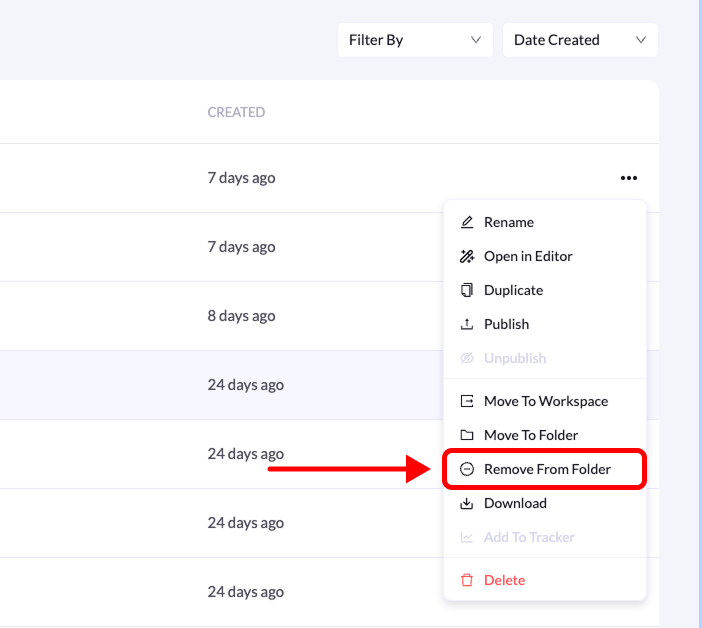
### 5. Select “Remove from Folder”
From the available options, click **Remove from Folder**.
Once removed, the landing page will be **moved back to the main landing pages list**.
## Step-by-Step Guide
### 1. Go to Landing Pages
From the **left-side menu**, click **Landing Pages**.
### 2. Open the folder
Locate the folder that contains the landing page and click on it.
### 3. Find the landing page
Inside the folder, locate the landing page you want to remove.
### 4. Open the page menu
Click the **three-dot menu (•••)** on the right side of the landing page.
### 5. Select “Remove from Folder”
From the available options, click **Remove from Folder**.
Once removed, the landing page will be **moved back to the main landing pages list**.