> ## Documentation Index
> Fetch the complete documentation index at: https://docs.landerlab.io/llms.txt
> Use this file to discover all available pages before exploring further.
# Use Animations to Enhance Engagement
> Add animations to highlight elements, guide user attention, and create more engaging and interactive landing page experiences.
Animations let you add movement to your elements to make your page more engaging and interactive. They help draw attention, guide users, and improve the overall experience.
***
## Where to Find It
1. Select any element (button, image, text, etc.)
2. Go to the **right panel**
3. Open the **Animation** section
4. Click **+ Add** or edit an existing animation
***
## Choosing an Animation
Inside the animation panel, you’ll find a large library of animations.
* You can **scroll** to explore all available options
* You can use the **search bar** to quickly find a specific animation
Animations are also organized into **categories**, such as:
* Attention Seekers
* Entrances
👉 This makes it easier to find the right type of animation depending on your goal
***
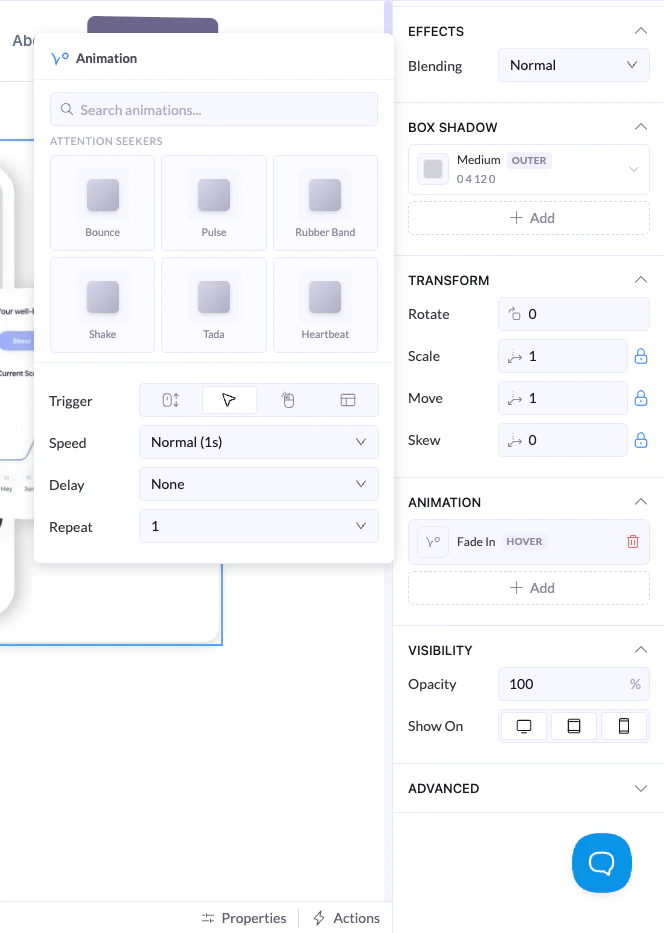 ## Animation Settings
### Trigger
Defines when the animation happens:
* **On Load** → plays when the element appears
* **On Hover** → plays when the user hovers over it
* **On Click** → plays when clicked
* **On Viewport** → plays continuously (if supported)
***
### Speed
* Controls how fast the animation runs
***
### Delay
* Adds a pause before the animation starts
***
### Repeat
* Controls how many times the animation plays
***
## Example
* Animation: Fade In
* Trigger: On Load
* Speed: Normal
* Delay: 0.3s
* Repeat: 1
👉 Result: element smoothly appears when the page loads
***
## Best Practices
* Keep animations subtle and purposeful
* Avoid using too many animations at once
* Use entrances to introduce elements smoothly
* Use attention animations only where needed
## Animation Settings
### Trigger
Defines when the animation happens:
* **On Load** → plays when the element appears
* **On Hover** → plays when the user hovers over it
* **On Click** → plays when clicked
* **On Viewport** → plays continuously (if supported)
***
### Speed
* Controls how fast the animation runs
***
### Delay
* Adds a pause before the animation starts
***
### Repeat
* Controls how many times the animation plays
***
## Example
* Animation: Fade In
* Trigger: On Load
* Speed: Normal
* Delay: 0.3s
* Repeat: 1
👉 Result: element smoothly appears when the page loads
***
## Best Practices
* Keep animations subtle and purposeful
* Avoid using too many animations at once
* Use entrances to introduce elements smoothly
* Use attention animations only where needed