> ## Documentation Index
> Fetch the complete documentation index at: https://docs.landerlab.io/llms.txt
> Use this file to discover all available pages before exploring further.
# Control Popups with the Popup API
> Open, close, and toggle LanderLab popups from buttons, links, and custom code. Full reference for the JavaScript API and the no-code opener/closer links.
The Popup API lets you control any popup with code instead of relying only on the built-in triggers (page load, delay, scroll, exit intent). Call `window.llPopupsApi` from a Custom Code element or any script to open a popup from a button, close it after a form is submitted, or wire popups into your own integrations.
**Use the popup's ID, not its name.** Everything in the API targets a popup by its `id`. The popup **name** (the human-readable label you see in the editor) is only metadata for analytics and display - it is never used for targeting. If you target by name, nothing will happen.
***
## Step 1 - Prepare the popup
Before you can control a popup with code, set it up so it doesn't fight your triggers, and give it an ID you can reference.
In the **Popup** tab of the right sidebar, set the **Trigger** to **Manual** (button-only). The popup will never auto-open - it appears only when your link or script opens it.
You don't *have* to use Manual. The API works on any popup regardless of its trigger. Manual just guarantees the popup stays closed until you open it yourself.
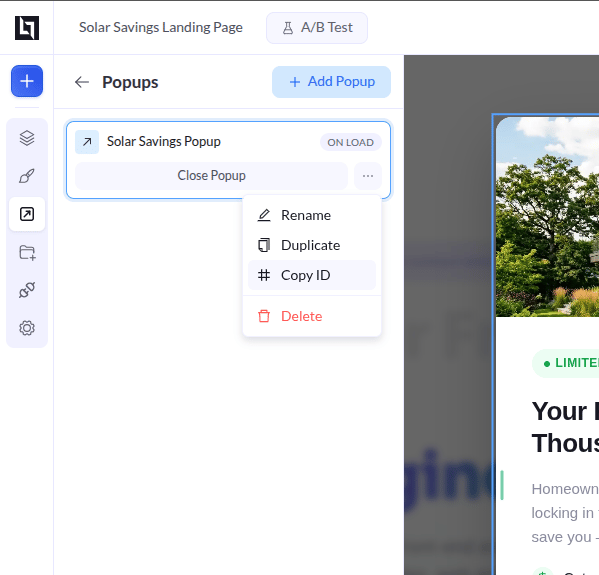
Every popup already has a unique ID. To find it, open the **Popups** panel in the left sidebar, click the **three dots (actions)** next to your popup, and choose **Copy ID**. Paste that value wherever the API asks for the popup ID.
 ***
## The JavaScript API (`window.llPopupsApi`)
Call the global `window.llPopupsApi` object to open, close, or toggle a popup - on a custom event, after a delay you control, or from another script. Drop the code into a **Custom Code** element on your page.
```javascript theme={null}
// Open a specific popup
window.llPopupsApi.open('promo-popup-id');
```
### Targeting: ID is optional
Every method takes an **optional** popup ID:
* **Pass an ID** → the action affects that one popup.
* **Omit the ID** → the action affects **every popup** on the page.
```javascript theme={null}
window.llPopupsApi.close('promo-popup-id'); // close one popup
window.llPopupsApi.close(); // close all popups on the page
```
### Methods
| Method | What it does |
| -------------- | ------------------------------------------------------------------------------------------------------------------------------------------------------------------------------- |
| `open(id?)` | Force-opens the popup. Reopens it even if the visitor dismissed it earlier in the session (your explicit call wins). |
| `close(id?)` | Closes the popup with its animation. Does **not** set the "stay dismissed" cookie - the popup can be triggered again. |
| `dismiss(id?)` | Closes the popup **and** locks it: sets the 30-day cookie if **Stay Dismissed** is on, or the session flag if **Show Once** is on. This is what the built-in close button does. |
| `toggle(id?)` | Opens the popup if it's closed, closes it if it's open. (Opening via toggle force-opens, same as `open`.) |
| `get(id?)` | Returns the popup's HTML element when you pass an ID (or `null` if not found), or an array of all popup elements when you omit the ID. |
**`close` vs `dismiss`.** `close()` is a temporary close - auto-triggers like exit-intent can still fire again. `dismiss()` is permanent for the session (and up to 30 days with **Stay Dismissed**). Use `close()` for "maybe later", `dismiss()` for "don't show this again".
### Examples
```javascript Open from a button theme={null}
// Wait until the page is ready before wiring things up.
// DOMContentLoaded guarantees both your button and llPopupsApi exist.
document.addEventListener('DOMContentLoaded', function () {
const button = document.getElementById('my-button');
button.addEventListener('click', function () {
window.llPopupsApi.open('promo-popup-id');
});
});
```
```javascript Close after a delay theme={null}
// Auto-close the popup 5 seconds after it opens
window.llPopupsApi.open('promo-popup-id');
setTimeout(function () {
window.llPopupsApi.close('promo-popup-id');
}, 5000);
```
```javascript Toggle / close all theme={null}
// Toggle a single popup
window.llPopupsApi.toggle('promo-popup-id');
// Close every popup on the page at once
window.llPopupsApi.close();
```
```javascript Get a popup element theme={null}
// Pass an ID to get one element (or null if not found)
const popup = window.llPopupsApi.get('promo-popup-id');
// Omit the ID to get an array of every popup on the page
const allPopups = window.llPopupsApi.get();
```
***
## Good to know
* **Run your code after the page is ready.** `window.llPopupsApi` only exists once the popup script has loaded. Wrap your calls in a `DOMContentLoaded` listener — like the **Open from a button** example above — so the API is available before you call it.
* **Preview mode.** On preview URLs, the "Stay Dismissed" cookie and "Show Once" flag are never read or written, so the popup always appears while you're testing.
* **ESC to close.** If **Close on ESC** is enabled for the popup, pressing Esc closes the topmost open popup - no code needed.
* **Open wins over dismissal.** Calling `open()` reopens a popup even after a visitor dismissed it, but the popup's own auto-triggers still respect the dismissal. Use `dismiss()` if you want to re-lock it.
***
## The JavaScript API (`window.llPopupsApi`)
Call the global `window.llPopupsApi` object to open, close, or toggle a popup - on a custom event, after a delay you control, or from another script. Drop the code into a **Custom Code** element on your page.
```javascript theme={null}
// Open a specific popup
window.llPopupsApi.open('promo-popup-id');
```
### Targeting: ID is optional
Every method takes an **optional** popup ID:
* **Pass an ID** → the action affects that one popup.
* **Omit the ID** → the action affects **every popup** on the page.
```javascript theme={null}
window.llPopupsApi.close('promo-popup-id'); // close one popup
window.llPopupsApi.close(); // close all popups on the page
```
### Methods
| Method | What it does |
| -------------- | ------------------------------------------------------------------------------------------------------------------------------------------------------------------------------- |
| `open(id?)` | Force-opens the popup. Reopens it even if the visitor dismissed it earlier in the session (your explicit call wins). |
| `close(id?)` | Closes the popup with its animation. Does **not** set the "stay dismissed" cookie - the popup can be triggered again. |
| `dismiss(id?)` | Closes the popup **and** locks it: sets the 30-day cookie if **Stay Dismissed** is on, or the session flag if **Show Once** is on. This is what the built-in close button does. |
| `toggle(id?)` | Opens the popup if it's closed, closes it if it's open. (Opening via toggle force-opens, same as `open`.) |
| `get(id?)` | Returns the popup's HTML element when you pass an ID (or `null` if not found), or an array of all popup elements when you omit the ID. |
**`close` vs `dismiss`.** `close()` is a temporary close - auto-triggers like exit-intent can still fire again. `dismiss()` is permanent for the session (and up to 30 days with **Stay Dismissed**). Use `close()` for "maybe later", `dismiss()` for "don't show this again".
### Examples
```javascript Open from a button theme={null}
// Wait until the page is ready before wiring things up.
// DOMContentLoaded guarantees both your button and llPopupsApi exist.
document.addEventListener('DOMContentLoaded', function () {
const button = document.getElementById('my-button');
button.addEventListener('click', function () {
window.llPopupsApi.open('promo-popup-id');
});
});
```
```javascript Close after a delay theme={null}
// Auto-close the popup 5 seconds after it opens
window.llPopupsApi.open('promo-popup-id');
setTimeout(function () {
window.llPopupsApi.close('promo-popup-id');
}, 5000);
```
```javascript Toggle / close all theme={null}
// Toggle a single popup
window.llPopupsApi.toggle('promo-popup-id');
// Close every popup on the page at once
window.llPopupsApi.close();
```
```javascript Get a popup element theme={null}
// Pass an ID to get one element (or null if not found)
const popup = window.llPopupsApi.get('promo-popup-id');
// Omit the ID to get an array of every popup on the page
const allPopups = window.llPopupsApi.get();
```
***
## Good to know
* **Run your code after the page is ready.** `window.llPopupsApi` only exists once the popup script has loaded. Wrap your calls in a `DOMContentLoaded` listener — like the **Open from a button** example above — so the API is available before you call it.
* **Preview mode.** On preview URLs, the "Stay Dismissed" cookie and "Show Once" flag are never read or written, so the popup always appears while you're testing.
* **ESC to close.** If **Close on ESC** is enabled for the popup, pressing Esc closes the topmost open popup - no code needed.
* **Open wins over dismissal.** Calling `open()` reopens a popup even after a visitor dismissed it, but the popup's own auto-triggers still respect the dismissal. Use `dismiss()` if you want to re-lock it.