> ## Documentation Index
> Fetch the complete documentation index at: https://docs.landerlab.io/llms.txt
> Use this file to discover all available pages before exploring further.
# How to Save and Reuse Components in LanderLab
> Learn how to save sections as reusable components in LanderLab to speed up your workflow, maintain consistency, and build landing pages faster.
The Save as Component feature allows you to save parts of your page and reuse them across other landing pages. This helps you build faster and keep your designs consistent.
***
## How to Save a Component
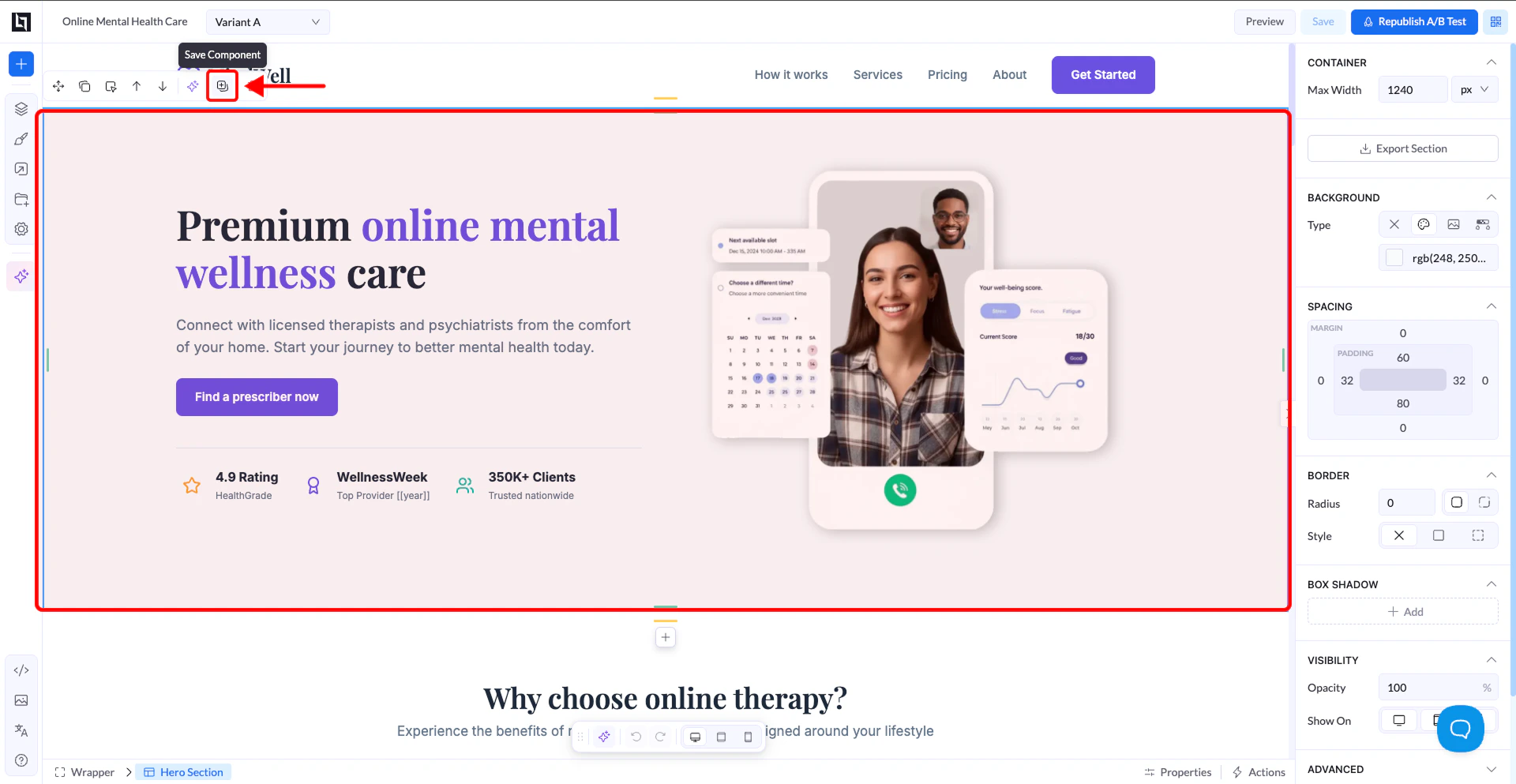
1. Select the element you want to save (usually a **section or box**)
2. Right-click on it or use the toolbar that appears on hover
3. Click **Save as Component**
4. Enter a name and save
 ***
## Where to Find Saved Components
1. Open the left sidebar
2. Click the **+ (Add Elements)** button
3. Go to the **Sections tab**
4. Go to **My Sections**
***
## Where to Find Saved Components
1. Open the left sidebar
2. Click the **+ (Add Elements)** button
3. Go to the **Sections tab**
4. Go to **My Sections**
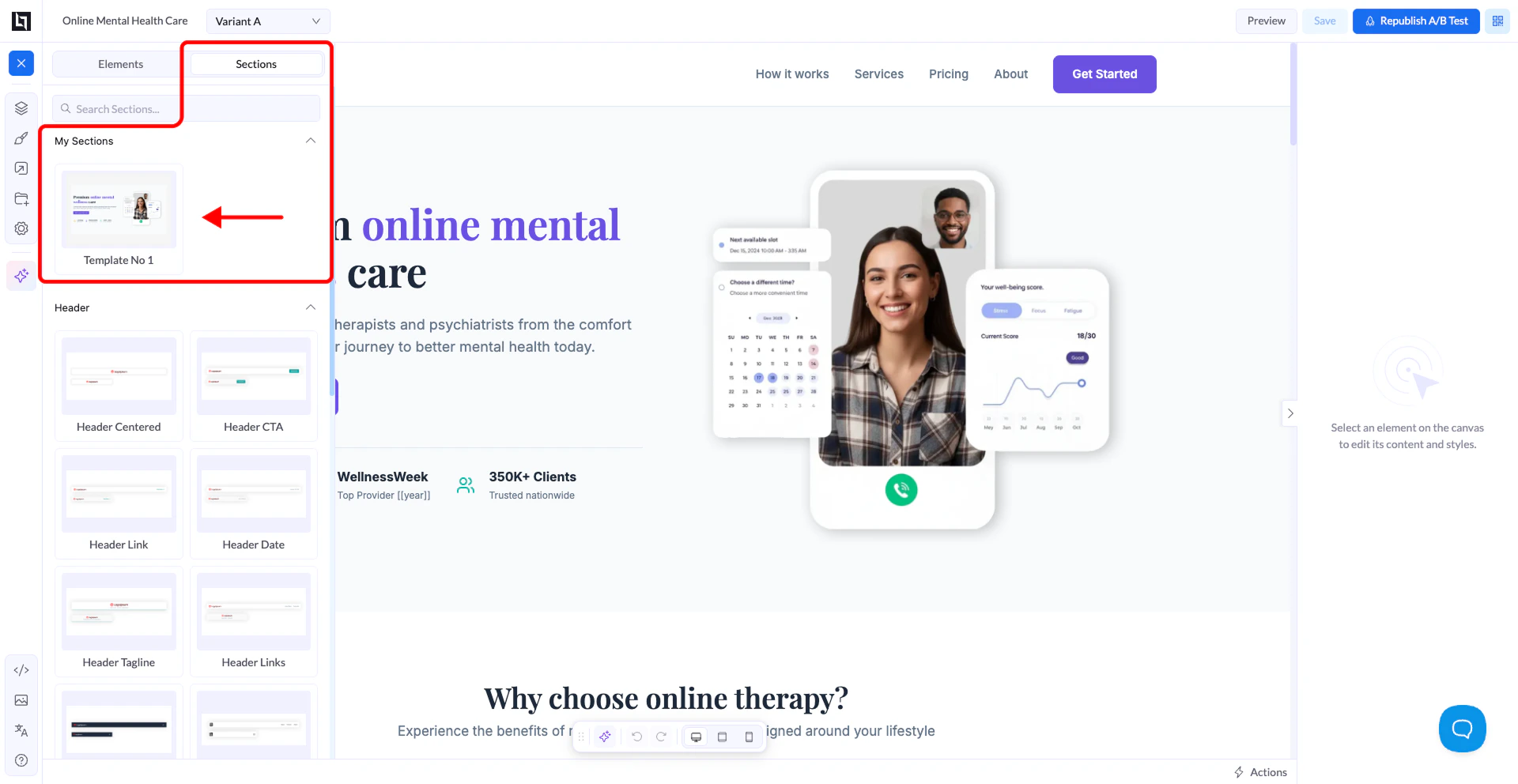 👉 All your saved components will appear there
***
## How It Works
Saved components include:
* Layout
* Styles
* Content
* Links
You can drag and drop them into any page.\
They act as reusable building blocks for faster page creation.
***
## Important Notes
Changes made to one instance **do not update others**
Each saved component is independent after being added
This feature is mainly for **design reuse**, not syncing content across pages
***
## When to Use It
* Reusing hero sections
* Reusing CTA blocks
* Reusing layouts across campaigns
* Speeding up page creation
***
## Warning (Imported Pages)
If you save components from pages imported via URL:
* The structure may not be clean
* This can sometimes cause layout issues when reused
👉 Always check and clean imported sections before saving them
***
## Best Practice
* Save clean, well-structured sections
* Use clear names for easy reuse
* Treat saved components as templates, not synced components
Tip: Build your own library of reusable components to speed up campaign launches.
👉 All your saved components will appear there
***
## How It Works
Saved components include:
* Layout
* Styles
* Content
* Links
You can drag and drop them into any page.\
They act as reusable building blocks for faster page creation.
***
## Important Notes
Changes made to one instance **do not update others**
Each saved component is independent after being added
This feature is mainly for **design reuse**, not syncing content across pages
***
## When to Use It
* Reusing hero sections
* Reusing CTA blocks
* Reusing layouts across campaigns
* Speeding up page creation
***
## Warning (Imported Pages)
If you save components from pages imported via URL:
* The structure may not be clean
* This can sometimes cause layout issues when reused
👉 Always check and clean imported sections before saving them
***
## Best Practice
* Save clean, well-structured sections
* Use clear names for easy reuse
* Treat saved components as templates, not synced components
Tip: Build your own library of reusable components to speed up campaign launches.