> ## Documentation Index
> Fetch the complete documentation index at: https://docs.landerlab.io/llms.txt
> Use this file to discover all available pages before exploring further.
# Add and Embed Videos in Landing Pages
> Embed videos from YouTube, Vimeo, or other platforms to enhance engagement and deliver content directly on your landing pages.
The Video element allows you to embed content from external hosts directly onto your canvas. Its built-in auto-detection engine identifies your video provider the moment you paste a link, saving you from manual configuration.
## Add the Video Element
**Locate the Element:** Open the **Elements Sidebar** (the “+” icon) on the left side of the editor.
**Drag & Drop:** Find the **Video** element under the **Content** category and drag it onto your desired section on the canvas.
## Connect Your Video
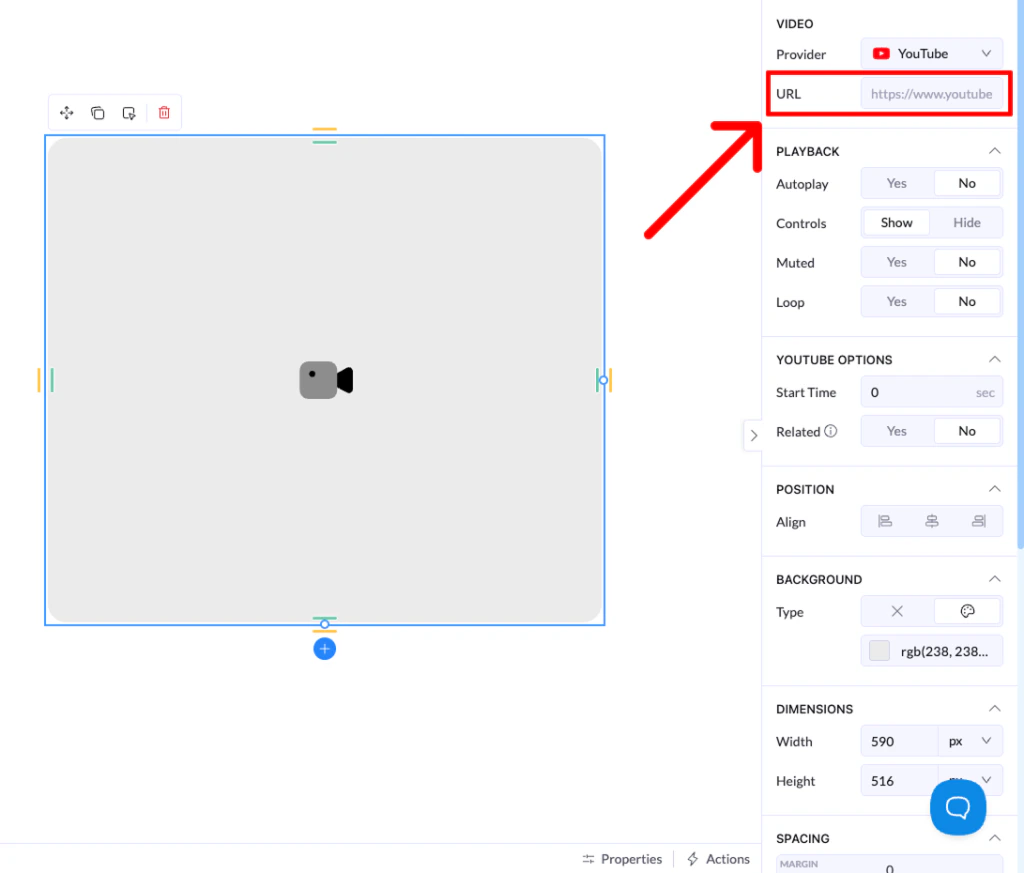
1. **Access Settings:** Click on the Video element on your canvas to open the **Properties** panel on the right.
2. **Paste the URL:** Paste your video link into the **URL** field.
3. **Auto-Identification:** Landerlab will immediately identify the source (e.g., YouTube, Vimeo, Wistia) and update the player settings accordingly
 ## Supported Video Players
* **YouTube:** Ideal for general content and ease of use.
* **Vimeo / Wistia:** Perfect for premium, ad-free video experiences.
* **Loom:** Great for quick explainers or personalized messages.
* **HTML Video:** Use this if you are hosting your own `.mp4` files.
## Key Video Controls
Once your video is connected, you can use the **Playback** settings to customize the user experience:
* **Autoplay:** Set the video to start as soon as the page loads (Note: Most browsers require autoplay videos to be **Muted** by default).
* **Controls:** Toggle whether the visitor can see the play/pause bar and volume settings.
* **Loop:** Set the video to restart automatically once it reaches the end.
* **Start Time:** (For YouTube) Specify exactly which second the video should begin playing.
## Supported Video Players
* **YouTube:** Ideal for general content and ease of use.
* **Vimeo / Wistia:** Perfect for premium, ad-free video experiences.
* **Loom:** Great for quick explainers or personalized messages.
* **HTML Video:** Use this if you are hosting your own `.mp4` files.
## Key Video Controls
Once your video is connected, you can use the **Playback** settings to customize the user experience:
* **Autoplay:** Set the video to start as soon as the page loads (Note: Most browsers require autoplay videos to be **Muted** by default).
* **Controls:** Toggle whether the visitor can see the play/pause bar and volume settings.
* **Loop:** Set the video to restart automatically once it reaches the end.
* **Start Time:** (For YouTube) Specify exactly which second the video should begin playing.