> ## Documentation Index
> Fetch the complete documentation index at: https://docs.landerlab.io/llms.txt
> Use this file to discover all available pages before exploring further.
# Use Accordion for FAQs and Structured Content
> Use accordion elements to organize FAQs and content into expandable sections for a cleaner and more user-friendly layout.
The Accordion element lets you display content in expandable sections.\
It’s commonly used for FAQs or structured information where you want to keep the page clean and organized.
## How to Add an Accordion
* Open the left sidebar
* Drag **Collapse / Accordion** onto the canvas
***
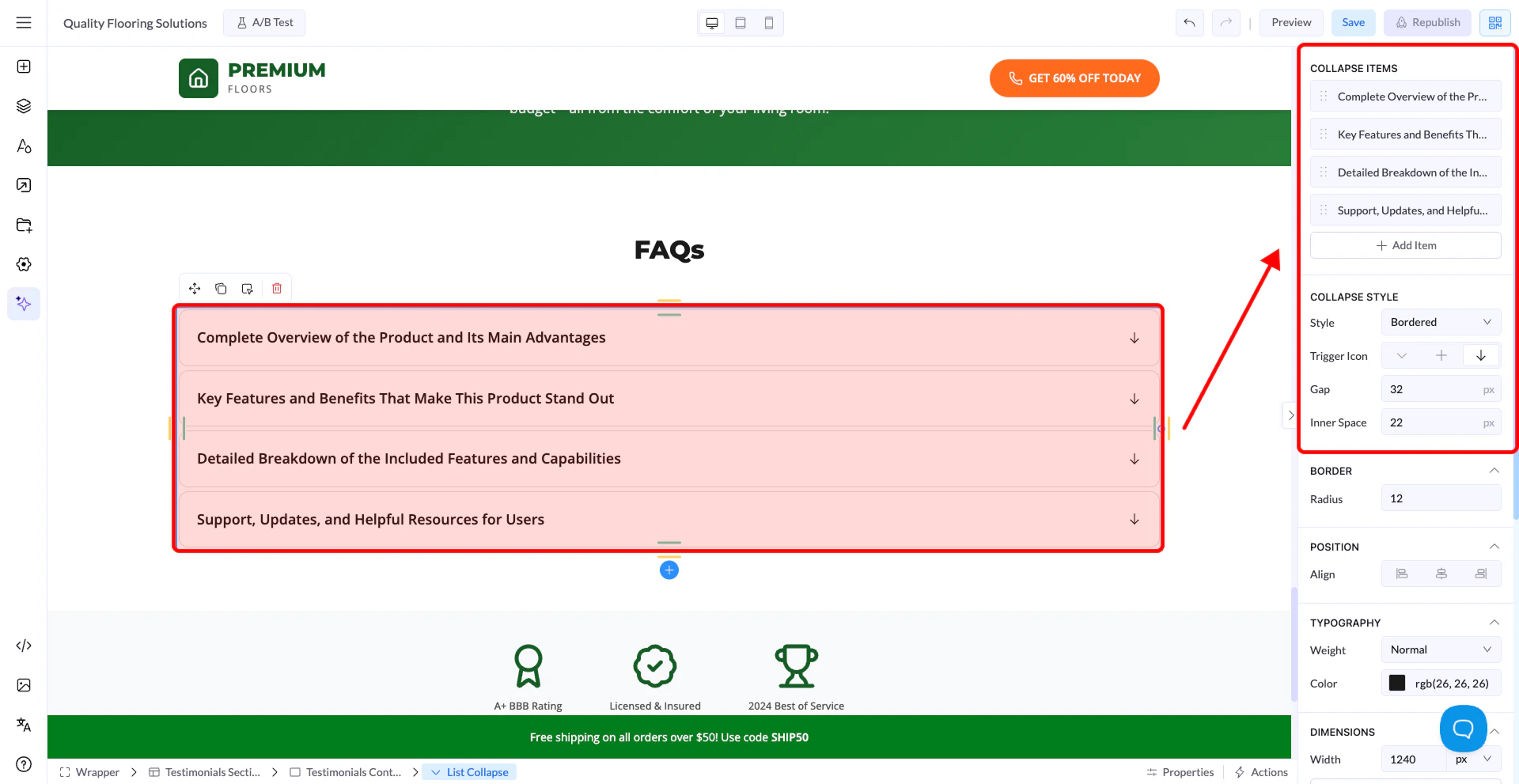 ## Editing Content
All content is edited directly on the canvas:
* Click on the **question** to edit the title
* Click on the **answer area** to edit the content
This is where you manage both the question and the answer.
## Managing Items
From the right panel:
* **Add Item** → Create new accordion entries
* Reorder items by dragging them
* Each item represents one question + answer
## How It Works
* Only **one item can be open at a time**
* Clicking another item will automatically close the previous one
## Collapse Style
You can change how the accordion looks using **Collapse Style**:
* **Simple** → Minimal design
* **Bordered** → Adds borders around items
* **Line Bottom** → Separator lines between items
* **Solid** → Filled background style
## Trigger Icon
* Choose the icon style (e.g. +, arrow)
* Indicates whether the item is open or closed
## Spacing Controls
* **Gap** → Space between items
* **Inner Space** → Padding inside each item
***
## Styling Options
Like other elements, you can also customize:
* Typography
* Colors
* Borders and radius
* Spacing
* Background
***
## Important Notes
* Content is edited directly on the canvas
* Only one accordion item stays open at a time
* Styling works the same as other elements
## Editing Content
All content is edited directly on the canvas:
* Click on the **question** to edit the title
* Click on the **answer area** to edit the content
This is where you manage both the question and the answer.
## Managing Items
From the right panel:
* **Add Item** → Create new accordion entries
* Reorder items by dragging them
* Each item represents one question + answer
## How It Works
* Only **one item can be open at a time**
* Clicking another item will automatically close the previous one
## Collapse Style
You can change how the accordion looks using **Collapse Style**:
* **Simple** → Minimal design
* **Bordered** → Adds borders around items
* **Line Bottom** → Separator lines between items
* **Solid** → Filled background style
## Trigger Icon
* Choose the icon style (e.g. +, arrow)
* Indicates whether the item is open or closed
## Spacing Controls
* **Gap** → Space between items
* **Inner Space** → Padding inside each item
***
## Styling Options
Like other elements, you can also customize:
* Typography
* Colors
* Borders and radius
* Spacing
* Background
***
## Important Notes
* Content is edited directly on the canvas
* Only one accordion item stays open at a time
* Styling works the same as other elements