> ## Documentation Index
> Fetch the complete documentation index at: https://docs.landerlab.io/llms.txt
> Use this file to discover all available pages before exploring further.
# Disable Indexing in LanderLab
> Learn how to prevent search engines from indexing all pages published under a specific domain in LanderLab.
When you disable indexing for a domain, search engines like Google will not crawl or index any pages published under that domain. This is useful for staging environments, internal pages, or any domain you want to keep out of search results.
 ## What Does Disabling Indexing Do?
Disabling indexing adds a `noindex` directive to all pages under the selected domain. This tells search engines not to include those pages in their index. The setting applies to every page published under that domain, not just individual pages.
If you only want to hide a single page from search engines, manage that at the page level instead of the domain level.
## How to Disable Indexing
1. Go to **Settings** in your LanderLab account.
2. Click on **Domains**.
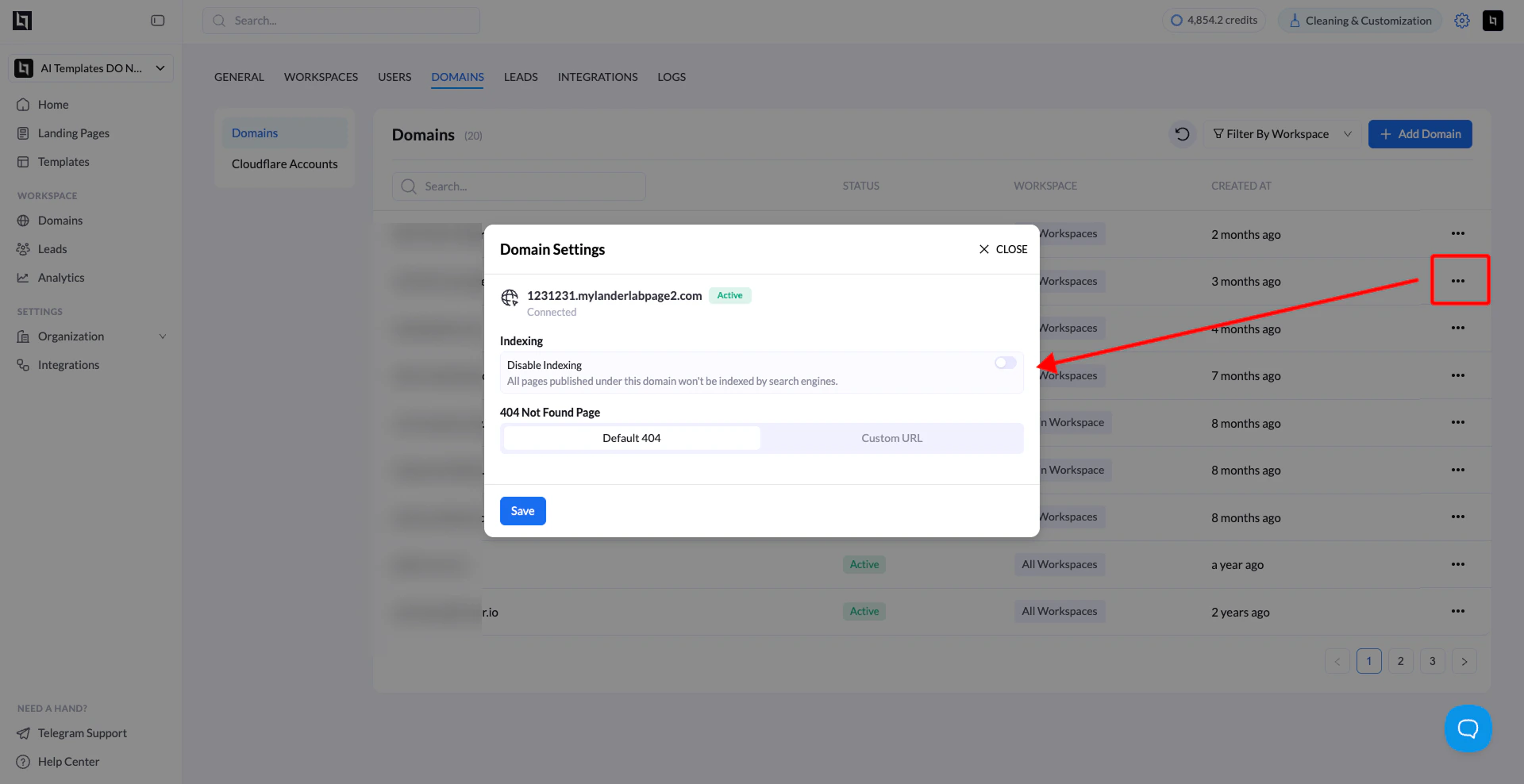
3. Find the domain you want to configure and click the three-dot menu (**...**) on the right.
4. Select **Settings**.
5. In the **Domain Settings** panel, find the **Indexing** section.
6. Toggle on **Disable Indexing**.
7. Click **Save**. Once saved, all pages under that domain will no longer be indexed by search engines.
## How to Re-enable Indexing
To allow search engines to index your pages again, follow the same steps above and toggle off **Disable Indexing**, then click **Save**.
Changes to indexing settings may take time to reflect in search engines, depending on how frequently they crawl your domain.
## When Should You Use This?
* You are testing a domain and do not want it to appear in search results yet.
* You are running campaigns on pages that are meant for paid traffic only, not organic search.
* You want to keep a domain private from the public web index.
## What Does Disabling Indexing Do?
Disabling indexing adds a `noindex` directive to all pages under the selected domain. This tells search engines not to include those pages in their index. The setting applies to every page published under that domain, not just individual pages.
If you only want to hide a single page from search engines, manage that at the page level instead of the domain level.
## How to Disable Indexing
1. Go to **Settings** in your LanderLab account.
2. Click on **Domains**.
3. Find the domain you want to configure and click the three-dot menu (**...**) on the right.
4. Select **Settings**.
5. In the **Domain Settings** panel, find the **Indexing** section.
6. Toggle on **Disable Indexing**.
7. Click **Save**. Once saved, all pages under that domain will no longer be indexed by search engines.
## How to Re-enable Indexing
To allow search engines to index your pages again, follow the same steps above and toggle off **Disable Indexing**, then click **Save**.
Changes to indexing settings may take time to reflect in search engines, depending on how frequently they crawl your domain.
## When Should You Use This?
* You are testing a domain and do not want it to appear in search results yet.
* You are running campaigns on pages that are meant for paid traffic only, not organic search.
* You want to keep a domain private from the public web index.