> ## Documentation Index
> Fetch the complete documentation index at: https://docs.landerlab.io/llms.txt
> Use this file to discover all available pages before exploring further.
# Personalize 404 Not Found Page
> Learn how to configure the 404 Not Found page for your domain in LanderLab, using either the default page or a custom URL.
When a visitor lands on a URL that does not exist under your domain, LanderLab shows a 404 Not Found page. You can choose between the default LanderLab 404 page or redirect visitors to a custom URL with a fully designed page of your own.
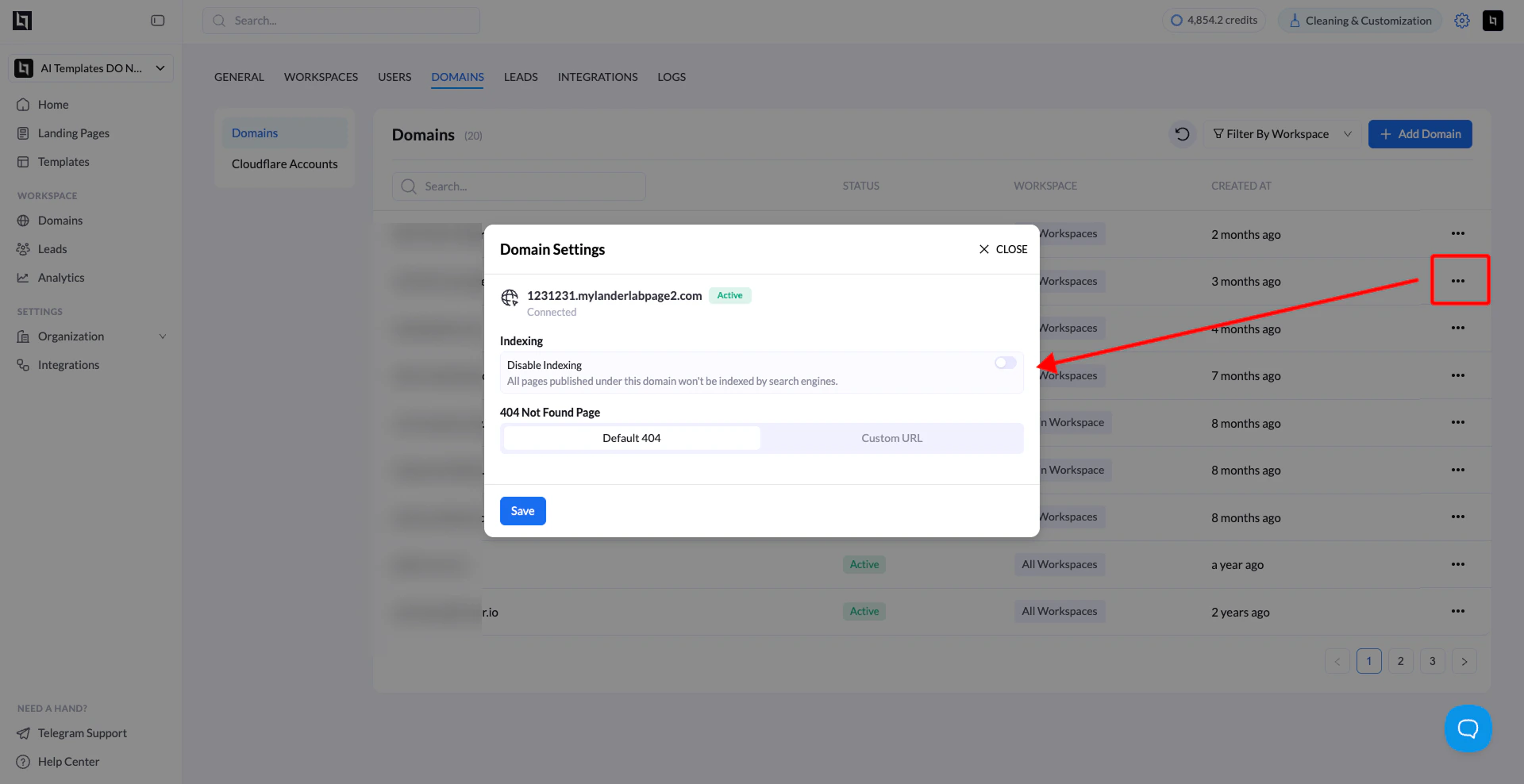 ## Available Options
### Default 404
The default option shows the standard LanderLab 404 page. This is enabled by default and requires no additional setup.
### Custom URL
If you have a custom 404 page already designed and hosted, you can point your domain to that URL instead. When a visitor hits a broken or missing URL, they will be redirected to your custom 404 page.
This is a good option if you want to match your brand, offer navigation options, or recover potential leads who land on a dead page.
## How to Configure Your 404 Page
1. Go to **Settings** in your LanderLab account.
2. Click on **Domains**.
3. Find the domain you want to configure and click the three-dot menu (**...**) on the right.
4. Select **Settings**.
5. In the **Domain Settings** panel, scroll to the **404 Not Found Page** section.
6. Select either **Default 404** or **Custom URL**.
7. If you selected **Custom URL**, enter the full URL of your 404 page.
8. Click **Save**.
Your custom 404 page must be a publicly accessible URL. LanderLab will redirect visitors to that URL when they hit a page that does not exist under your domain.
## Tips for a Good Custom 404 Page
* Keep the design consistent with your brand.
* Add a clear call to action, such as a link back to your main landing page.
* If you are running lead generation campaigns, consider including an opt-in form on the 404 page to recover lost visitors.
## Available Options
### Default 404
The default option shows the standard LanderLab 404 page. This is enabled by default and requires no additional setup.
### Custom URL
If you have a custom 404 page already designed and hosted, you can point your domain to that URL instead. When a visitor hits a broken or missing URL, they will be redirected to your custom 404 page.
This is a good option if you want to match your brand, offer navigation options, or recover potential leads who land on a dead page.
## How to Configure Your 404 Page
1. Go to **Settings** in your LanderLab account.
2. Click on **Domains**.
3. Find the domain you want to configure and click the three-dot menu (**...**) on the right.
4. Select **Settings**.
5. In the **Domain Settings** panel, scroll to the **404 Not Found Page** section.
6. Select either **Default 404** or **Custom URL**.
7. If you selected **Custom URL**, enter the full URL of your 404 page.
8. Click **Save**.
Your custom 404 page must be a publicly accessible URL. LanderLab will redirect visitors to that URL when they hit a page that does not exist under your domain.
## Tips for a Good Custom 404 Page
* Keep the design consistent with your brand.
* Add a clear call to action, such as a link back to your main landing page.
* If you are running lead generation campaigns, consider including an opt-in form on the 404 page to recover lost visitors.