> ## Documentation Index
> Fetch the complete documentation index at: https://docs.landerlab.io/llms.txt
> Use this file to discover all available pages before exploring further.
# Landing Page Analytics and Performance Metrics
> Analyze landing page performance with metrics like views, clicks, leads, and conversions to optimize campaigns and improve results.
The **Landing Page Analytics** section provides detailed insights into how your landing pages are performing. These analytics help you understand visitor behavior, measure conversions, and identify opportunities to optimize your campaigns.
By analyzing this data, you can make informed decisions to improve **engagement, lead generation, and overall campaign performance**.
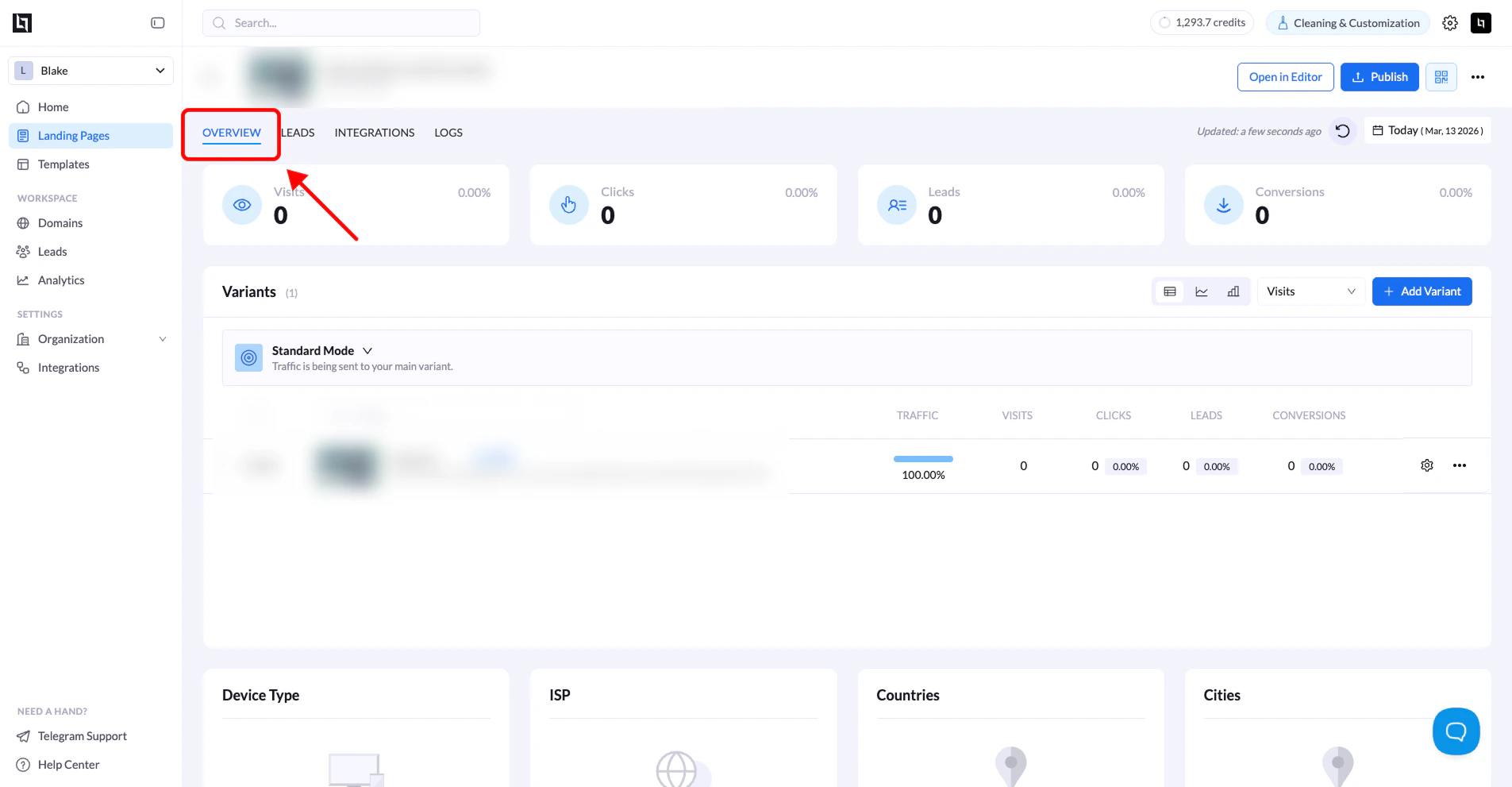 ## How to Access Landing Page Analytics
Follow the steps below to view the analytics for a specific landing page.
### 1. Go to Landing Pages
Navigate to your **workspace dashboard** where your landing pages are listed.
### 2. Select the landing page
Locate the landing page you want to analyze and click its **name**.
### 3. Open the Overview tab
Once the landing page overview opens, make sure you are on the **Overview** tab.\
This is where the analytics data is displayed.
### 4. Select a date range
Click the **date range selector** in the top-right corner of the page.
Choose the time period you want to analyze.
### 5. Analyze the data
After selecting the date range, the analytics dashboard will update and display performance data for the landing page and all of its variants.
***
## Key Analytics Metrics
The analytics dashboard includes several important metrics that help you evaluate your landing page performance.
| Metric | Description |
| :-------------- | :----------------------------------------------------- |
| **Page Views** | Total number of times the landing page has been loaded |
| **Clicks** | Total number of clicks recorded on the page |
| **Leads** | Number of leads collected from the page |
| **Conversions** | Total number of successful conversion events |
***
## Variant Performance
If your landing page has multiple variants (for example during **A/B testing**), the analytics page shows the performance of each variant individually.
You can view:
* **Traffic percentage assigned to each variant**
* **Visits**
* **Clicks**
* **Leads**
* **Conversions**
This makes it easier to determine which variant performs best.
***
## Traffic Breakdown
The analytics dashboard also provides additional insights into your traffic sources and audience demographics.
### Device Breakdown
Shows the distribution of visitors by device type:
* Desktop
* Mobile
* Tablet
### Geographic Breakdown
Displays where your visitors are coming from, including:
* **Countries**
* **Cities**
## How to Access Landing Page Analytics
Follow the steps below to view the analytics for a specific landing page.
### 1. Go to Landing Pages
Navigate to your **workspace dashboard** where your landing pages are listed.
### 2. Select the landing page
Locate the landing page you want to analyze and click its **name**.
### 3. Open the Overview tab
Once the landing page overview opens, make sure you are on the **Overview** tab.\
This is where the analytics data is displayed.
### 4. Select a date range
Click the **date range selector** in the top-right corner of the page.
Choose the time period you want to analyze.
### 5. Analyze the data
After selecting the date range, the analytics dashboard will update and display performance data for the landing page and all of its variants.
***
## Key Analytics Metrics
The analytics dashboard includes several important metrics that help you evaluate your landing page performance.
| Metric | Description |
| :-------------- | :----------------------------------------------------- |
| **Page Views** | Total number of times the landing page has been loaded |
| **Clicks** | Total number of clicks recorded on the page |
| **Leads** | Number of leads collected from the page |
| **Conversions** | Total number of successful conversion events |
***
## Variant Performance
If your landing page has multiple variants (for example during **A/B testing**), the analytics page shows the performance of each variant individually.
You can view:
* **Traffic percentage assigned to each variant**
* **Visits**
* **Clicks**
* **Leads**
* **Conversions**
This makes it easier to determine which variant performs best.
***
## Traffic Breakdown
The analytics dashboard also provides additional insights into your traffic sources and audience demographics.
### Device Breakdown
Shows the distribution of visitors by device type:
* Desktop
* Mobile
* Tablet
### Geographic Breakdown
Displays where your visitors are coming from, including:
* **Countries**
* **Cities**