> ## Documentation Index
> Fetch the complete documentation index at: https://docs.landerlab.io/llms.txt
> Use this file to discover all available pages before exploring further.
# How to Pass Variant ID to ClickFlare from LanderLab
> Learn how to pass the variantId parameter from LanderLab to ClickFlare to track A/B test performance and analyze conversions by variant.
When running A/B tests in LanderLab, you can pass the active **variant ID** to ClickFlare to track performance per variant.
This allows you to see which variant is generating better results directly inside your tracking platform.
***
## Important Requirement
This works **only if A/B testing is enabled and you have more than one variant active**.
If your landing page has only one variant, the `variantId` parameter will not be relevant.
***
## How It Works
LanderLab automatically appends the `variantId` as a URL parameter.
You just need to make sure your tracking setup (ClickFlare, Voluum, RedTrack, etc.) is configured to capture it.
***
## Step-by-Step Setup
### 1. Open Your Traffic Source in ClickFlare
* Go to your **Traffic Source settings**
* Locate the **Parameters** section
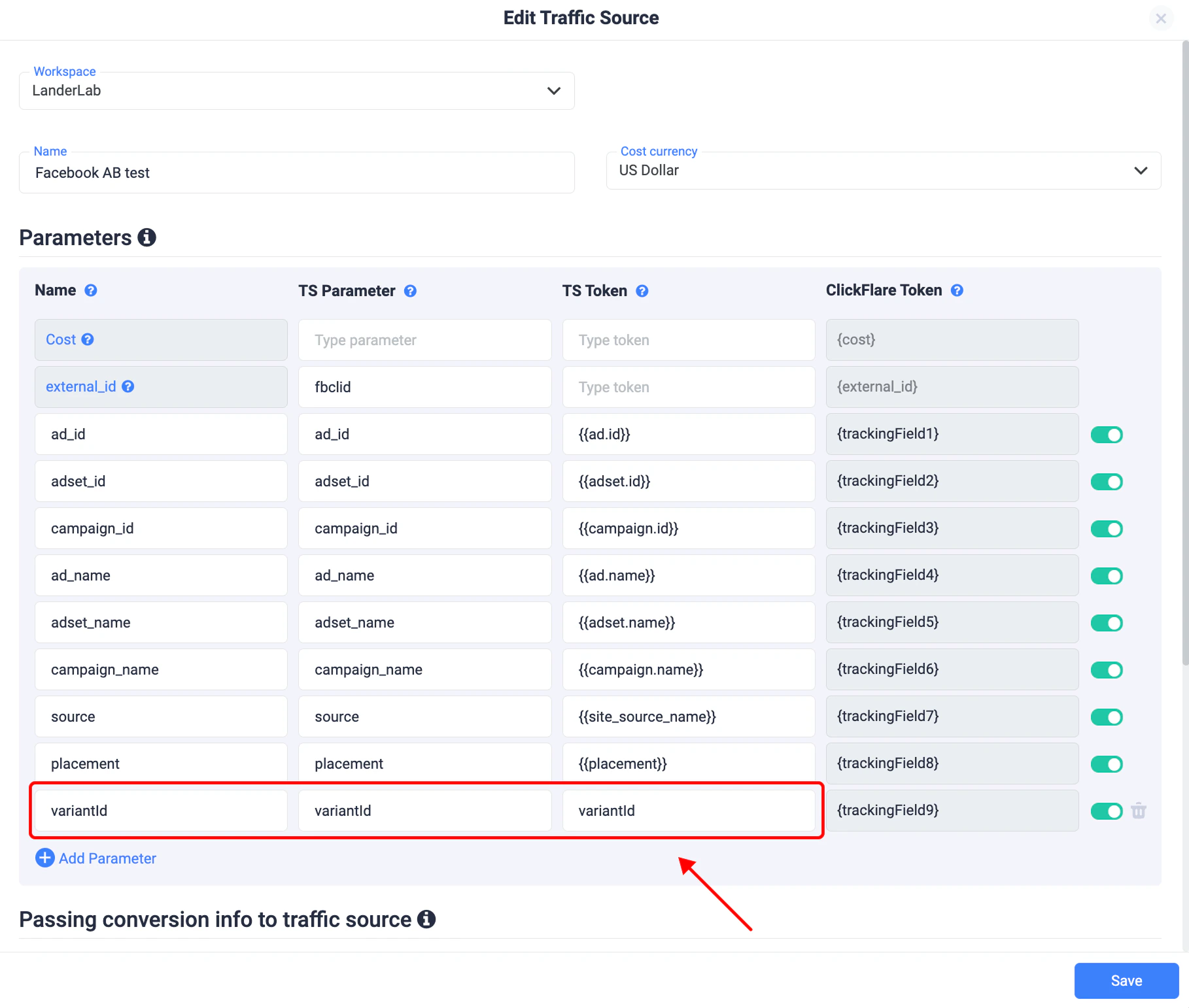
### 2. Add a New Parameter
Create a new parameter with:
* **Name:** `variantId`
* **TS Parameter:** `variantId`
* **TS Token:** `variantId` (or your platform equivalent)
This ensures ClickFlare captures the variant dynamically
### 3. Save Your Settings
* Click **Save**
* Your traffic source is now ready to receive variant data
 ## What Happens Next
When traffic hits your LanderLab page:
* The active variant (A, B, etc.) is automatically added to the URL
* ClickFlare captures it as `variantId`
* You can analyze performance by variant inside your tracker
***
## Why This Is Useful
* Track conversions by variant
* Optimize campaigns based on real performance data
* Connect downstream events (calls, leads, sales) to specific variants
***
## Important Notes
* No manual setup is needed inside LanderLab - the parameter is passed automatically
* You only need to configure your tracking platform to read it
* Works with any tracker that supports URL parameters
## What Happens Next
When traffic hits your LanderLab page:
* The active variant (A, B, etc.) is automatically added to the URL
* ClickFlare captures it as `variantId`
* You can analyze performance by variant inside your tracker
***
## Why This Is Useful
* Track conversions by variant
* Optimize campaigns based on real performance data
* Connect downstream events (calls, leads, sales) to specific variants
***
## Important Notes
* No manual setup is needed inside LanderLab - the parameter is passed automatically
* You only need to configure your tracking platform to read it
* Works with any tracker that supports URL parameters